Controls - 62 JT40/JT40 All Terrain Operator’s Manual
Right Control Console
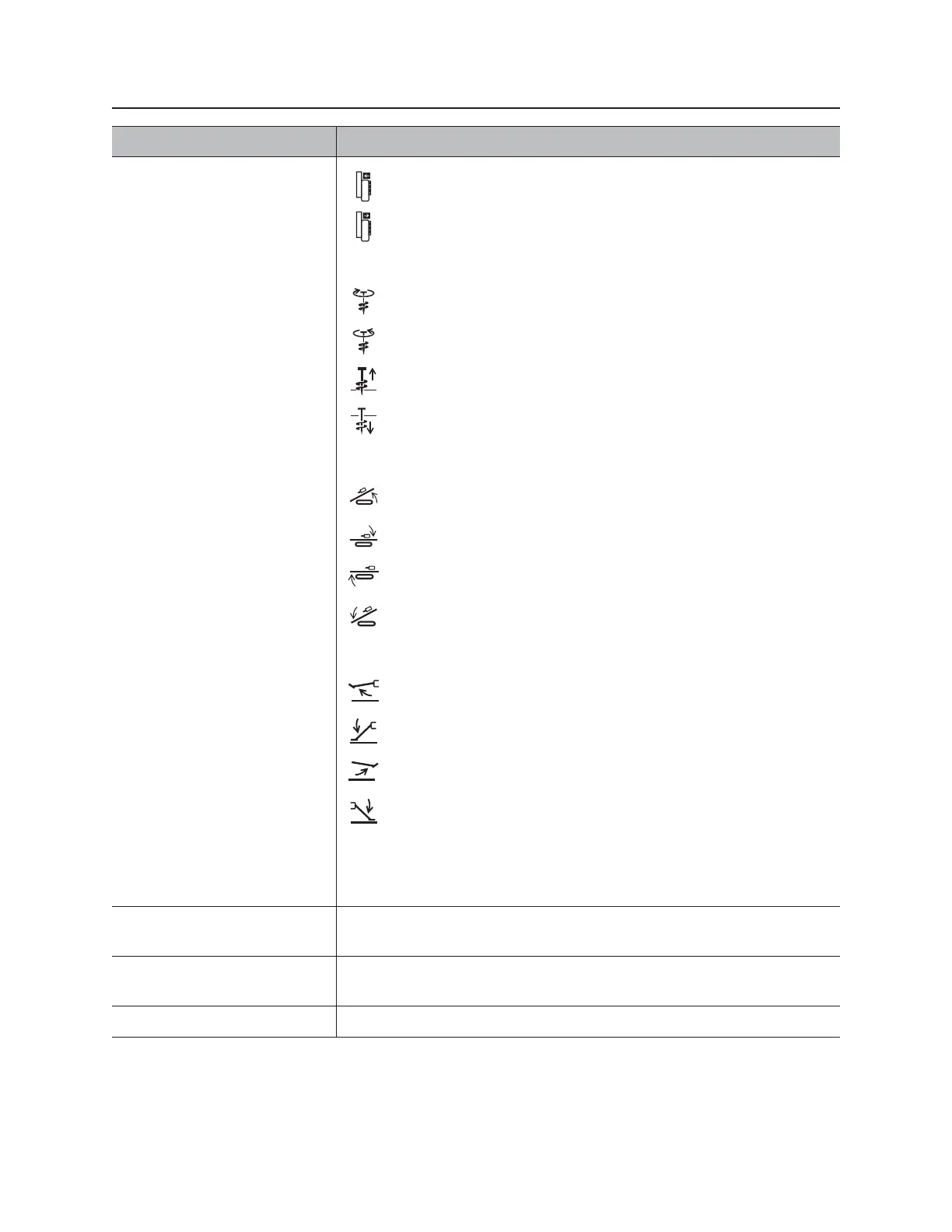
2. Set-up controls To move cab toward drill, press joystick left.
To move cab away from drill, press joystick right.
To move anchor clockwise, press joystick right.
To move anchor counterclockwise, press joystick left.
To raise anchor, move joystick backward.
To lower anchor, move joystick forward.
To raise back frame tilt, move joystick forward and to the right.
To lower back frame tilt, move joystick backward and to the right.
To raise front frame tilt, move joystick backward and to the left.
To lower front frame tilt, move joystick backward and to the left.
To raise left stabilizer, move joystick forward and to the left.
To lower left stabilizer, move joystick backward and to the left.
To raise right stabilizer, move joystick forward and to the right.
To lower right stabilizer, move joystick backward and to the right.
*Functions can be combined while setting up anchors, frame tilt, or
stabilizers.
3. Previous system set-up
display key
Press to display previous system set-up display.
4. Next system set-up
display key
Press to display next system set-up display.
5. Return key Press to return to main screen (gauges).
Item Description



 To Next Page