AS/400 User Guide
Option Command Command Description
performed with it until it is released.
4 Delete Deletes the spooled file from the system. When you
choose this option the Confirm Delete of Spooled Files
prompt is displayed. You can either accept or decline
deletion. If you accept the spooled file is deleted
permanently from the system.
5 Display Displays the contents of the data in the spooled file to
the screen.
6 Release Releases the spooled file from hold status.
7 Messages Displays messages related to the printing of the spooled
file.
8 Attributes Displays the attributes of the spooled file to the screen.
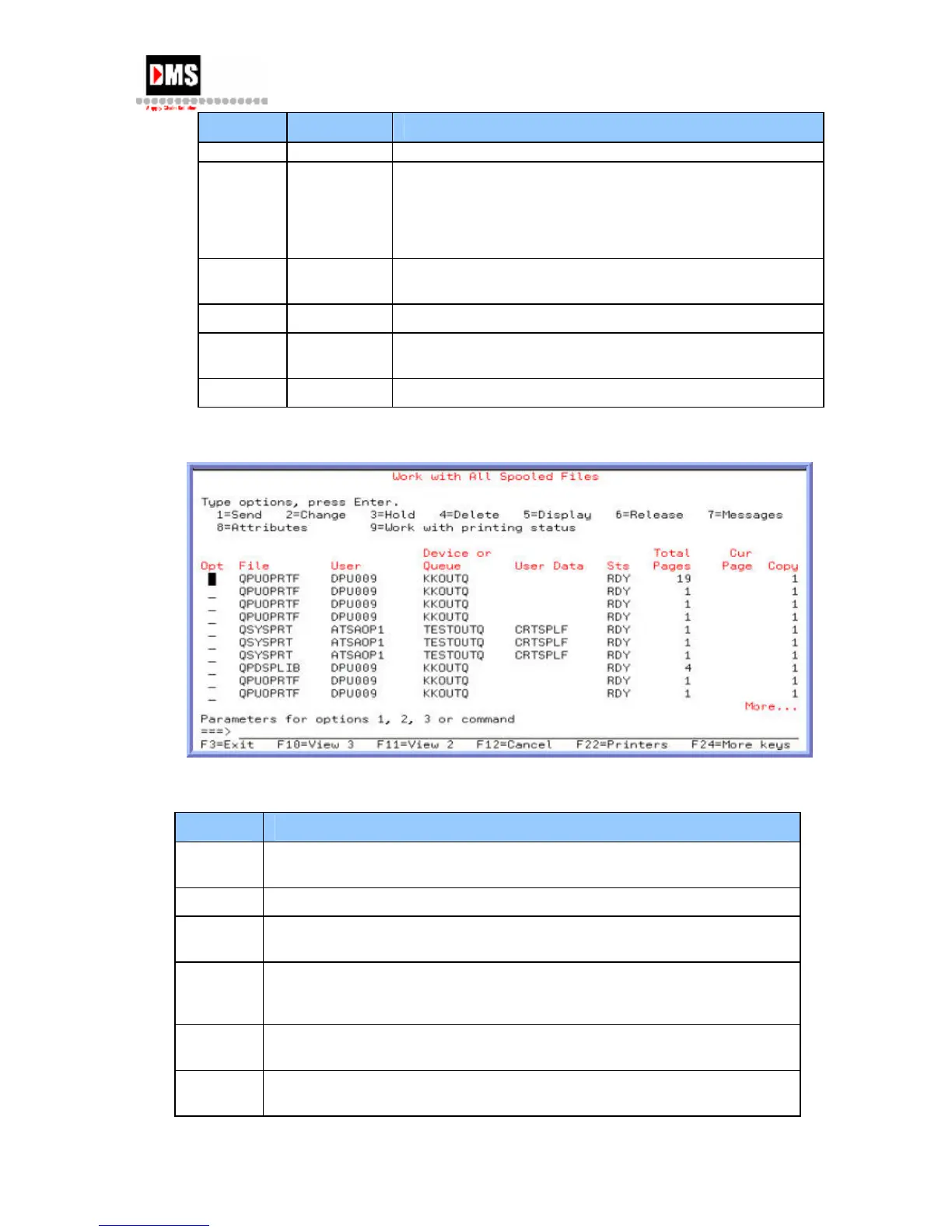
4. Enter F11 to obtain more information (3 different views of the same file).
The column headers describe the following:
Heading Description
File The file name that was specified by the user program when the file was
created, or the device file
User The name of the user who owns the spooled file.
Device
or Queue
If a printer was specified for this spooled file this is the name of the
printer. It is also the name of the output queue that contains the file.
Status Shows the status of the file. There are several statuses such as ready,
open, etc. A spooled file can have a status with an * in front which
indicates a change to the file as a result of taking an option.
Total
Pages
The total number of pages or records in the spooled file.
Current
Page
Shows page number currently being printed.
DMS Systems Corp. 41
October 13, 2003
Version 1.0



 To Next Page