AS/400 User Guide
IBM Version Releases
IBM issues new releases of its OS/400 operating system, program products and licensed
internal code. New releases are called versions and will be handled through DMS Corp. DMS
orders the new version releases for you. There is generally no charge except for media (tape
or CD-ROM) for these version releases.
You are responsible for loading these onto your system. Once they are uploaded to the AS/400
they must be installed.
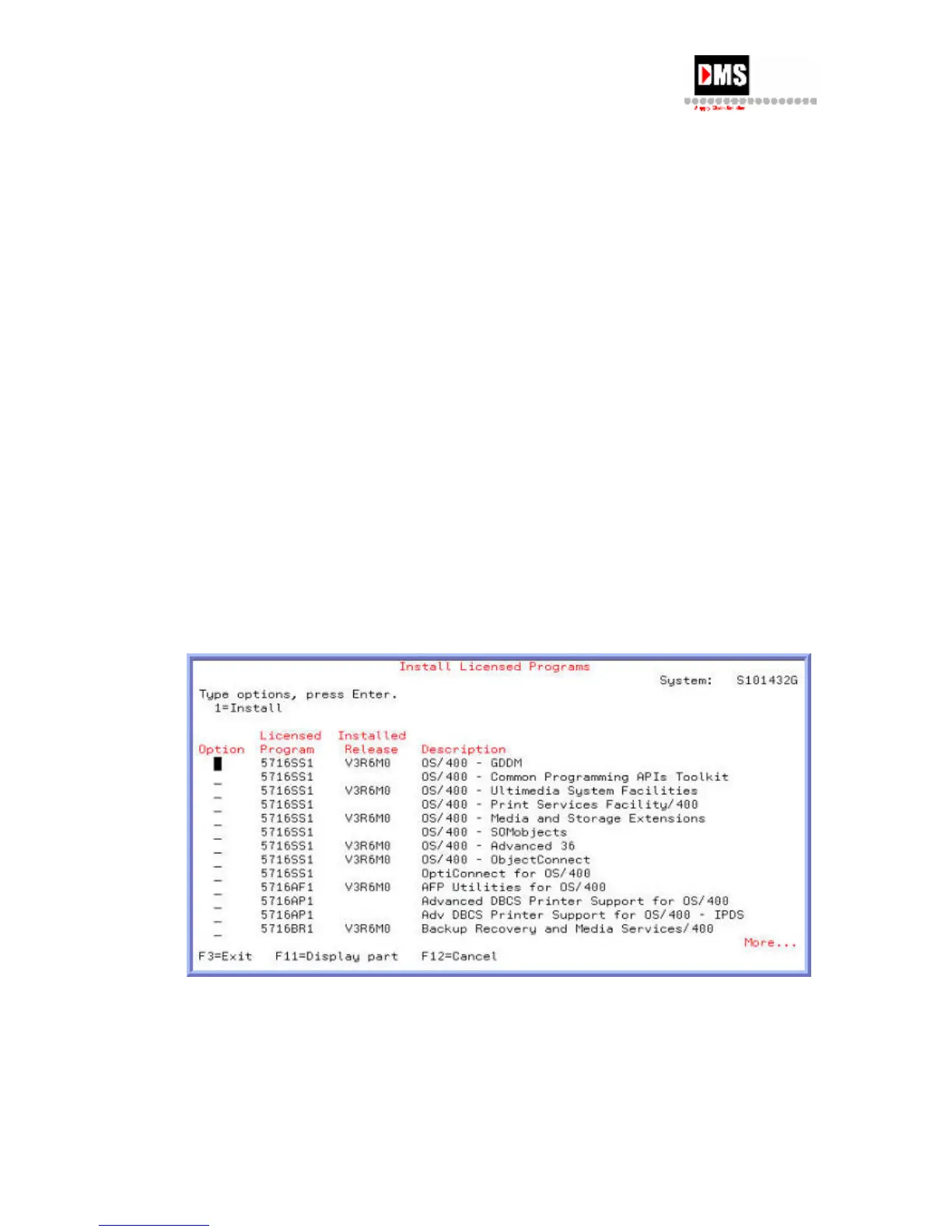
You can view licensed programs and operating system versions running on your machine. The
Install Licensed Programs screen is helpful in determining if the latest releases are installed.
Steps:
1. From Main Menu, select Option 7
2. From Define or change the system, select Option 2
3. From Work with Licensed Programs, select Option 11
4. From Install Licensed Programs, press F11=Display Release command key.
5. Where the Installed Release column is blank, the release is not installed on your
system.
6. From this screen, type 1 in the Option column and press enter to install the versions
not installed. These are the version releases that are sent to you on either tape or CD-
ROM media and have been uploaded.
76 DMS Systems Corp.
October 13, 2003
Version 1.0



 To Next Page