AS/400 User Guide
Restoring Libraries from Tape
Restoring libraries from tape is how you archive, distribute and backup data to the AS/400 so
you can recover in the event of a system crash. The Restore Library command restores a
library and all its respective objects.
Options include:
• Restore specific libraries by name and list library names or a generic name.
• Restore all non-System libraries using the "*NONSYS” command, if they were saved
originally with the *NONSYS option.
Warning: Prior to restoring a library from tape, make sure the library you are
restoring from tape does currently exist on the AS/400. If it does, perform a delete
library to remove the current version from the system to ensure that you have a
complete backup from tape put on the system.
Steps:
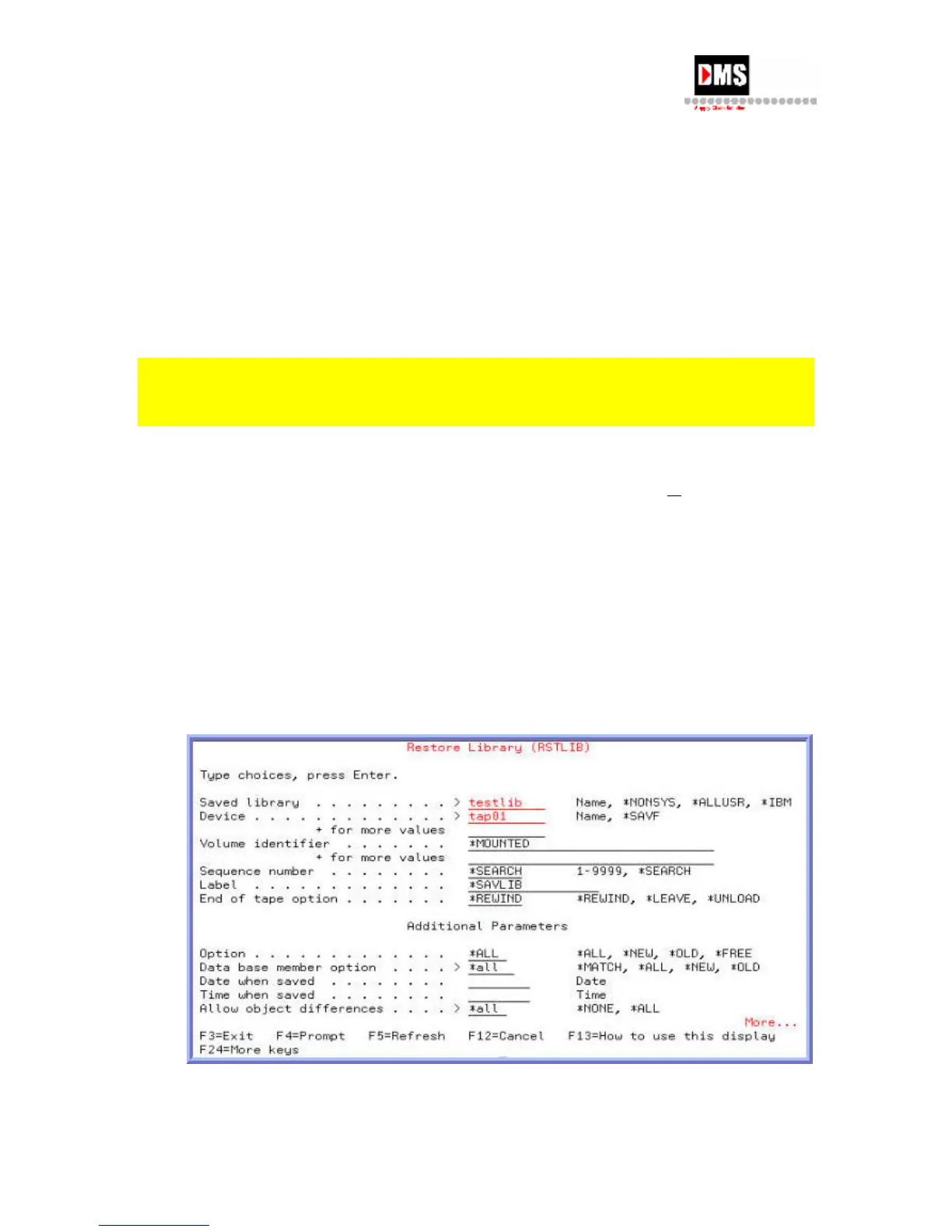
1. Type "RSTLIB" on the command line and press F4 (PROMPT) key
or ENTER key
• From Tape, select Option 5
OR
• From Main Menu, select Option 3
• From General System Tasks, select Option 7
2. From Restore, select Option 2
NOTE: Use "*all" in Database Member Option and Allow Object Differences fields.
50 DMS Systems Corp.
October 13, 2003
Version 1.0



 To Next Page