44
docomo Palette UI
docomo Palette UI
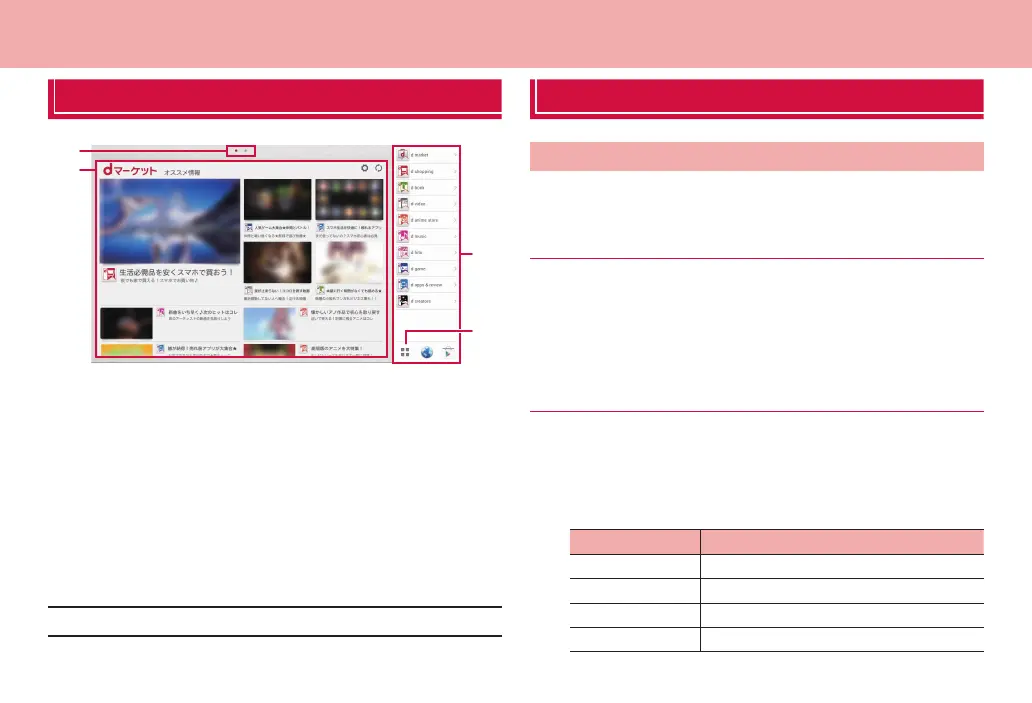
Home screen
❶
❸
❷
❹
Home screen
❶ Home screen position
Indicate current position of home screens. Switch by flicking left or right.
❷ Widget
Use widgets.
❸ Dock
Shortcuts such as for dmarket are displayed. Always displayed even if the
Home screen is changed.
❹ Application button
Tap to display an application screen (P. 48).
■ Information
·
The Home screen is displayed only horizontally.
Managing the Home screen
Items to add to the Home screen
Add shortcuts, widgets, folders, application groups, etc. to the Home
screen.
Adding shortcuts
1
From the Home screen, touch and hold the wallpaper
area without shortcuts, widgets, etc.
2
“Shortcut” → Tap an item you want to add to the Home
screen
Adding widgets
1
From the Home screen, touch and hold the wallpaper
area without shortcuts, widgets, etc.
2
“Widget” → Tap an item you want to add to the Home
screen
Widget Description
Analog clock Display analog clock
Bookmarks Display bookmarks in browser
Bookmarks Display bookmarks in Google Chrome
Calendar Display calendar



 To Next Page