97
Applications
Gallery
Play still images/videos shot by the terminal and downloaded data. Also,
editing still images and sharing still images/videos are available.
·
In Gallery, you can play data stored in the microSD card or internal storage.
·
File extensions supported by the terminal are as follows. However, some
files may not be available.
Type Extension
Still images gif, jpeg, png, bmp
Videos mp4, 3gp, 3g2, avi, mkv, webm
Opening Gallery
1
From the Home screen, → “Google” → “Gallery”
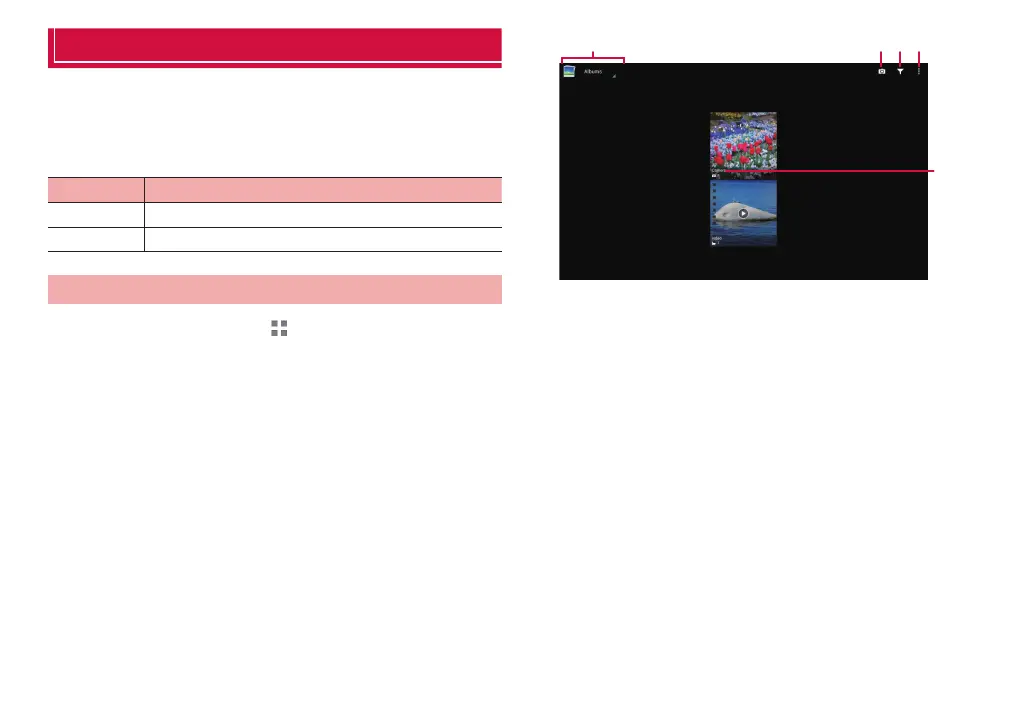
The album list screen appears.
❶ ❷ ❸ ❹
❺
Album list screen
❶ Split files into folders by selected theme.
❷ Activate the camera.
❸ Filter image files.
Toggle hide/display for small image files such as for icons.
❹ Menu icon
Display the menu for the album list screen (P. 98).
❺ Show folder names.



 To Next Page