70
Settings
DEVICE
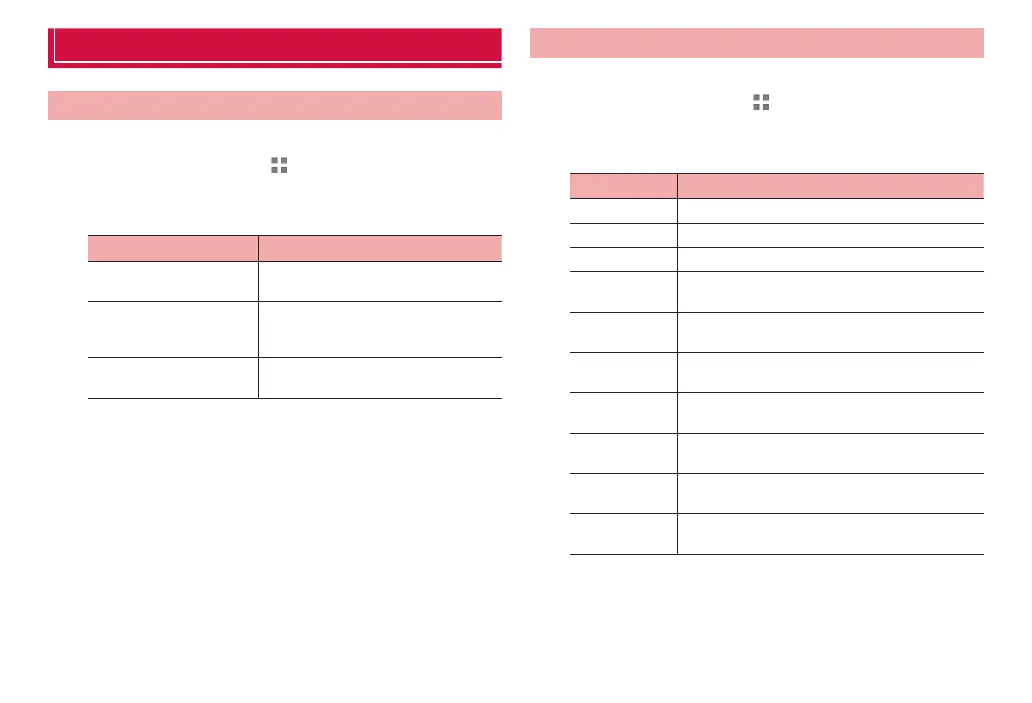
Power saving
Reduce the battery consumption on the terminal.
1
From the Home screen, → “基本機能/設定 (Basic
Functions/Settings)” → “Settings”
2
“Power saving”
Item Description
Battery saver Maintain automatic data updates at a
minimum for longer battery life.
Balanced Adjust battery consumption according
to ambient brightness to keep the
battery longer.
Performance Let terminal operate at peak
performance without saving on power.
Sound
You can make settings for ringtone, notification, Silent mode, etc.
1
From the Home screen, → “基本機能/設定 (Basic
Functions/Settings)” → “Settings”
2
“Sound”
Item Description
Volume P. 71
Vibration P. 71
Silent mode P. 71
Notification
tone
P. 71
Touch sounds Set whether to emit operation sound when
selecting an application or menu item.
Screen lock
sound
Set whether to emit notification sound when
locking/unlocking screen.
Screenshot
tone
Set whether shutter clicks when capturing a
screenshot.
Vibrate on
touch
Set whether terminal vibrates when tapping
onscreen keys (P. 41) or for specified actions.
Screen unlock
vibrate
Set whether ter
minal vibrates when canceling the
screen lock.
Vibrate on
charging
Set whether terminal vibrates at the start of
charging.



 To Next Page