59
Mail/Web browser
Web browser
Using web browser
Use web browser to view web pages.
·
Some pages cannot be viewed or viewed properly.
Activating browser
1
From the Home screen,
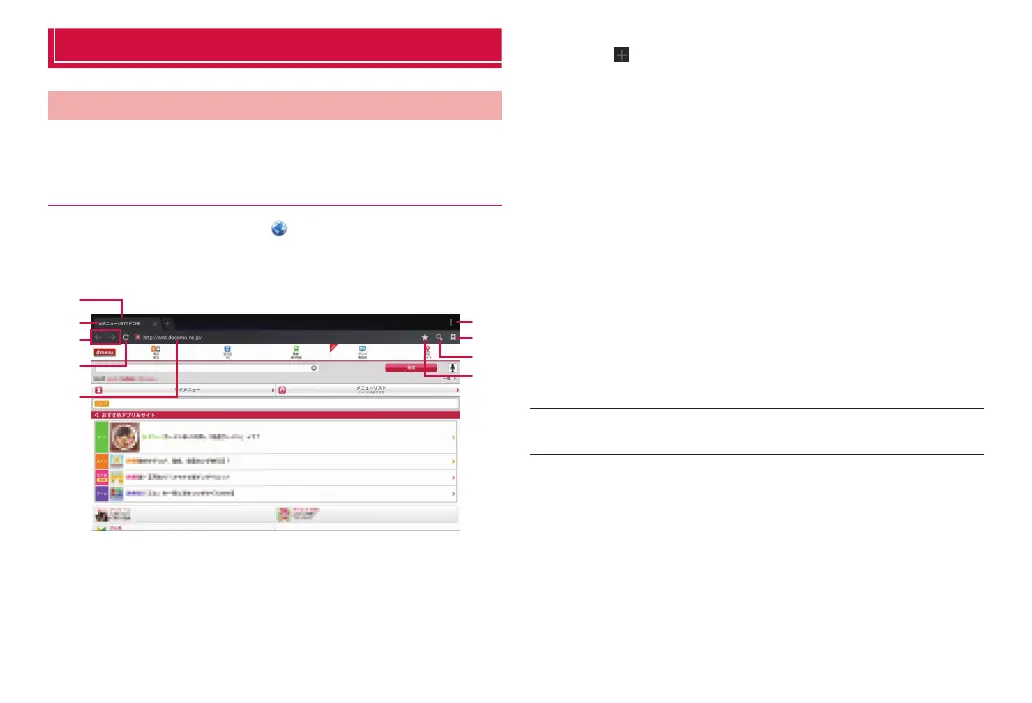
Web browser activates and web page set as home page (dmenu
(http://smt.docomo.ne.jp/ (in Japanese only)) by default) appears.
❶
❸
❹
❺
❷
❻
❼
❾
❽
Browser screen
❶ Tab
Tap to display a new tab. Tap a tab to switch the web page that
is displayed.
❷ Title of web page
❸ Return/advance icon
If a previously displayed web page is registered, tap to display the
web page.
❹ Refresh icon
Refresh the displayed web page.
❺ Address bar
Enter a URL of web page or keyword for searching.
❻ Menu icon
Display the settings menu for the browser (P. 60).
❼ Bookmarks icon
Display registered bookmarks or history, or saved web pages.
❽ Search icon
Enter keywords in text or by voice to search web pages.
❾ Add bookmark icon
Bookmark the displayed web page.
■ Information
·
If the address bar is not displayed, slide (swipe) the screen downward to
scroll and display the address bar.



 To Next Page