60
Mail/Web browser
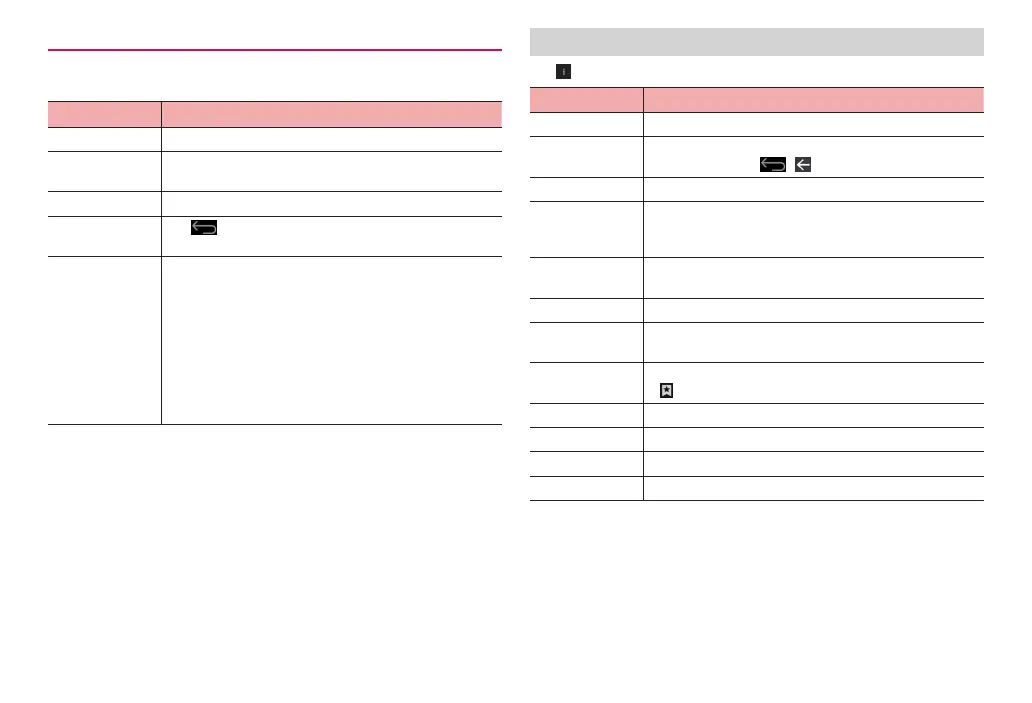
Available operations while opening browser screen
The following operations can be made on the browser screen.
·
Depending on web pages opened, some operations cannot be made.
Intention Operation
Zoom in/out Pinch in/out on the screen.
Fit image to
screen
Double-tap the screen.
·
Double-tap an image fit to screen to zoom in.
Scroll Slide (swipe)/flick.
Return to the
previous screen
Tap
.
Select/copy,
search for, share
text
Touch and hold text.
·
Drag the slider up/down/left/right to select text to copy
Tap “COPY” to copy.
·
Tap “SELECT ALL” to select all characters on the web
page.
·
Tap “SHARE” to share selected text by email, etc.
·
Tap “FIND” to search for selected text within the
displayed page.
·
Tap “WEB SEARCH” to search for selected text on the
Web.
Menu on the browser screen
Tap on the browser screen to show the following items.
Item Description
Refresh/Stop Refresh/stop refreshing web page.
Forward Return to the previous screen when a web page is
viewed by tapping
/ .
New tab Display a new tab.
New incognito
tab
Open a new secret tab. Pages opened in a secret tab
window do not remain in the browser history or search
history.
Share page Share URL of web pages through online services or
send URL via Bluetooth communication or mail.
Find on page Search in web page.
Request
desktop site
Set to open PC-version web pages.
Save for offline
reading
Save currently viewed web page to read offline.
·
“SAVED PAGES” to check content.
Page info Display information for the displayed web page.
Settings Make browser settings.
About Display information such as the browser version.
Exit Close all tabs and exit the browser.



 To Next Page