53
Phonebook
Phonebook
Phonebook
Adding contacts
Use the phonebook application to manage various kinds of information
for contacts, such as names, phone numbers, mail addresses.
1
From the Home screen, → “基本機能/設定 (Basic
Functions/Settings)” → “People”
Contacts list appears.
2
→ Select saving location
3
Enter name on the editing profile screen
·
Tap the “Name” field to enter “Name prefix”, “Middle name”, etc.
4
Enter required items
·
“Add new” / “ ” to add/delete fields for selected items.
·
“MOBILE” / “HOME” field to select labels (types) for entered items.
·
Tap “Add another field” to add residential address, a memo, and
other information.
5
“DONE”
Using contacts
1
From the Home screen, → “基本機能/設定 (Basic
Functions/Settings)” → “People”
Contacts list appears.
2
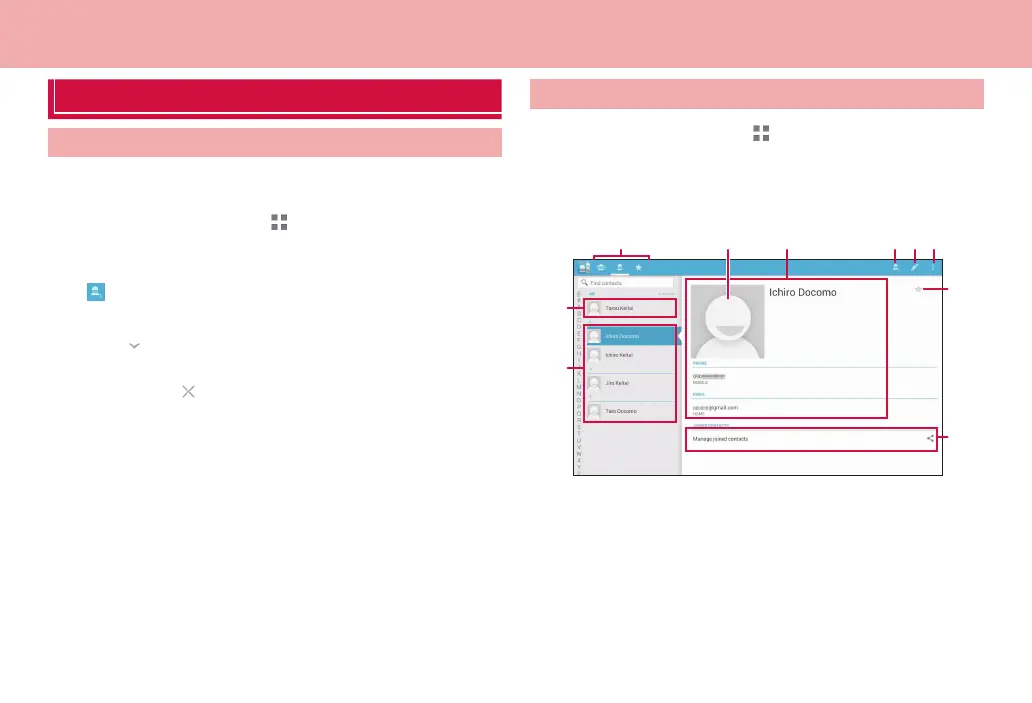
Tap a contact you want to check
❷
❼❺ ❽❻
❸
❾
❿
❶ ❹
Contacts list
❶ Switch contact list display
Tap an icon to switch the contact display to group/Japanese
syllabary/favorites.
❷ Your name
❸ Contact list
❹ Photo set for contact



 To Next Page