43
Before using the terminal
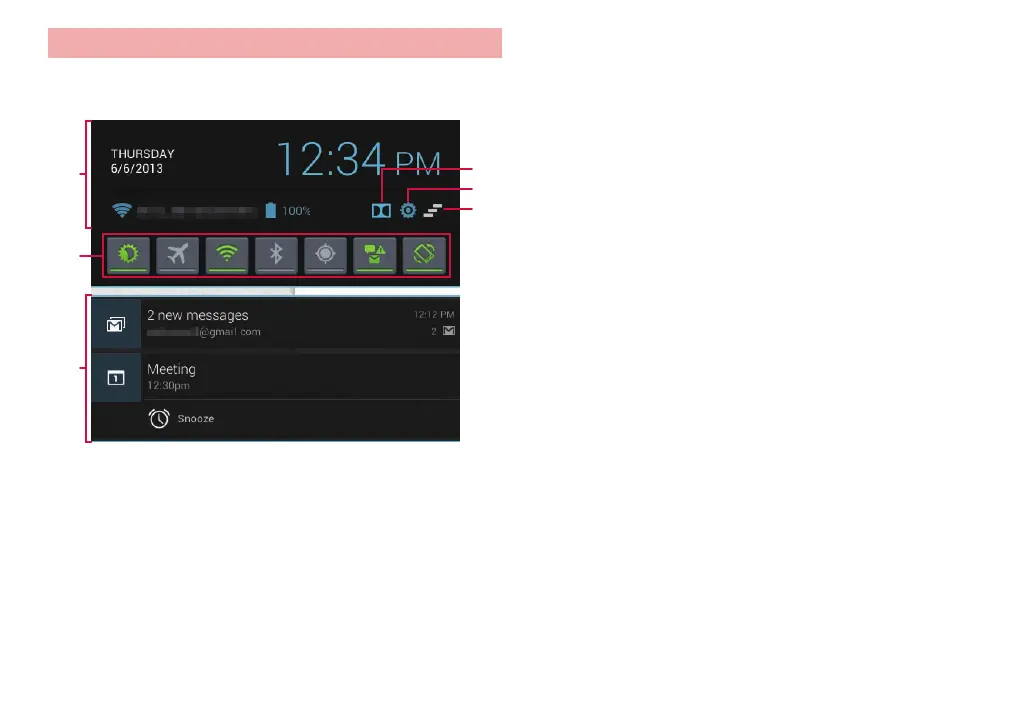
Notification panel
Tap the time display or a icon in the status bar to display the notification
panel, then tap icons to set functions or check notification information.
❶
❹
❺
❻
❸
❷
Notification panel
❶ Information including time, date, battery level, and name of connected
Wi-Fi network are displayed.
❷ Tap icons to change the brightness setting for the screen, or switch show/
hide for Airplane mode, Wi-Fi, Bluetooth, GPS, and notification icons as
well as ON/OFF for automatic screen rotation. When a function is disabled,
the icon is grayed out.
❸ Notification information and run
ning information appear
. Tap to check
notification information or operate related function. To delete notification
information, flick left or right.
❹ Tap to select from “Off”, “Music”, or “Movie” for the acoustic setting. If an
earphone/microphone, headphones, etc. are connected, you can set the
effect according to the acoustic setting.
❺ Tap to recall the settings screen.
❻ Erase notification infor
mation, etc. and close the notifications panel.
·
Not displayed if only non-erasable information is displayed.



 To Next Page