94
Applications
Starting up the camera
1
From the Home screen,
→ “エンタメ/便利ツール
(Entertainment/Tools)” → “Camera”
The shooting screen appears.
·
To end the camera, on the shooting screen tap / .
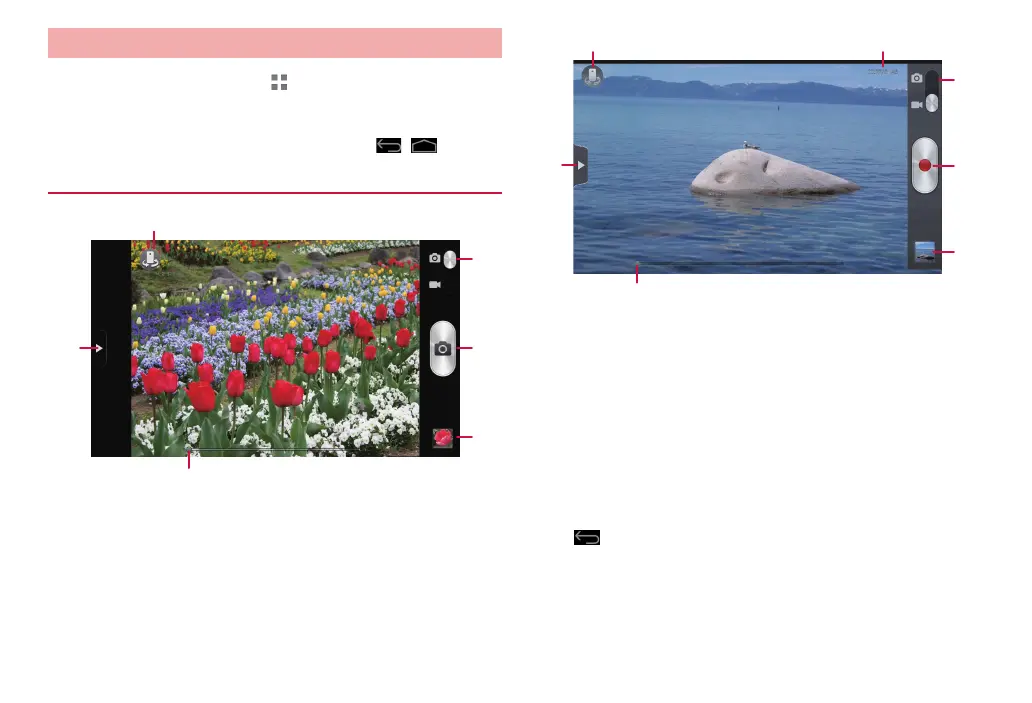
Shooting screen
❶
❷
❸
❻
❹
❺
Shooting screen (still image)
❶
❷ ❼
❸
❻
❹
❺
Shooting screen (video)
❶ Menu
Tap to show the menu items for the shooting screen (P. 96).
❷ Switch cameras
Switch out-camera (back camera)/in-camera (front camera).
❸ Shooting mode
Drag the slider up/down to switch shooting mode (still image shooting/
video shooting).
❹ Shutter
❺ Thumbnail
Open Gallery to check still images/videos.
Tap
to go back to the shooting screen.
❻ Zoom
Drag the slider left/right to set zoom.
❼ Recording time of video
Show recording time.



 To Next Page