48
docomo Palette UI
Application screen
1
From the Home screen,
The Application screen appears.
❶
❺
❸
❹
❻
❷
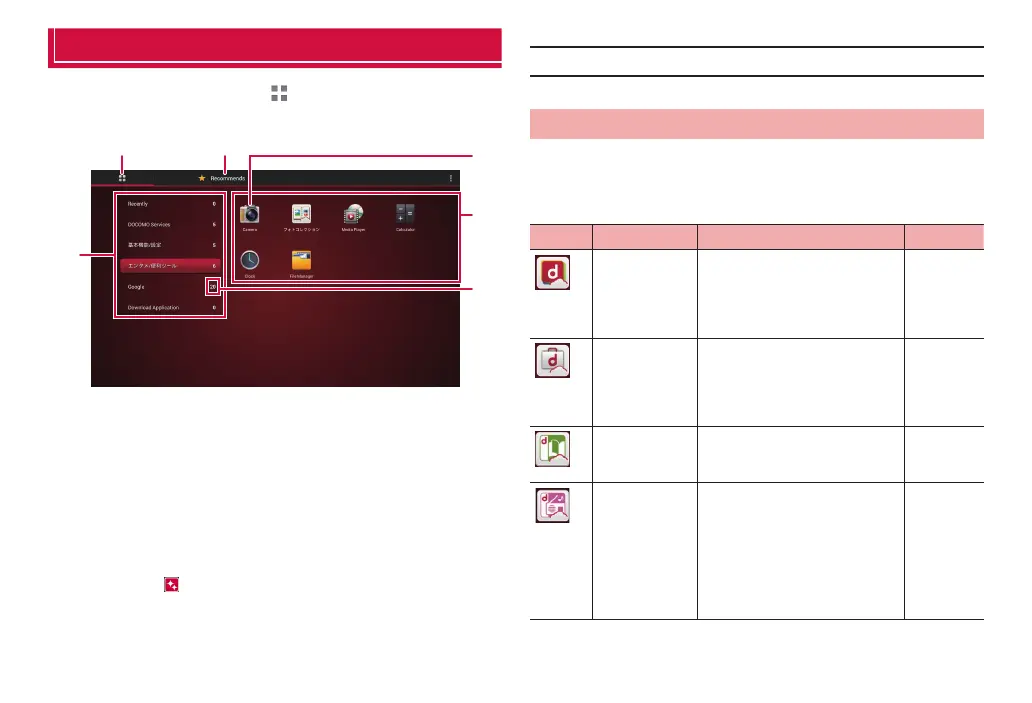
Application screen
❶ Application tab
Display Application screen.
❷ Recommended tab
Install applications recommended by DOCOMO.
❸ Group name
Tap to show/hide applications in a group.
❹ Application icon
When new applications are downloaded or existing applications are
updated,
appears on the upper left of each icon.
For some icons, the number of unread mails, etc. is displayed with
a number.
❺ Applications in a group
❻ Number of applications in a group
■ Information
·
The Application screen is displayed only horizontally.
Application list
Applications displayed in the default Application screen are as follows.
·
For using some applications, subscription (charged) is required separately.
■ DOCOMO Services
Icon Application Description Reference
dmenu A shortcut application for
“dmenu” to quickly find contents
that you used in i-mode and
interesting and convenient
contents special to tablet.
P. 91
dmarket Activate dmarket. On dmarket,
you can purchase contents such
as music, videos, e-books, etc.
Provide information of
applications on Google Play.
P. 91
d book MyShelf Book viewer application for
reading books purchased with d
book MyShelf.
d (d hit) A choice selection from about one
million songs through “d
(d music)”, mostly J-POPs
and other hits, are available for
download. A cross-section of
artists, genres, eras, etc. in 50
programs on 8 channels are
available.



 To Next Page