89
File management
Connecting external device
Connecting a PC
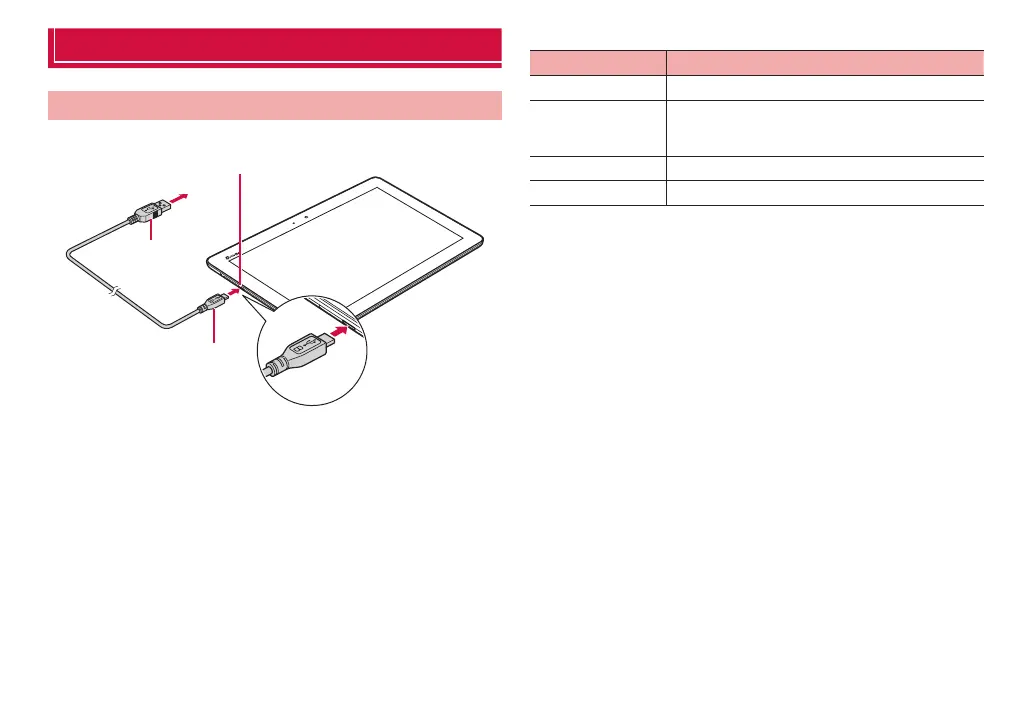
Connect the terminal and a PC with the bundled microUSB cable.
To PC USB connector
USB plug
microUSB plug
❶
❷
1
Insert microUSB plug of microUSB Cable into the
external connection jack of the terminal with USB
mark side up horizontally (❶)
2
Insert a USB plug of a microUSB Cable 01 into the
USB connector of a PC horizontally (❷)
·
The system requirements for available PC are as follows.
Item Description
PC PC-AT compatible PCs with USB ports equipped
OS Japanese version of Windows 8 (32/64 bit), Windows
7 (32/64 bit), Windows Vista (32/64 bit), Windows XP
(SP3 or later/32 bit)
Amount of memory* 64 MB or more (128 MB or more is recommended)
Available memory* 64 MB or more
* Amount of memory and available memory required for operation are shown.



 To Next Page