17
Before using the terminal
microSD card
Using microSD card allows you to save data in the terminal or import data
in the microSD card to the terminal.
·
The terminal supports microSD card of up to 2 GB, and microSDHC card of
up to 32 GB (as of February, 2013). However, operation is not guaranteed
for all commercially available microSD cards. For compatible information on
each microSD card, contact a manufacturer of the microS
D card.
·
When using a commercially available microSD card, you should format it on
the terminal (P. 74).
Installing/Removing microSD card
Installing
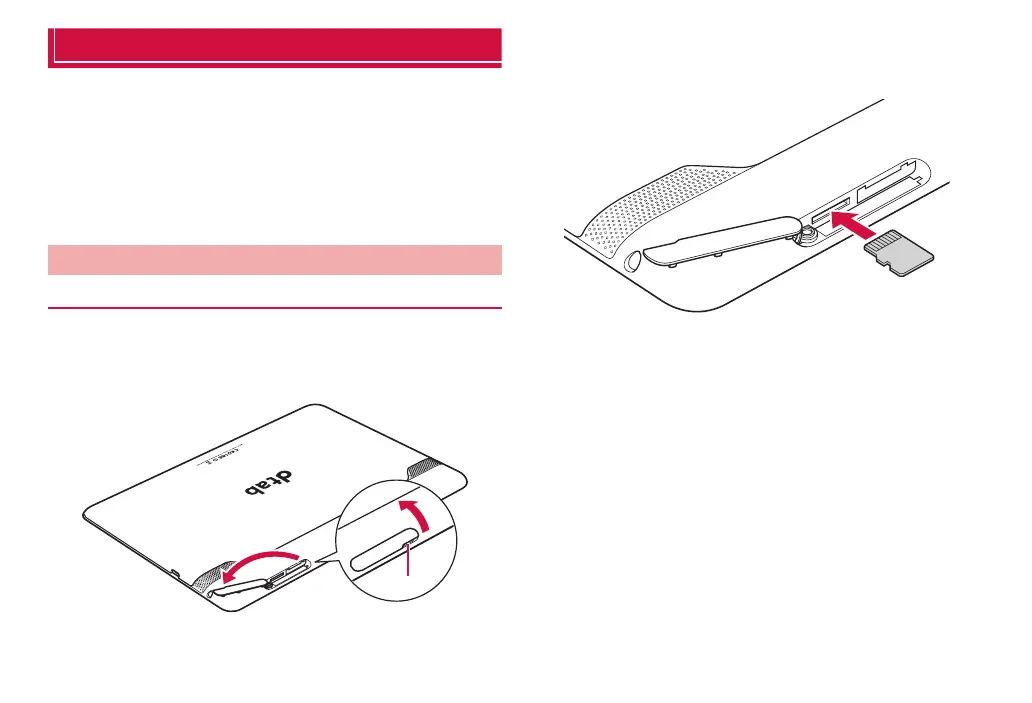
1
Use notch to open the cover of the microSD card slot
·
Urethane foam is located in the slot next to the microSD card slot to
protect the circuitry. Do not remove/push in the urethane foam. May
cause malfunction.
❶
❷
Notch
2
With the gold contacts on the microSD card facing up,
push in gently until it clicks in place
·
Check that the microSD card is completely installed.
3
Close the cover of the microSD card slot



 To Next Page