98
Applications
Menu on the album list screen
Tap on the album list screen to show the following menu items.
Item Description
Select album Tap to select several folders to share or
delete them.
·
Tap “XX items selected” “Select all”
to select all folders.
·
Tap to share data in the selected
folders on Picasa or via Bluetooth
communication, mail, etc.
·
Tap to delete or check details of
data in the selected folders.
Settings Set whether to display folders set as
hidden.
·
Touch and hold a folder Tap
“Hide” to set a folder to be hidden.
■ Information
·
Alternatively, touch and hold folders and tap desired folders one by one on
the album list screen to select several folders.
·
Depending on types of data, some applications to use for sharing may not
appear.
Playing still image/video
1
Tap a folder to play on the album list screen
❺
❷ ❸ ❹❶
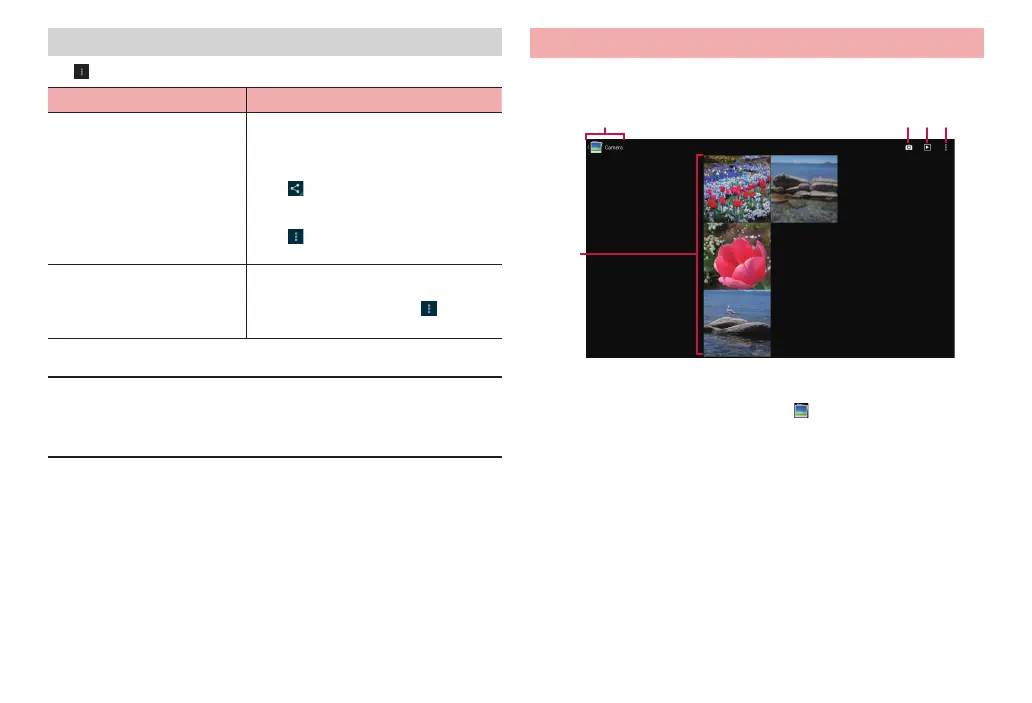
Thumbnail screen
❶ Show selected folder name. Tap
to return to the folder list
screen.
❷ Start up the camera.
·
Displayed only for the camera folder.
❸ Show slideshow of images in a folder.
❹ Menu icon
Display the menu for the thumbnail screen (P. 99).
❺ Still images/videos are shown as thumbnail images. Tap a
thumbnail image to play. Slide (swipe) left/right to scroll through
the screen.



 To Next Page