62
Mail/Web browser
Menu on the BOOKMARKS/HISTORY/SAVED PAGES
screen
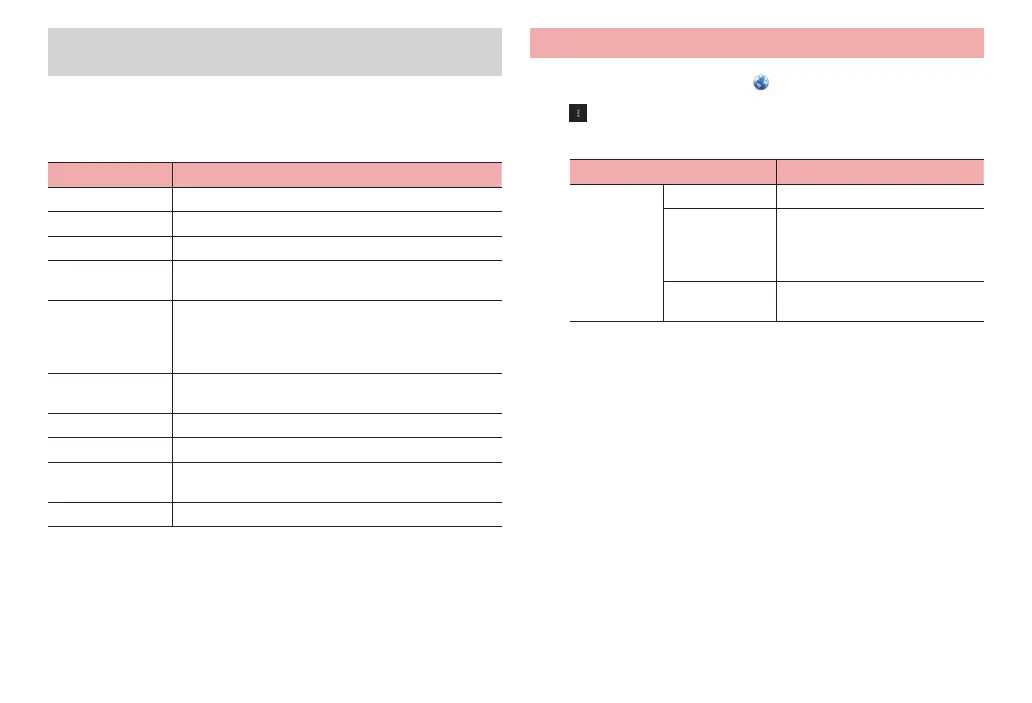
Touch and hold a web page in the list to show the following menu items.
·
Items shown defer depending on web pages.
·
On the saved page list screen, only “Delete saved page” appears to delete
saved pages.
Item Description
Open Open web page in the currently opened tab.
Open in new tab Open web page in a new tab.
Edit bookmark*
1
Edit bookmark name/URL or change folder to save to.
Add shortcut to
home*
1
Create a shortcut for bookmark on the Home screen.
Save to
bookmarks/
Remove from
bookmarks*
2
Add to bookmarks/delete from bookmarks.
Share link Share URL of web pages through online services or
send URL via Bluetooth communication or email.
Copy link URL Copy URL.
D
elete bookmark*
1
Delete from bookmarks.
Remove from
history*
2
Delete web pages from the history.
Set as homepage Set web page as home page.
*1 Appears only in bookmark list.
*2 Appears only in history list.
Setting browser
1
From the Home screen,
2
→ “Settings”
3
Set each item
Item Description
General Set homepage Set home page.
Form auto-fill Set whether to automatically enter
content saved in “Auto-fill text”
when an entry field for web form
is tapped.
Auto-fill text Save content to enter an entry
field for web form.



 To Next Page