D O D T E C H N O L O G I E S , I
Rev 12.109
Page 12
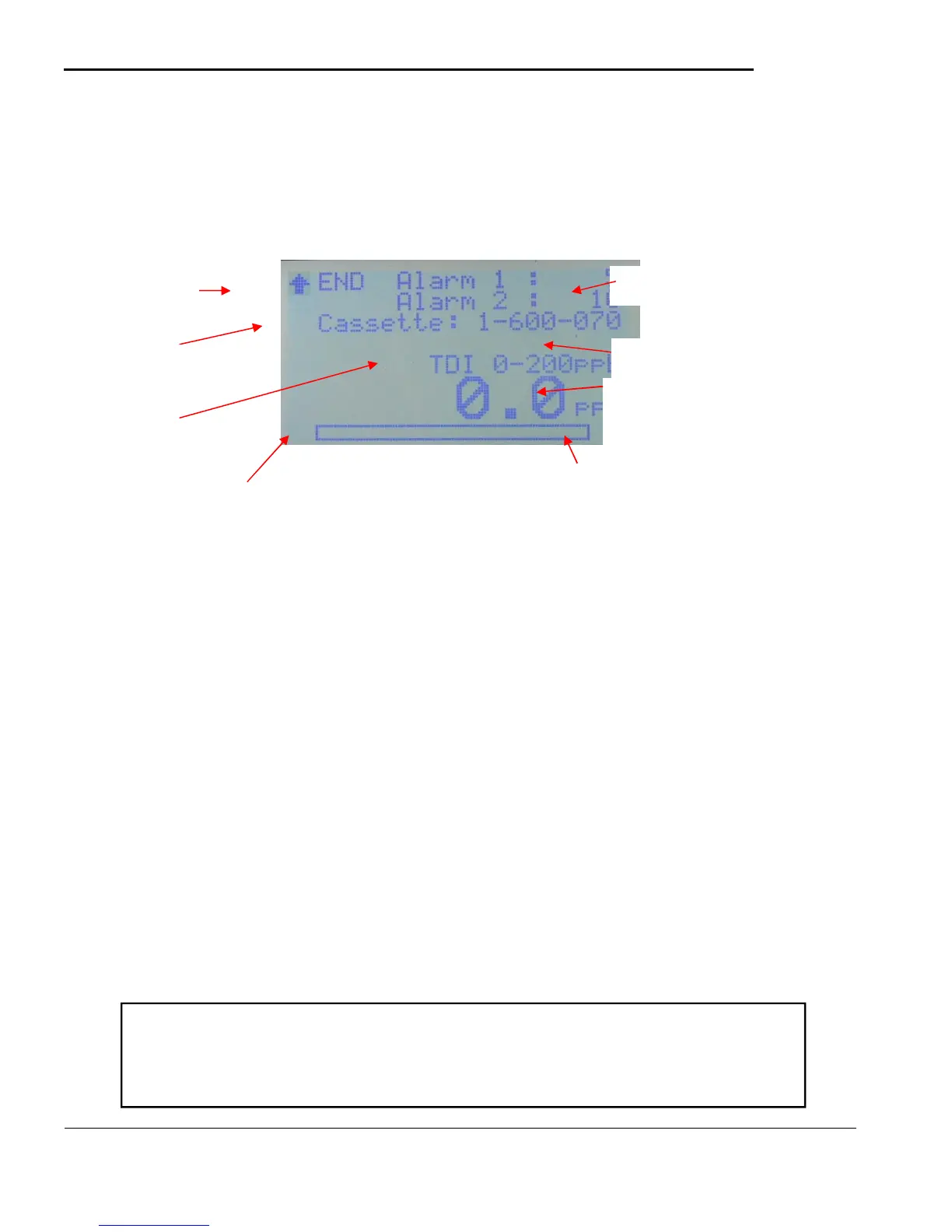
Selecting this menu item will start gas analysis and bring up the screen in figure 5.4. During this phase the
tape will advance and the system will verify the optical system and adjust the light intensity if necessary.
Once the optical system is verified the analysis screen shown in figure 5.4 will be displayed and the pump
will start.
Figure 5.4
• NOTE 1 – An asterisk in the lower right corner indicates the machine has past the time necessary to
detect the LDL for the selected gas since the last tape advance. The asterisk will disappear and the
timer reset at each tape advance. Press the down arrow to reset the timer when looking for LDL at
another location.
The words ‘Alarm Level 1’ and ‘Alarm Level 2’ will blink when the concentration meets or exceeds the
preset alarm levels. Alarm Level 1 blinks at a 2 second rate while Alarm Level 1 blinks at a 1 second rate.
In addition the letters ‘SD’ will appear in the upper left corner under the up arrow when there is an error
writing the MicroSD’ card or there is no MicroSD card inserted.
The status line displayed between the cassette part number and the gas/range display will show various
information about the current analysis cycle :
• Beyond Full Scale (Actual concentration exceeds full scale)
• Shutdown in X seconds (battery voltage below shutdown level)
• Low Battery (battery voltage below alarm level)
• Adv Pending (preparing/advancing cassette)
Press up button to
exit analysis.
Cassette that should
be used for selected
gas.
Selected gas being
monitored. and range
Concentration
and unit of
measure
Note : During analysis detailed information is viewable by using the
LEFT key. This screen may be useful for service and repair. To return to
the main analysis screen presss the LEFT key again.



 To Next Page