Operation Section
-58-
Display Cluster
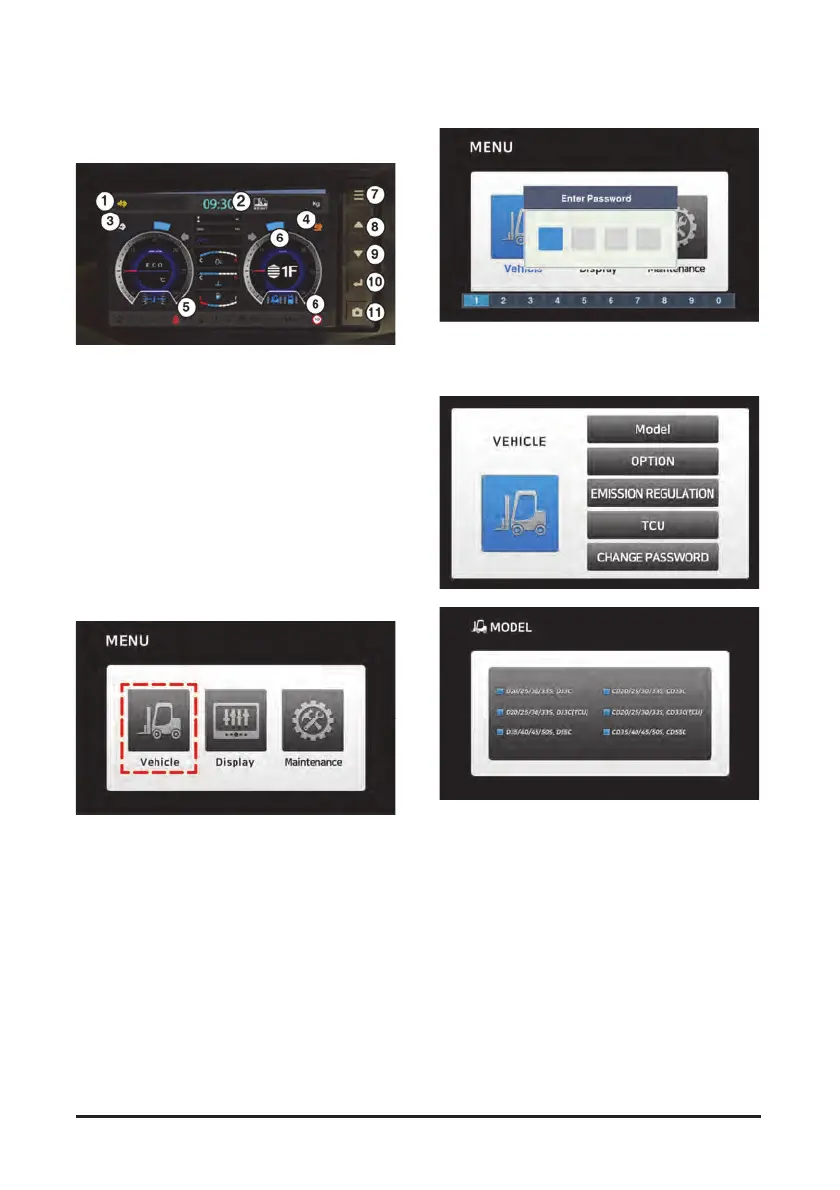
Display
1) SCR device warning display information.
2) Weight information on the weight scale
(Option).
3) SCR cleaning warning display and guideline.
4) Urea residual quantity warning display and
guideline.
5) Engine check warning lamp.
6) Speed limit setting speed
(the lamp comes ON when it is set up).
7) Menu button.
8) UP button.
9) Down button.
10) Enter button.
11) Rear view camera operation button (manual).
Menu
Menu - Vehicle
The password needs to be entered.
The initial password is 1111.
Menu - Vehicle - Model
Consists of the Doosan model and the Crown model.
Upon selecting either model, the corresponding
brand logo will be displayed at the time of initial
starting.



 To Next Page