Operation Section
-64-
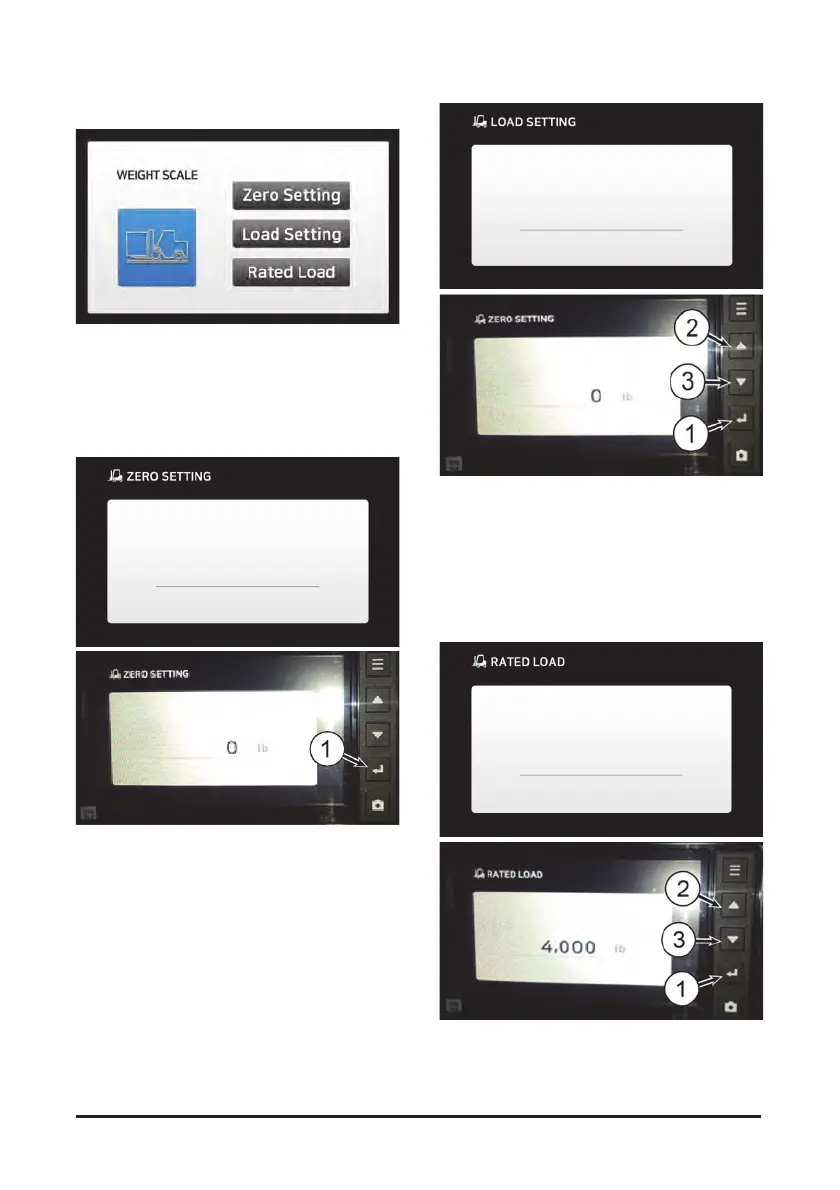
Weight Scale Mode (Optional - Hydraulic)
This option enables the operator to measure and limit
the weight of the load using the LCD display. Use
“WEIGHT SCALE” under the “VEHICLE” menu.
Zero Setting
Raise the forks by 1 m as unloaded and press ENTER(1)
to set the weight of the mast assembly to be zero.
Load Setting
Prepare a reference load whose weight is accurately
known and enter its weight into the display. Put the
reference load on the forks and raise the forks. And
then press ENTER(1) to complete the setting of a
reference load value.
If the measured weight is different from the Load
weight, press the button(2), (3) to change the weight.
Since the weights of any loads will be measured
based on this reference load value, it must be
accurately set.
Rated Load Setting
Enter(1) the rated load capacity of the vehicle into the
display and press ENTER(1) to complete the setting of
the rated load value.
Press the button (2), (3) to set the rated capacity, then
press Enter(1) to set it.
An overload warning will be given if any weight
exceeding the rated load entered is measured.



 To Next Page