Operation Section
-77-
AUX player
Listening to auxiliary audio equipment
By connecting an optional portable audio device to
the AUX input jack (stereo mini jack) on the unit and
then simply selecting the source, you can listen on
your car speakers.
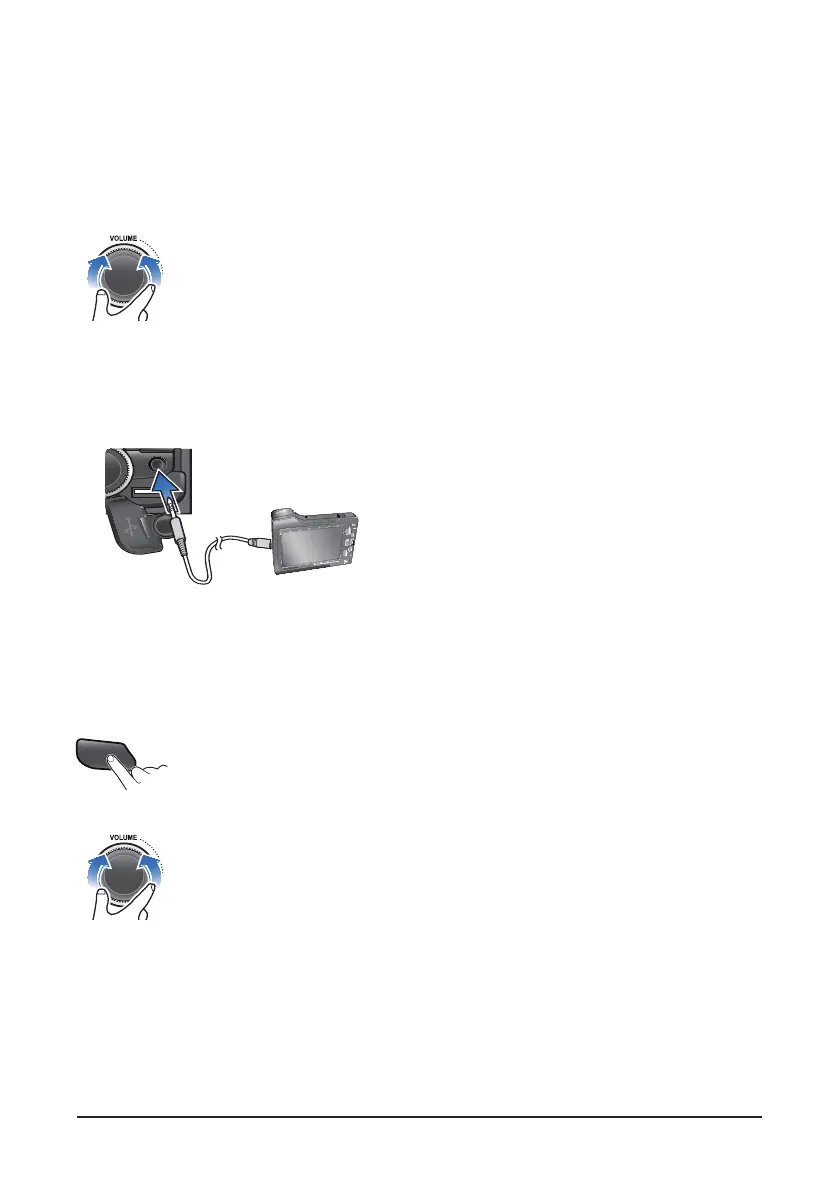
1. Turn the VOLUME dial left to decrease the
volume level.
The AUX volume can also be controlled
separately through the connected device.
2. Turn the external audio equipment off Open the
cover, connect the audio output of the external
audio equipment to AUX input terminal on the unit.
3. Turn the external audio equipment on. Start
playback of the external audio equipment at a
moderate volume.
4. Press the AUX button to select the AUX function.
5. Set your usual listening volume by turn the
VOLUME dial left/right on the unit.
Once the connector is disconnected, the previous
mode will be restored.
AUX mode can be used only when an external
audio player has been connected.
Listening to DMB sound (lf Equipped)
1. By connecting the optional DMB receiver, you can
listen the DMB source provided for the vehicle.
When the DMB receiver is turned power on, the
current operation will be paused and the “AUX 1"
will be displayed on the Display window.
The DMB's sound is output from the speakers in
the unit.
2. While playing the DMB, press the AM, FM or USB
button to change the function.
3. While playing the DMB, if turn the DMB receiver
off, the unit will be returned to previous mode.
Calling via Handsfree (lf Equipped)
1. By connecting the optional Handsfree equipment,
you can use the Handsfree mode.
When make a call or receive. the bell will sound
and the "PHONE“ will be displayed on the Display
window.
2. The ringtone and talker's voice are output only
from the front speakers.
3. When the call is ended, the mute will be canceled
and the unit will be returned to the previous mode.
AUX



 To Next Page