Section 4. Parameter Setup
The Model 7000XL and Model 7000 have twenty two setup and calibration parameters
which can be changed (nineteen in the Legal for Trade mode). This flexibility makes
these scales versatile weighing instruments capable of meeting almost all common
weighing needs.
Entering and Exiting the Setup Mode:
To enter the setup menu, locate the Quick Access Cover on the back side
of the indicator. Remove the two hex screws to open the cover. Once
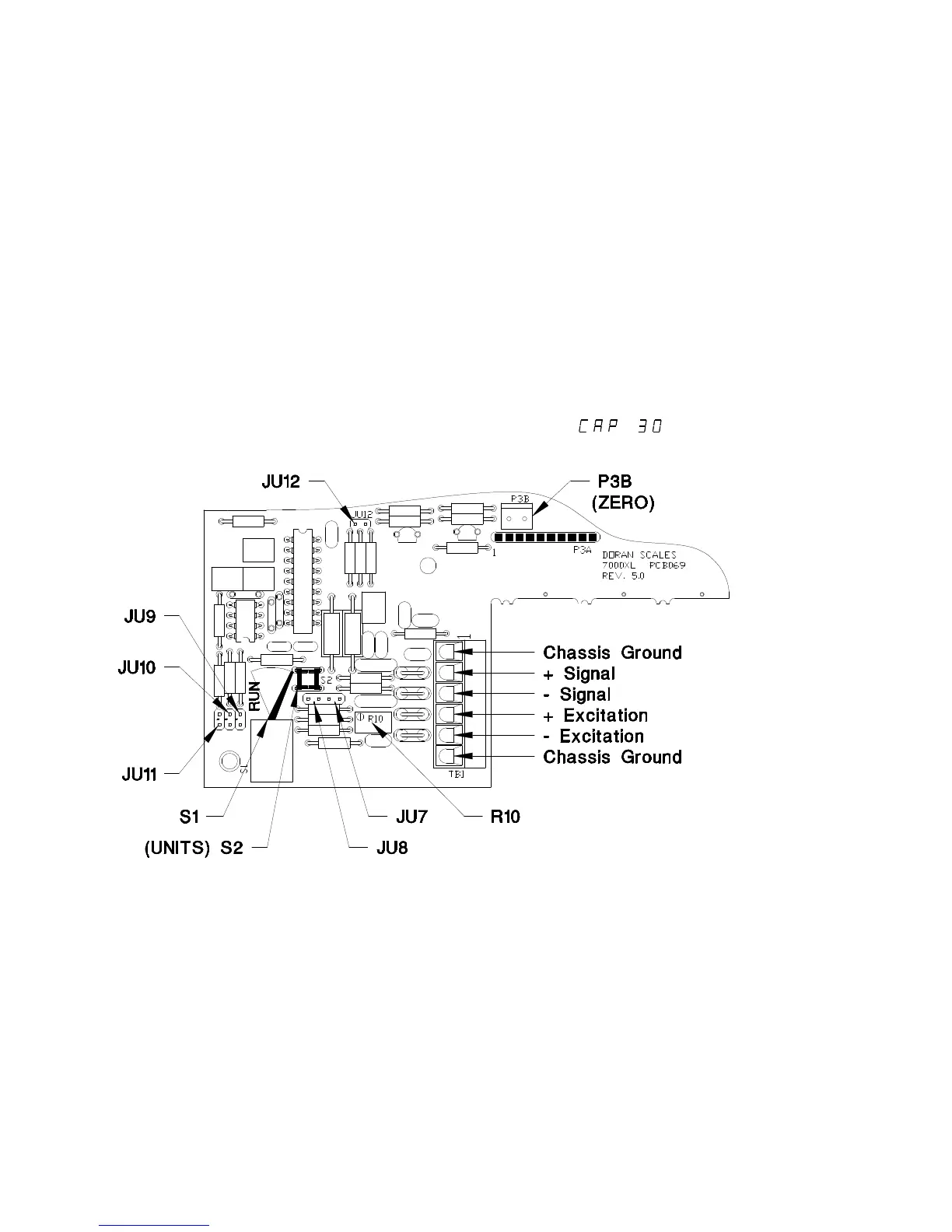
opened, locate the Calibration switch S1 just inside the opening. Place
the switch in the CALIBRATE mode by moving the switch lever. The
indicator will display the first menu item, (Where 30 can be
any valid capacity).
Figure 1. Load Cell Connection and Calibration Jumpers.
Switch S1 is shown in the CALIBRATION mode.
To exit the setup mode, simply return the Calibration switch S1 to the
RUN position. The indicator will return to the normal weighing mode. All
menu selections will be saved at that time.
NOTE: No setup information is saved until S1 is returned to the
RUN position. In the event of a power failure while in the
Setup Mode, any changes that have been made will be lost.
14



 To Next Page