Half/Pack
®
Issued April 2018
Body Controller Software
Copyright 2018, Heil Environmental
Printed in the U.S.A.
Body Controller Software
95
Note
3
: Applicable only for Remote Tailgate CORTEX32 Controller (“RTG”) and the Remote Can CORTEX32 Controller
(“RCN”).
1.02: Inputs
The CORTEX32 Controller Inputs are activated by positive +12 volt signals and some Ground signals (some chassis
signals). All Switches, Proximity, Pressure, Toggle, Push buttons, etc., used as input devices to the Controller, supply a
+12 volt signal to a CORTEX32 Extended Controller input to turn the Input ON unless otherwise specified.
With an Input ON, the corresponding Input field (with Description and Address) shown on the INSIGHT display will also be
ON.
Refer section 5.04 for more details about Diagnostic display options and INSIGHT display tool.
1.03: Outputs
During each cycle the CPU will analyze the status of the inputs, and based upon the logic of the programming, will produce
the appropriate +12 volt DC outputs.
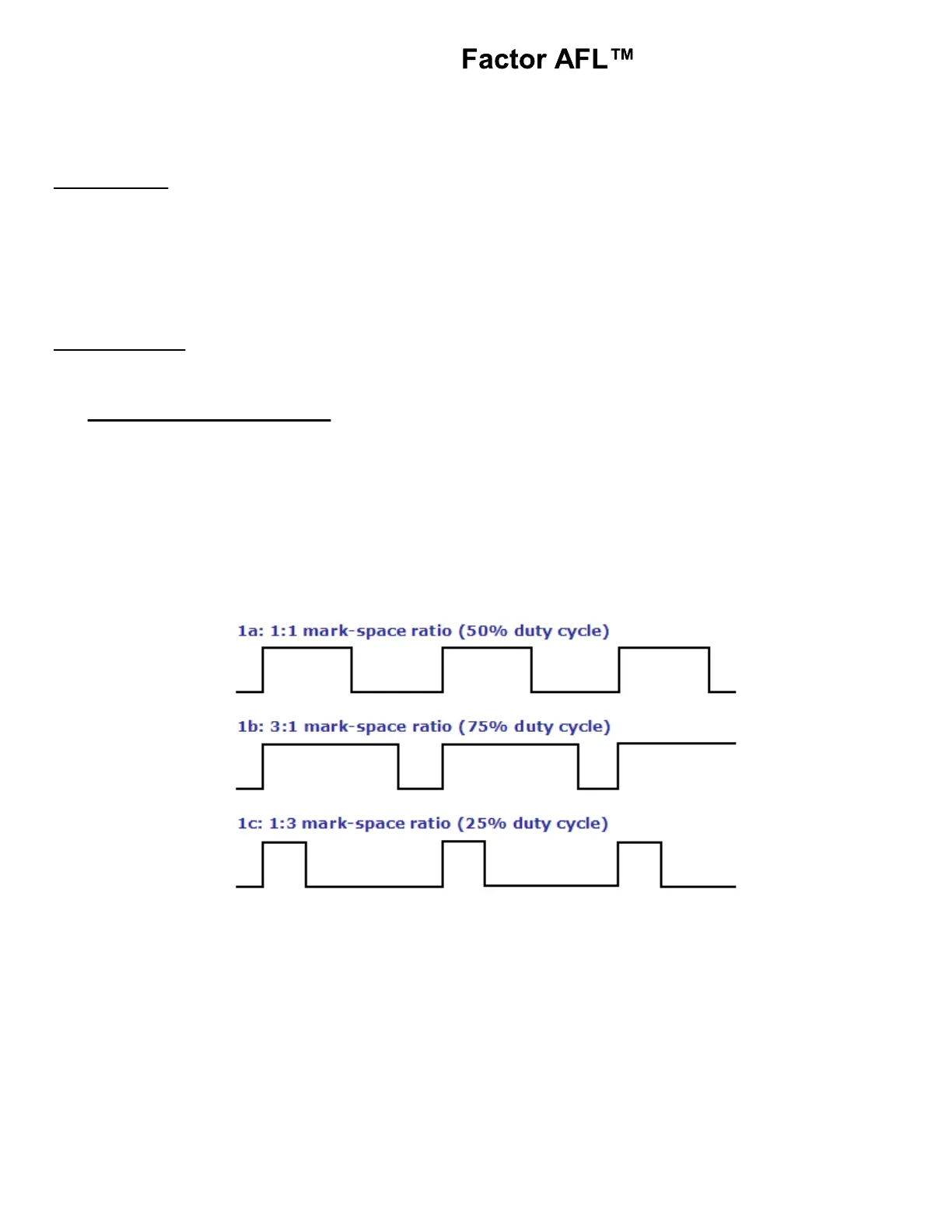
Pulse Width Modulation (P.W.M):
a. The primary use of a PWM signal is to allow the control of the power, supplied to electrical devices.
b. The Average value of Voltage (and Current) fed to the load is controlled by turning the switch between supply
and load ON and OFF at a fast pace. The longer the switch is ON compared to the OFF periods, the higher
the power supplied to the load is.
c. The main advantage of PWM is that power loss in the switching devices is very low. When a switch is OFF
there is practically no current, and when switch is ON, there is almost no voltage drop across the switch. Refer
figure below for PWM output signals and Waveforms.
d. To test a PWM output use an Incandescent test light and the brightness will vary with the Voltage level.
Refer section 5.04 for more details about Diagnostic display options and INSIGHT display tool.



 To Next Page