Vigor2120 Series User’s Guide
86
3
3
.
.
6
6
H
H
o
o
w
w
t
t
o
o
S
S
e
e
n
n
d
d
a
a
N
N
o
o
t
t
i
i
f
f
i
i
c
c
a
a
t
t
i
i
o
o
n
n
t
t
o
o
S
S
p
p
e
e
c
c
i
i
f
f
i
i
e
e
d
d
P
P
h
h
o
o
n
n
e
e
N
N
u
u
m
m
b
b
e
e
r
r
v
v
i
i
a
a
S
S
M
M
S
S
S
S
e
e
r
r
v
v
i
i
c
c
e
e
i
i
n
n
W
W
A
A
N
N
D
D
i
i
s
s
c
c
o
o
n
n
n
n
e
e
c
c
t
t
i
i
o
o
n
n
Follow the steps listed below:
1. Log into the web user interface of Vigor router.
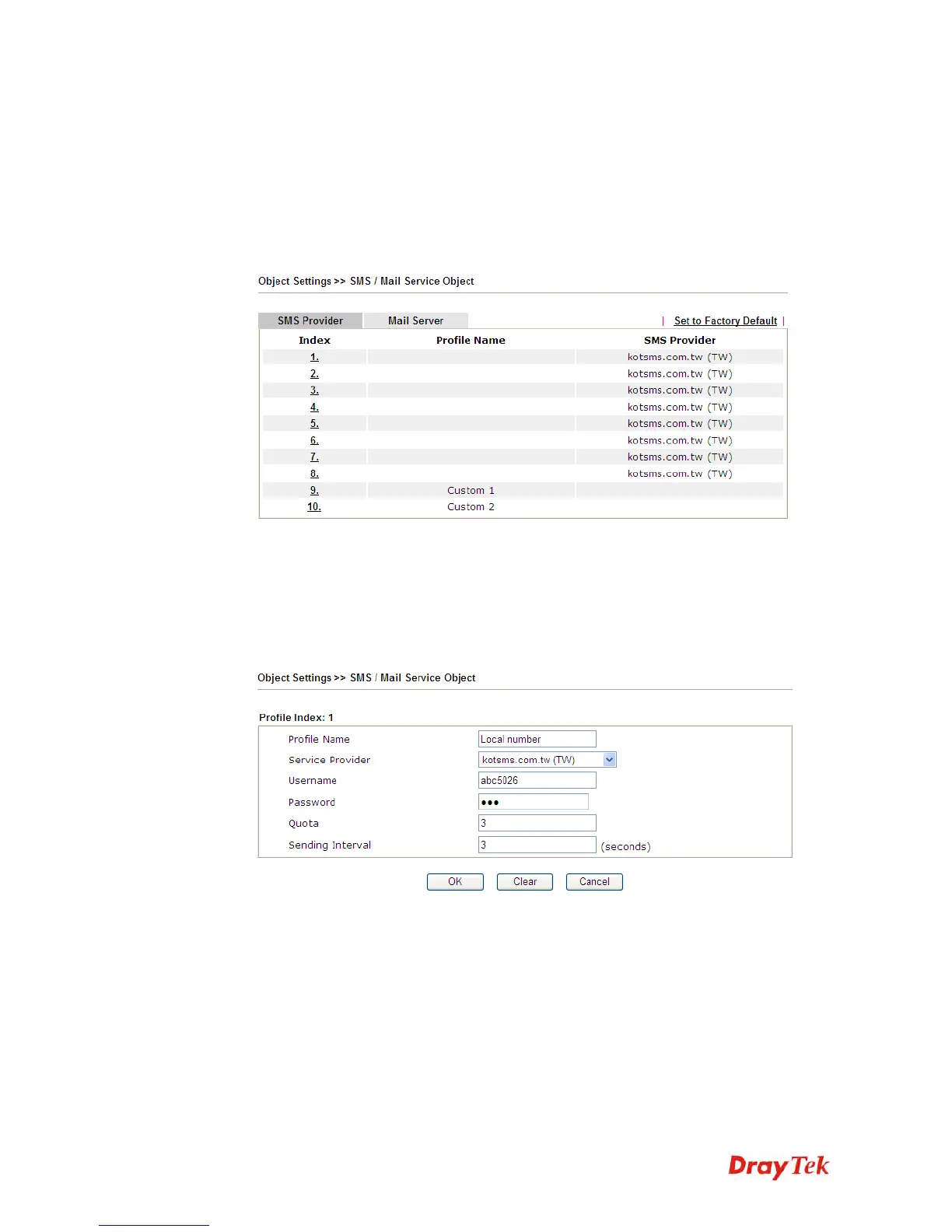
2. Configure relational objects first. Open Object Settings>>SMS/Mail Server Object to
get the following page.
Index 1 to Index 8 allows you to choose the built-in SMS service provider. If the SMS
service provider is not on the list, you can configure Index 9 and Index 10 to add the new
service provider to Vigor router.
3. Choose any index number (e.g., Index 1 in this case) to configure the SMS Provider
setting. In the following page, type the username and password and set the quota that the
router can send the message out.















 To Next Page