Vigor2120 Series User’s Guide
551
T
T
e
e
l
l
n
n
e
e
t
t
C
C
o
o
m
m
m
m
a
a
n
n
d
d
:
:
w
w
l
l
d
d
u
u
a
a
l
l
s
s
e
e
c
c
u
u
r
r
i
i
t
t
y
y
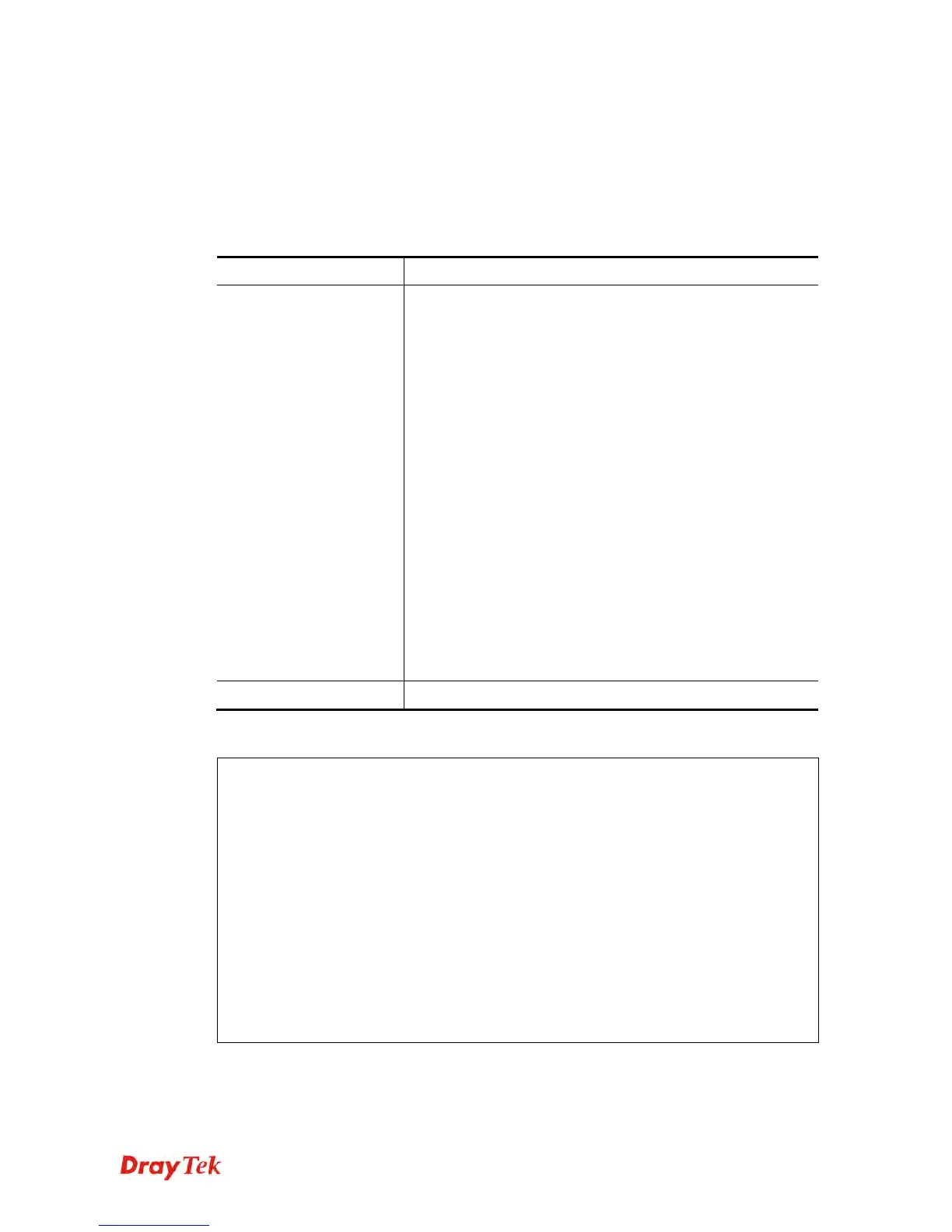
This command allows users to configure security settings for the wirelesss connection (5GHz).
wl dual security[SSID_NUMBER] [mode][key][index]
wl dual security show
S
S
y
y
n
n
t
t
a
a
x
x
D
D
e
e
s
s
c
c
r
r
i
i
p
p
t
t
i
i
o
o
n
n
Parameter Description
Security
[SSID_NUMBER]
[mode][key][index]
SSID_NUMBER: Type 1, 2, 3 or 4 to specify SSID1, SSID2,
SSID3 or SSID4.
mode: Available settings are:
disable: No security.
wpa1x: WPA/802.1x Only
wpa21x: WPA2/802.1x Only
wpamix1x: Mixed (WPA+WPA2/802.1x only)
wep1x: WEP/802.1x Only
wpapsk: WPA/PSK
wpa2psk: WPA2/PSK
wpamixpsk: Mixed (WPA+WPA2)/PSK
wep: WEP
key, index: Moreover, you have to add keys for wpapsk,
wpa2psk, wpamixpsk and wep, and specify index number of
schedule profiles to be followed by the wireless connection.
WEP keys must be in 5/13 ASCII text string or 10/26
Hexadecimal digit format; WPA keys must be in 8~63 ASCII
text string or 64 Hexadecimal digit format.
show
It means to display current mode selection for each SSID.
E
E
x
x
a
a
m
m
p
p
l
l
e
e
> wl dual security 1 wpa2psk 123456789e
% <Note> Please restart 5G wireless after you set the parameters.
> wl dual security show
%% 5G Wireless LAN Security Settings:
% SSID1
%% Mode: WPA2/PSK
% SSID2
%% Mode: Disable
% SSID3
%% Mode: Disable
% SSID4
%% Mode: Disable
>















 To Next Page