Vigor2120 Series User’s Guide
27
Q
Q
u
u
i
i
c
c
k
k
S
S
e
e
t
t
u
u
p
p
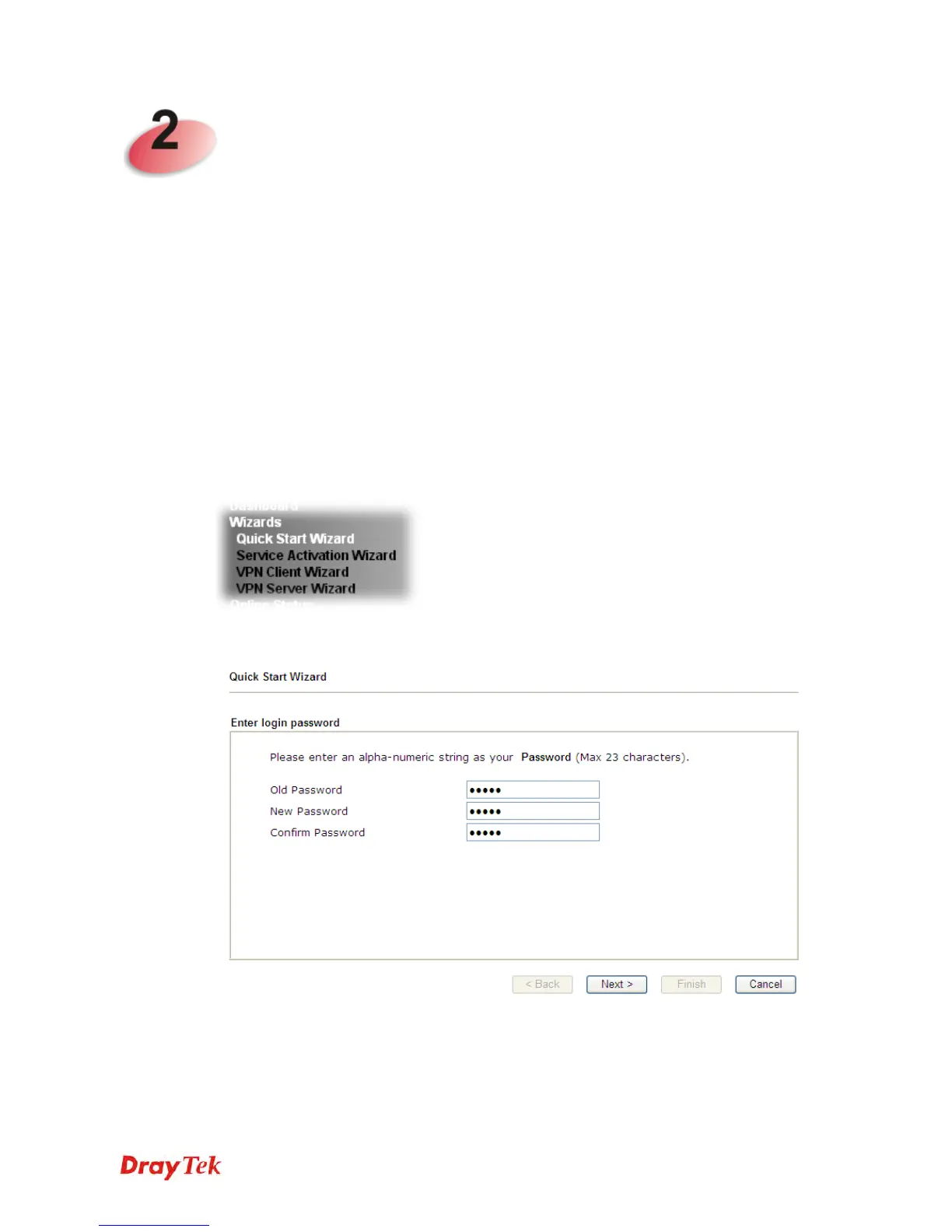
There are several setup wizards offered for you to configure the router simply and quickly.
Quick Start Wizard – used for building network connection, Internet access.
Service Activation Wizard – used for activating the web content filter service.
VPN Client Wizard – used for establishing VPN tunnel; the router is treated as a VPN
client.
VPN Server Wizard – used for establishing VPN tunnel; the router is treated as a VPN
server.
2
2
.
.
1
1
Q
Q
u
u
i
i
c
c
k
k
S
S
t
t
a
a
r
r
t
t
W
W
i
i
z
z
a
a
r
r
d
d
The Quick Start Wizard is designed for you to easily set up your router for Internet access.
Open Wizards>>Quick Start Wizard.
It can help you to deploy and use the router easily and quickly. The first screen of Quick Start
Wizard is entering login password. After typing the password, please click Next.
On the next page as shown below, please select the WAN interface that you use. If Ethernet
interface is used, please choose WAN1; if 3G USB modem is used, please choose WAN2.
Then click Next for next step.















 To Next Page