Vigor2120 Series User’s Guide
389
T
T
e
e
l
l
n
n
e
e
t
t
C
C
o
o
m
m
m
m
a
a
n
n
d
d
R
R
e
e
f
f
e
e
r
r
e
e
n
n
c
c
e
e
A
A
c
c
c
c
e
e
s
s
s
s
i
i
n
n
g
g
T
T
e
e
l
l
n
n
e
e
t
t
o
o
f
f
V
V
i
i
g
g
o
o
r
r
2
2
1
1
2
2
0
0
This chapter also gives you a general description for accessing telnet and describes the
firmware versions for the routers explained in this manual.
Note: For Windows 7 user, please make sure the Windows Features of Telnet Client has
been turned on under Control Panel>>Programs.
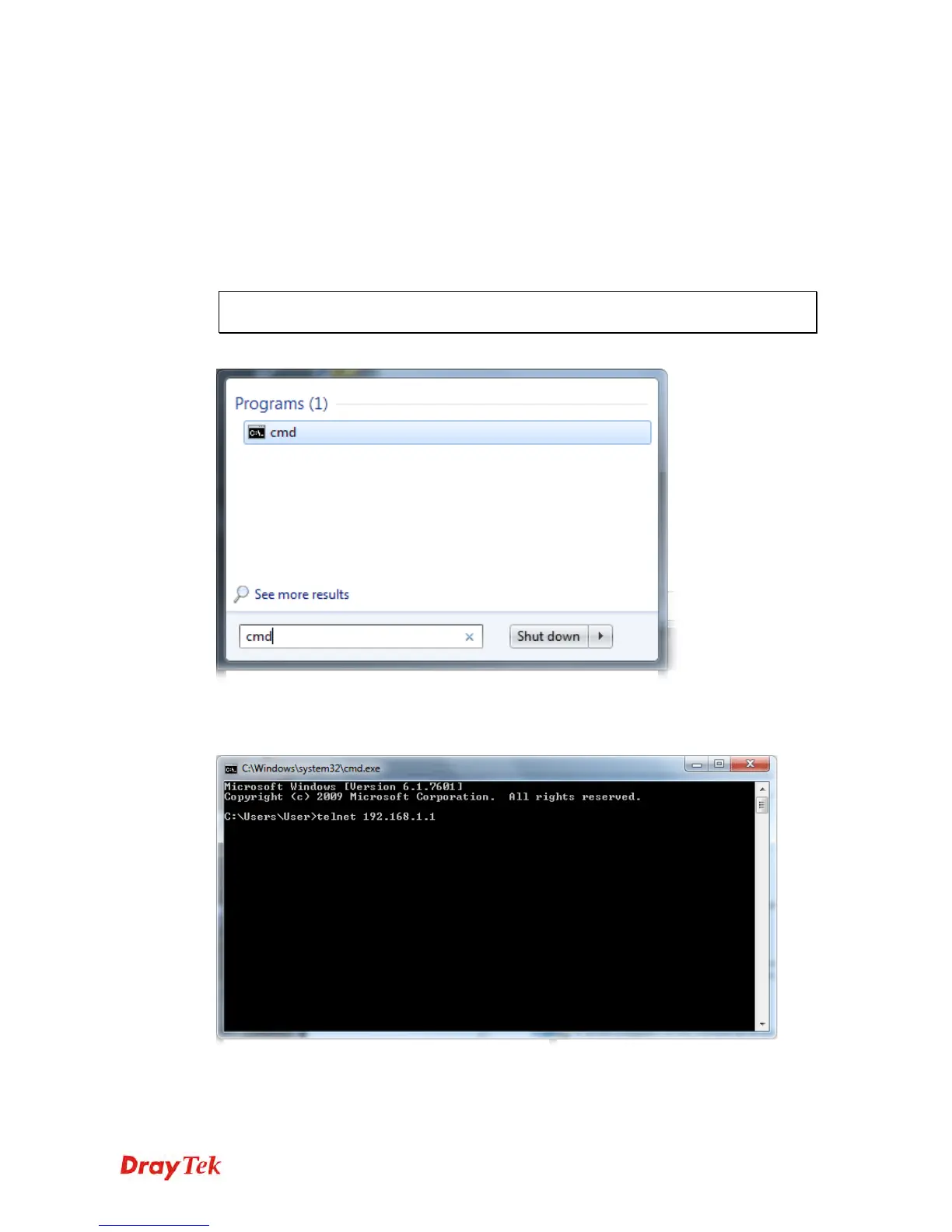
Type cmd and press Enter. The Telnet terminal will be open later.
In the following window, type Telnet 192.168.1.1 as below and press Enter. Note that the IP
address in the example is the default address of the router. If you have changed the default,
enter the current IP address of the router.
Next, type admin/admin for Account/Password. Then, type ?. You will see a list of
valid/common commands depending on the router that your use.















 To Next Page