Vigor2120 Series User’s Guide
106
4
4
.
.
1
1
.
.
3
3
.
.
1
1
D
D
e
e
t
t
a
a
i
i
l
l
s
s
P
P
a
a
g
g
e
e
f
f
o
o
r
r
P
P
P
P
P
P
o
o
E
E
i
i
n
n
W
W
A
A
N
N
1
1
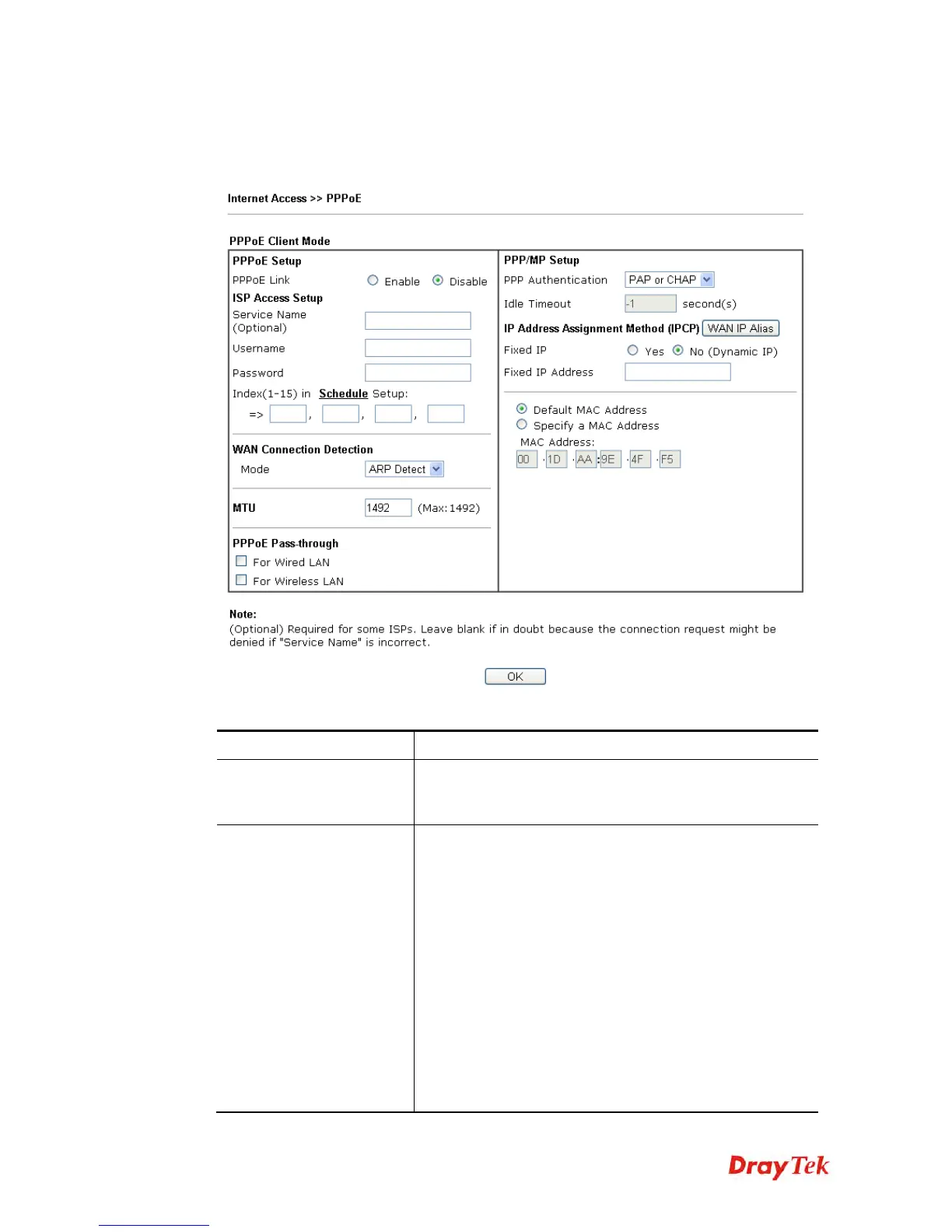
To use PPPoE as the accessing protocol of the internet, please click the PPPoE tab. The
following web page will be shown.
Available settings are explained as follows:
Item Description
PPPoE Link
Click Enable for activating this function. If you click
Disable, this function will be closed and all the settings that
you adjusted in this page will be invalid.
ISP Access Setup
Enter your allocated username, password and authentication
parameters according to the information provided by your
ISP.
Username – Type in the username provided by ISP in this
field.
The maximum length of the user name you can set is 63
characters.
Password – Type in the password provided by ISP in this
field.
The maximum length of the password you can set is 62
characters.
Index (1-15) in Schedule Setup - You can type in four sets
of time schedule for your request. All the schedules can be
set previously in Application >> Schedule web page and















 To Next Page