Vigor2120 Series User’s Guide
141
If both the Primary IP and Secondary IP Address fields are
left empty, the router will assign its own IP address to local
users as a DNS proxy server and maintain a DNS cache.
If the IP address of a domain name is already in the DNS
cache, the router will resolve the domain name immediately.
Otherwise, the router forwards the DNS query packet to the
external DNS server by establishing a WAN (e.g.
DSL/Cable) connection.
When you finish the configuration, please click OK to save and exit this page.
4
4
.
.
2
2
.
.
2
2
.
.
2
2
D
D
e
e
t
t
a
a
i
i
l
l
s
s
P
P
a
a
g
g
e
e
f
f
o
o
r
r
I
I
P
P
R
R
o
o
u
u
t
t
e
e
d
d
S
S
u
u
b
b
n
n
e
e
t
t
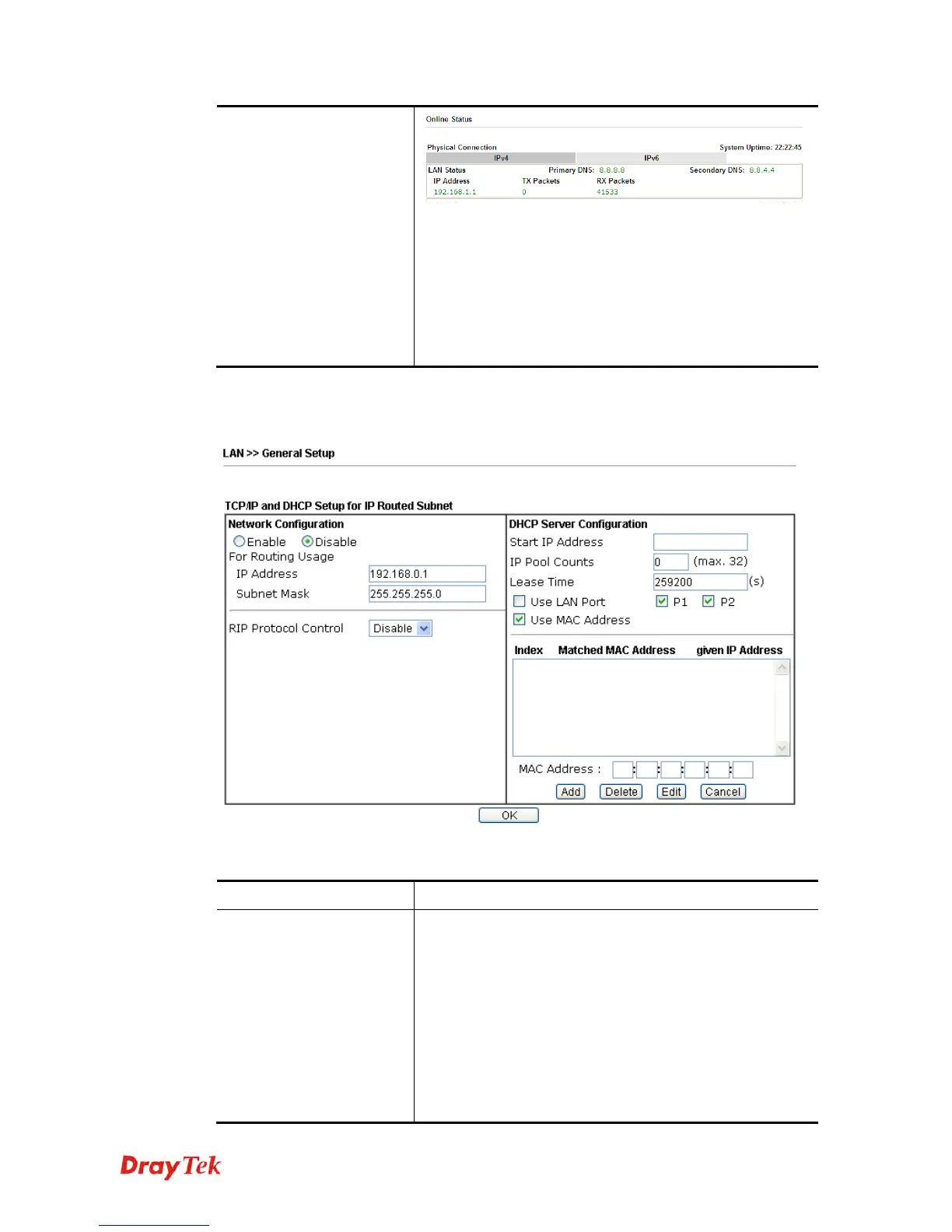
Available settings are explained as follows:
Item Description
Network Configuration
Enable/Disable - Click Enable to enable such
configuration; click Disable to disable such configuration.
For Routing Usage,
IP Address - Type in private IP address for connecting to a
local private network (Default: 192.168.1.1).
Subnet Mask - Type in an address code that determines the
size of the network. (Default: 255.255.255.0/ 24)
RIP Protocol Control,
Disable - deactivate the RIP protocol. It will lead to a
stoppage of the exchange of routing information between















 To Next Page