Vigor2120 Series User’s Guide
240
You can configure general setup for the WAN interface, edit the Class Rule, and edit the
Service Type for the Class Rule for your request.
O
O
n
n
l
l
i
i
n
n
e
e
S
S
t
t
a
a
t
t
i
i
s
s
t
t
i
i
c
c
s
s
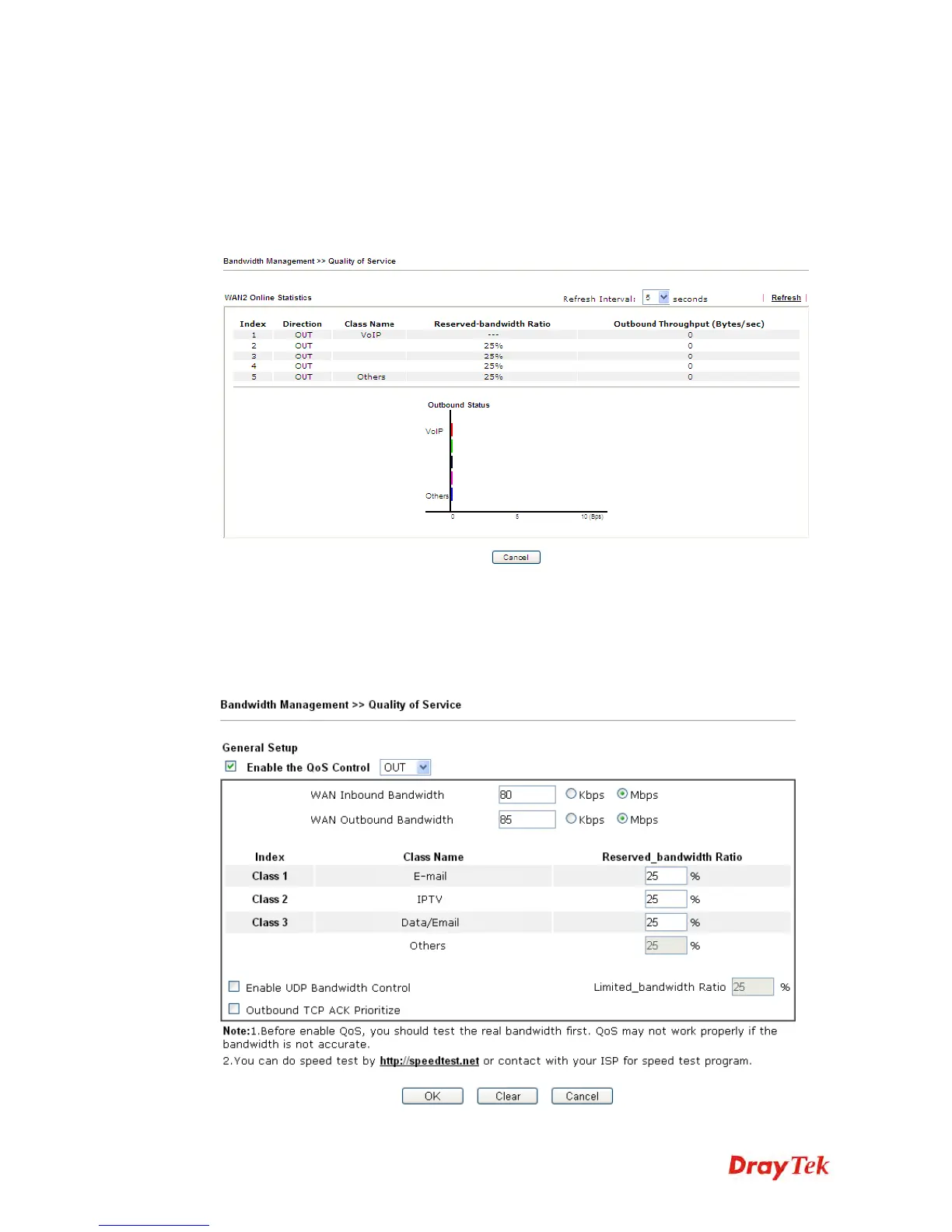
Display an online statistics for quality of service for your reference. This feature is available
only when the Quality of Service for WAN interface is enabled.
G
G
e
e
n
n
e
e
r
r
a
a
l
l
S
S
e
e
t
t
u
u
p
p
f
f
o
o
r
r
W
W
A
A
N
N
I
I
n
n
t
t
e
e
r
r
f
f
a
a
c
c
e
e
When you click Setup, you can configure the bandwidth ratio for QoS of the WAN interface.
There are four queues allowed for QoS control. The first three (Class 1 to Class 3) class rules
can be adjusted for your necessity. Yet, the last one is reserved for the packets which are not
suitable for the user-defined class rules.















 To Next Page