Vigor2120 Series User’s Guide
434
Type “2” to display the log of blocked packet.
Type “3” to display the log of non-matching packet.
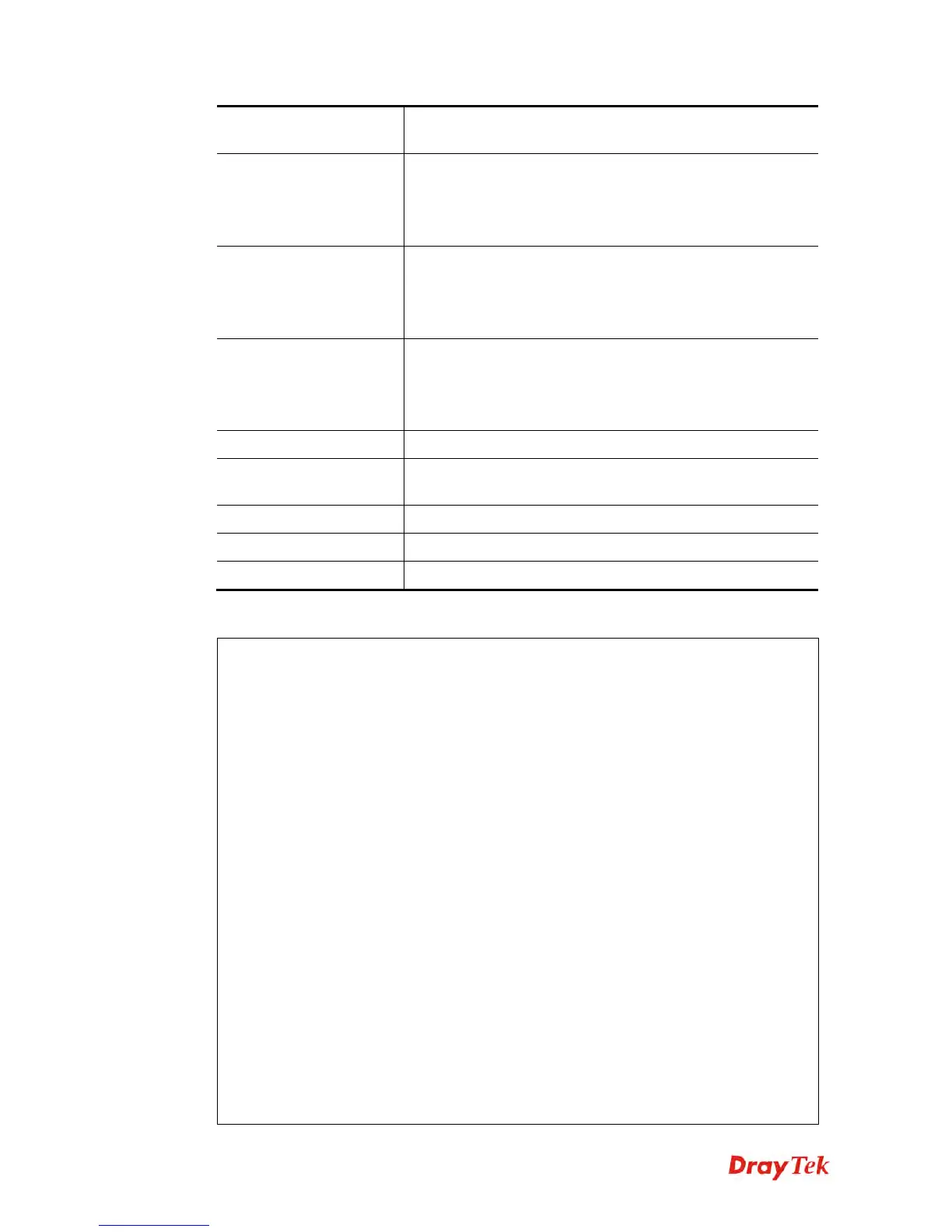
- p [VALUE]
It means to setup actions for packet not matching any rule,
e.g., -p 1
Type “0” to let all the packets pass;
Type “1” to block all the packets.
-M [P2P_NO]
It means to configure IM/P2P for the packets not matching
with any rule, e.g., -M 1
Type “0” to let all the packets pass;
Type “1” to block all the packets.
-U [URL_NO]
It means to configure URL content filter for the packets not
matching with any rule, e.g., -U 1
Type “0” to let all the packets pass;
Type “1” to block all the packets.
-a [AD_SET]
It means to configure the advanced settings.
-f [VALUE]
It means to accept large incoming fragmented UDP or ICMP
packets.
-E [VALUE]
It means to set the maximum count for session limitation.
-F [VALUE]
It means to configure the load-balance policy.
-Q [VALUE]
It means to set the QoS class.
E
E
x
x
a
a
m
m
p
p
l
l
e
e
> ipf set -c 1 #set call filter start from set 1
Setting saved.
> ipf set -d 2 #set data filter start from set 2
Setting saved.
> ipf set -v
Call Filter: Enable (Start Filter Set = 1)
Data Filter: Enable (Start Filter Set = 2)
Log Flag : None
Actions for packet not matching any rule:
Pass or Block : Pass
CodePage : ANSI(1252)-Latin I
Max Sessions Limit: 60000
Current Sessions : 0
Mac Bind IP : Non-Strict
QOS Class : None
APP Enforcement : None
URL Content Filter: None
Load-Balance policy : Auto-select
--------------------------------------------------------------
CodePage : ANSI(1252)-Latin I
Window size : 65535















 To Next Page