VigorAP 902 User’s Guide
245
(1) Please tick Enable Wireless LAN.
(2) Choose the Mode.
Note: To utilize the Universal Repeater Mode on VigorAP 902, it’s required not
to choose 11a mode here on Vigor2830n.
(3) Name a SSID.
(4) Choose a channel.
Note: To avoid signal interference, it’s suggested to do a Scan in Wireless
LAN >> AP Discovery, and choose an unoccupied or not-so-crowded channel.
(5) Click OK.
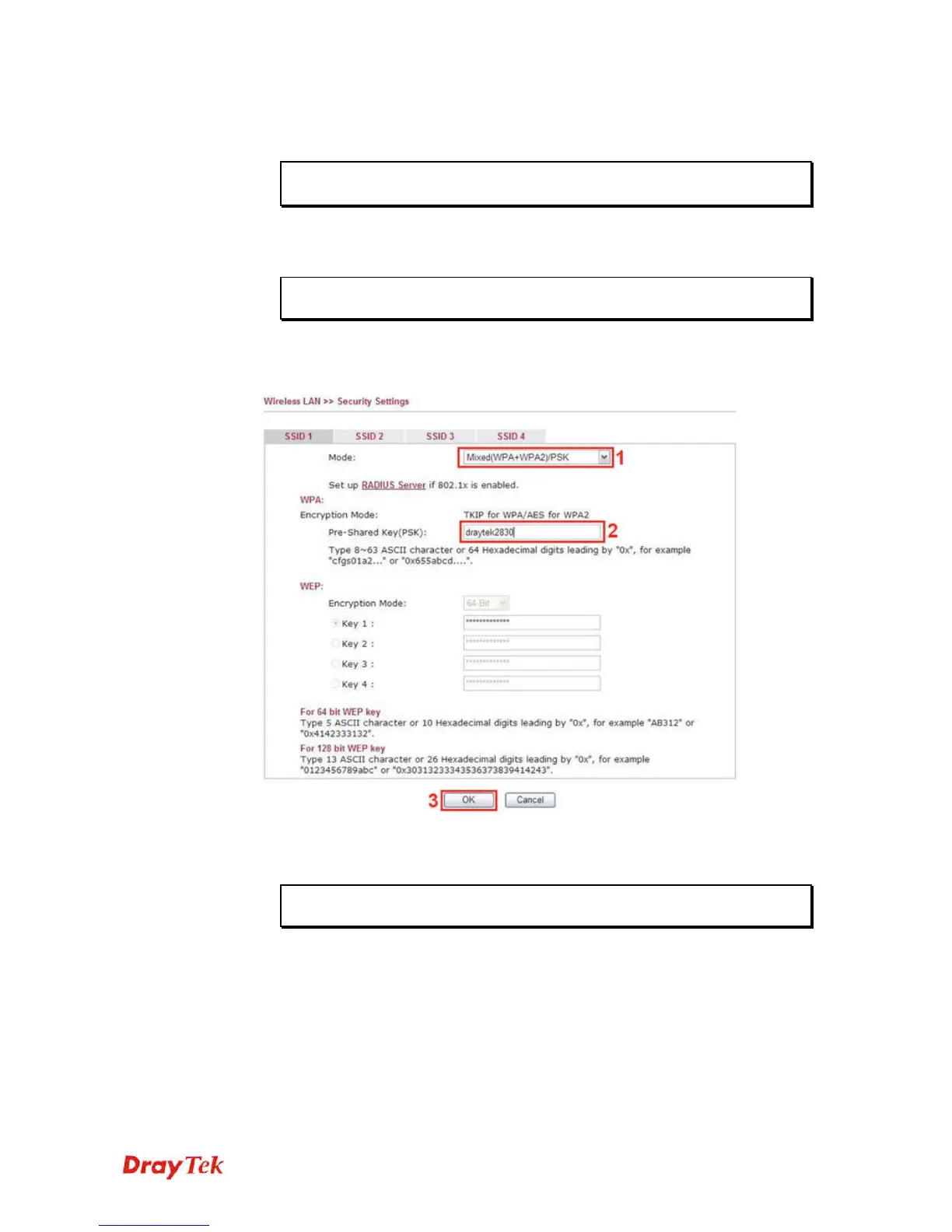
2. Setting the Security. Please go to Wireless LAN >> Security.
(1) Choose the Mode.
(2) Give a Pre-Shared Key.
Note: The Mode and Pre-shared Key will be needed when setting on VigorAP
902, and it’s suggested to memorize them.
(3) Click OK.











 To Next Page