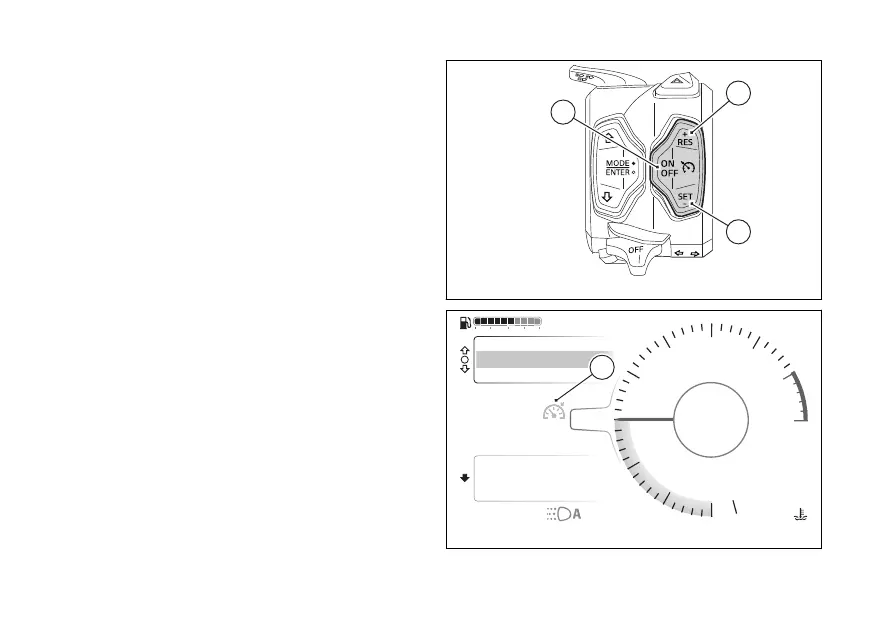
The icon on the instrument panel informs the user of
system status and current
Switching on the CC
Press the ON/OFF (C, Fig 82)to turn on the
CC.
Saving the speed and activating the control
To store the current motorcycle speed as your
cruising speed and activate the control, press SET/-
(E, Fig 82) RES/+ (D, Fig 82). The stored speed is
shown in the Cruise Control icon (A, Fig 83).
Switching the CC
Press the ON/OFF (C, Fig 82) to turn the
Cruise Control. The Cruise Control icon (A, Fig 83)
disappears.
Icon (A, Fig 83)
The Cruise Control icon can be:
- green and grey: the system is on but the speed
control is not active. If no speed is stored, dashes
are shown; otherwise, the last stored cruising
speed is shown;
- green: the system is on and speed control is
active;
- yellow: the system asks the rider to take prompt
action;
Fig 82
Air
24
°C
100
km/h
90
°C
10:34
pm
rpm X1000
4
1
2
3
5
6
7
8
10
12
44
Gear
Total
Range
2017 km
250 km
Phone
Music
Setting menu
URBAN
100
km/h
100
km/h
A
Fig 83
107











 To Next Page