35
12 of 35
FLEXIBLE BATCH BROILER
EQUIPMENT
MANUAL
April 1, 2007
III. Operation Instructions
The information in this section is intended for the
use of qualified operating personnel. Qualified
Operating Personnel are those individuals who
have carefully read the information contained in
this manual, are familiar with the function of the
broiler and/or have had experience with operating
the equipment described. We recommend
following these instructions to insure optimum
performance, long life and trouble-free service
from your broiler.
The controller is pre-programmed at the factory
for known recipes at the time of manufacture.
The product keys must be programmed with an
approved recipe and the broiler properly
calibrated prior to use.
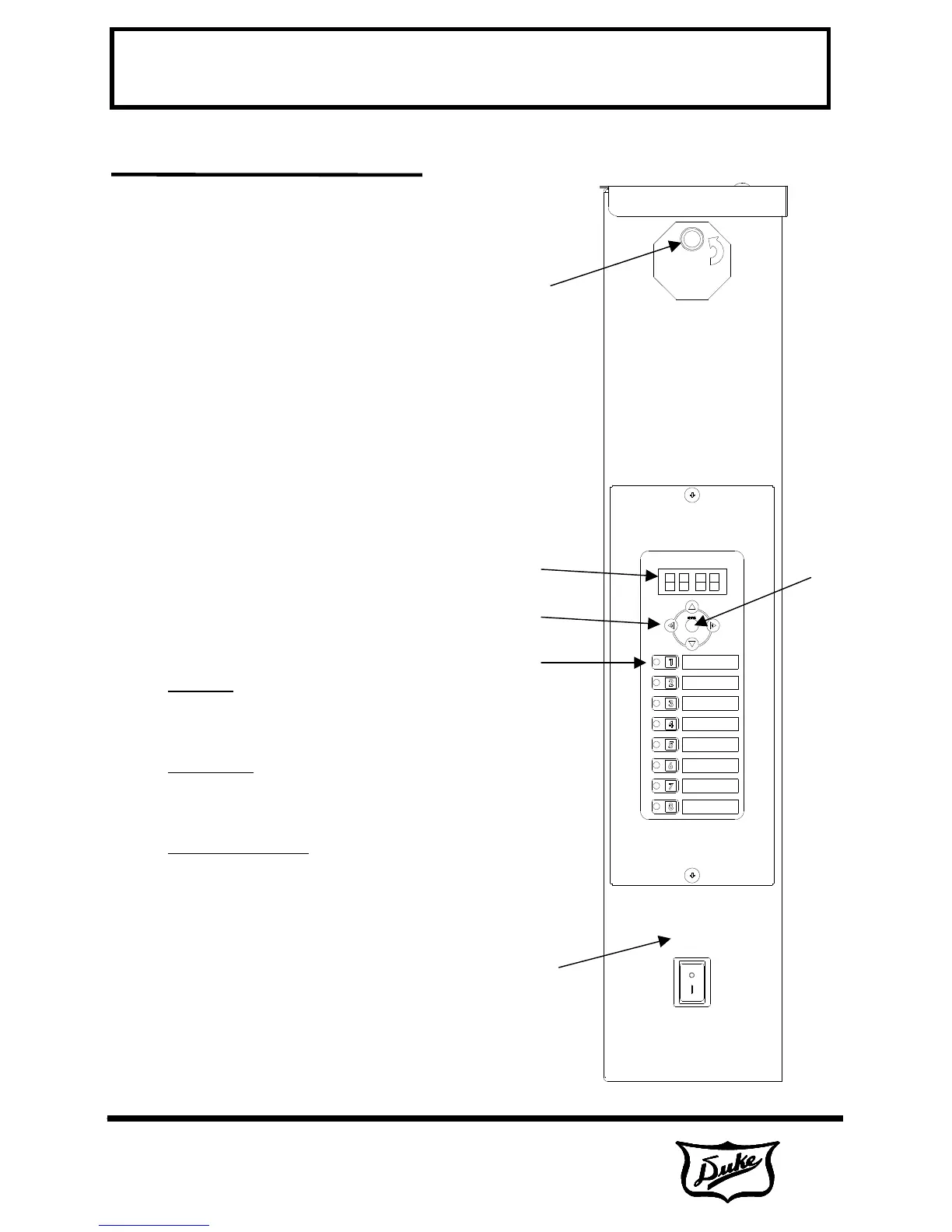
A. Broiler Controls
• 1. Power Switch – Turns the broiler ON or
OFF. The broiler is self-lighting.
• 2. Product Selection Keys – Selects the
product recipe to run. Also functions as
number keys 1-8 in programming mode.
• 3. Arrow Keys
Up-Arrow: Displays the current broiler
temperature when pressed in run mode.
Scrolls backward through parameters when
pressed in program mode.
Down-Arrow: Displays the broiler set-point
temperature when pressed in run mode.
Scrolls backward through parameters when
pressed in program mode.
Left-Right Arrows: Moves between
characters or parameters in program mode.
Also used as numerals 0 and 9 keys.
• 4. Display
• 5. Enter Key – Press and hold for 5
seconds to enter program mode. Also
used to move though and enter parameters
in programming mode.
• 6. Cook Light – This light is lit during
preheat and the entire cook. The operator
should not load the broiler while the light is
lit.
1
2
3
4
5
6



 To Next Page