SV-MAP-270 Navigation Mapping Software
SkyView Classic Pilot’s User Guide – Revision Z 7-12
Moving Map Page Layout
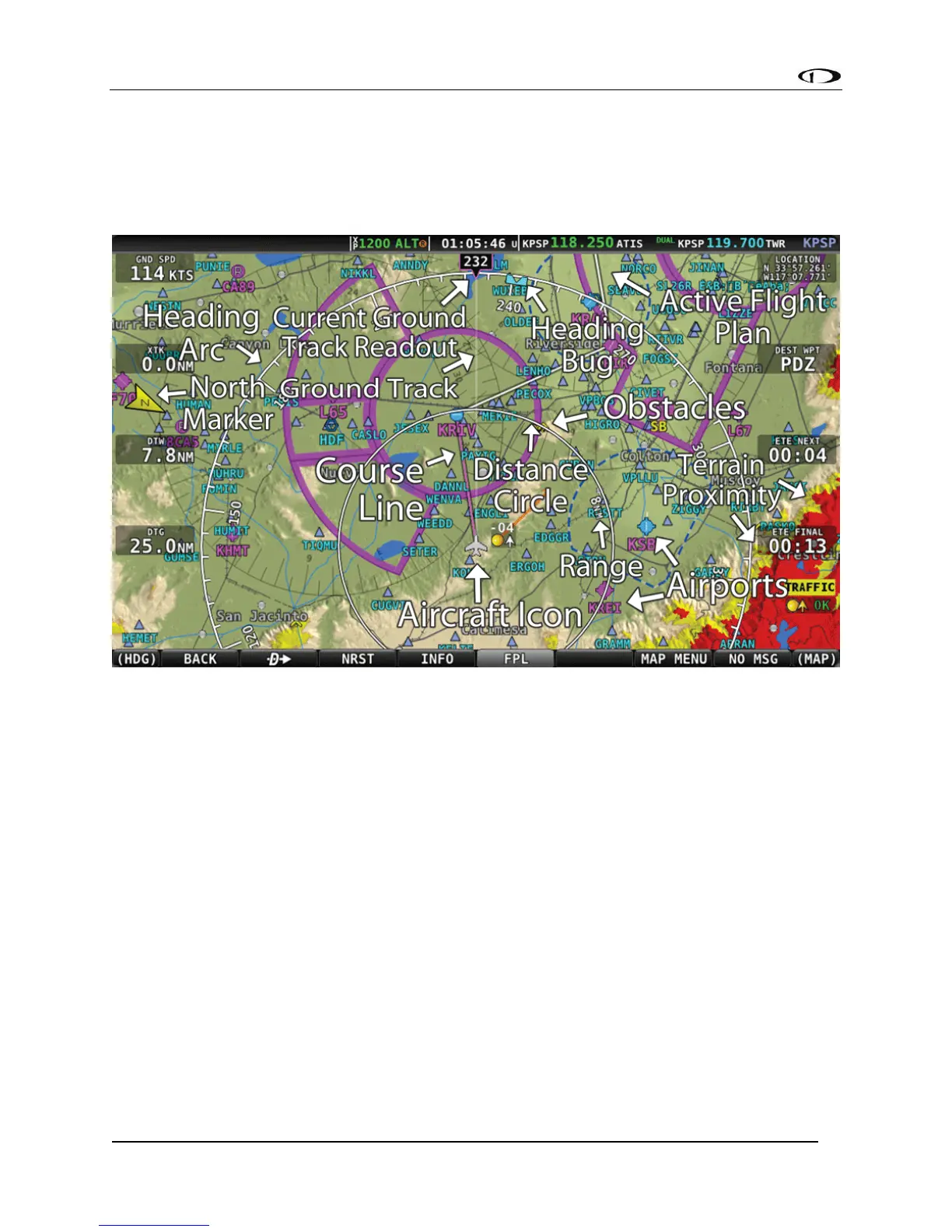
The Moving Map Page as shown in Figure 80 displays a real-time topographical map in Track Up
or North Up mode (depending on user setting). The map is sourced from a database that is
stored inside the display and correlated to your current position using a GPS feed.
Figure 80 – SkyView Moving Map
The following items are displayed on the Moving Map Page shown in Figure 80:
• Topography (terrain and bodies of water) with Terrain Proximity Alerting.
• Default Aircraft Icon with Ground Track Line.
• Distance Circle and Range.
• Heading Arc, Current Ground Track, Heading Bug, True North Marker.
• Configurable Info Items. Examples include GPS Ground Speed (SPEED), GPS Altitude
(ALTITUDE), Distance to Waypoint (DTW), and Bearing to Waypoint (BTW).
• Course line (only displayed when actively navigating to an aviation waypoint).
• Airports with runways (if known).
• Obstacles.
• Airspace (with floors/ceilings).
• Navigation aids, such as VORs, NDBs, and Fixes.
• Active Flight Plan.



 To Next Page