SV-MAP-270 Navigation Mapping Software
SkyView Classic Pilot’s User Guide – Revision Z 7-16
MAP MODE > INC MAP RANGE. Range level can be adjusted between 0.3 and 1200 nautical
miles. Distance units can be set to miles, nautical miles, or kilometers. Reference the SkyView
System Installation Guide instructions on how to change the displayed units.
The heading arc is explained in the next section.
Ground Track Arc, Current Ground Track and Marker, Heading Bug, North Marker,
and Course Line
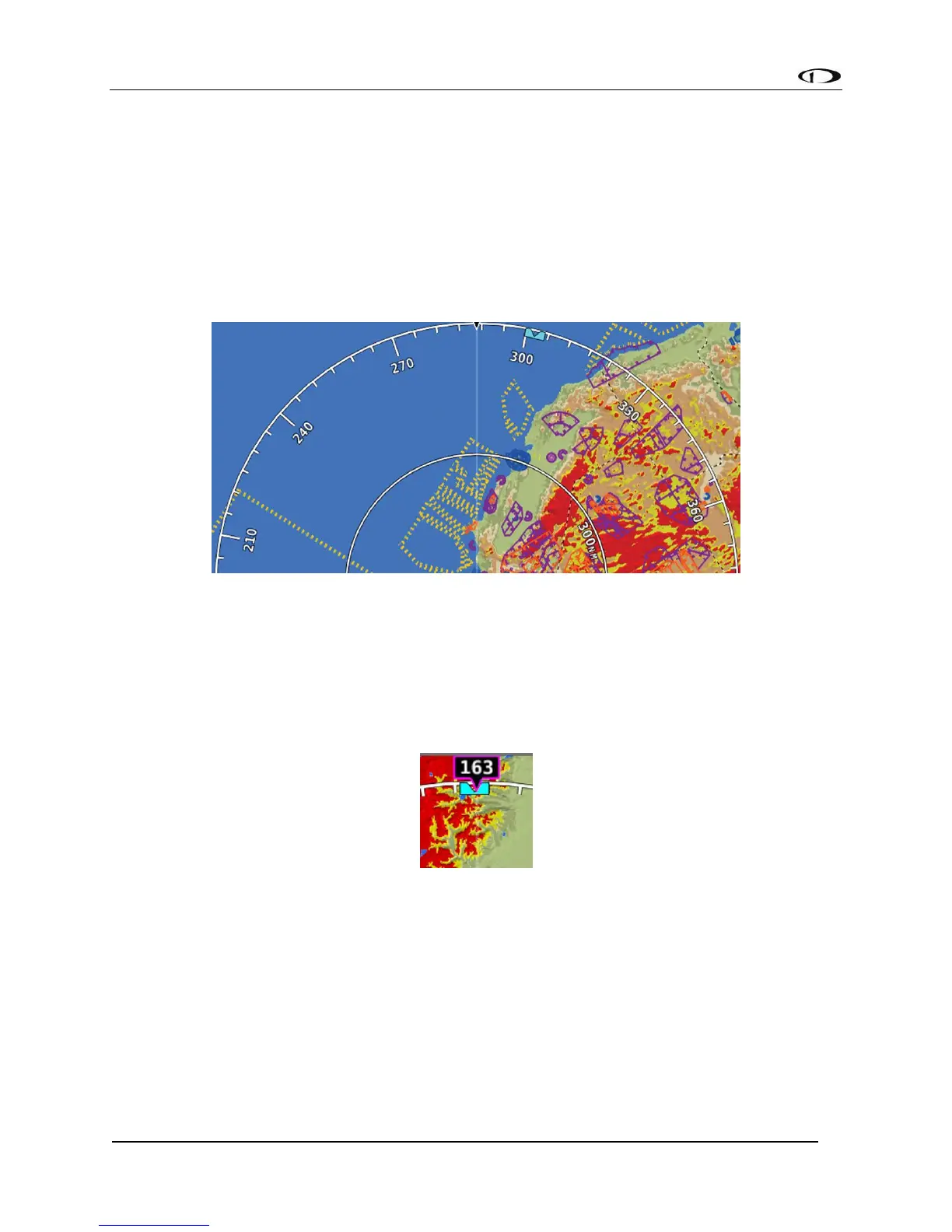
The ground track arc as shown in Figure 88 is centered on the current ground track.
Figure 88 - Ground Track Arc
The current ground track, as shown in Figure 89, is displayed in two ways: the digital readout
and the white ground track line. The border around the digital readout is normally magenta
when based on the GPS ground track. When the aircraft is not moving fast enough for SkyView
to reliably determine the ground track direction, magnetic heading is used instead. In this case,
the border around the digital readout will be white.
Figure 89 - Current Ground Track
The heading bug as shown in Figure 90 is represented with a cyan marker. When moving the
heading bug, a cyan colored lubber line that extends from the aircraft to the bug is displayed as
well. Reference the Heading/Track Bug Section for instructions on how to adjust the heading
bug.



 To Next Page