Autopilot Operation
SkyView Classic Pilot’s User Guide – Revision Z 8-17
• VNAV mode: Label changes to GA (go around). When the autopilot is in an active
VNAV mode (such as glide slope captured) pressing this button will initiate the go
around function.
NOSE UP will be unavailable and grayed-out if the active mode is not VS, IAS or Altitude Hold.
Expert Autopilot Menu Annunciation
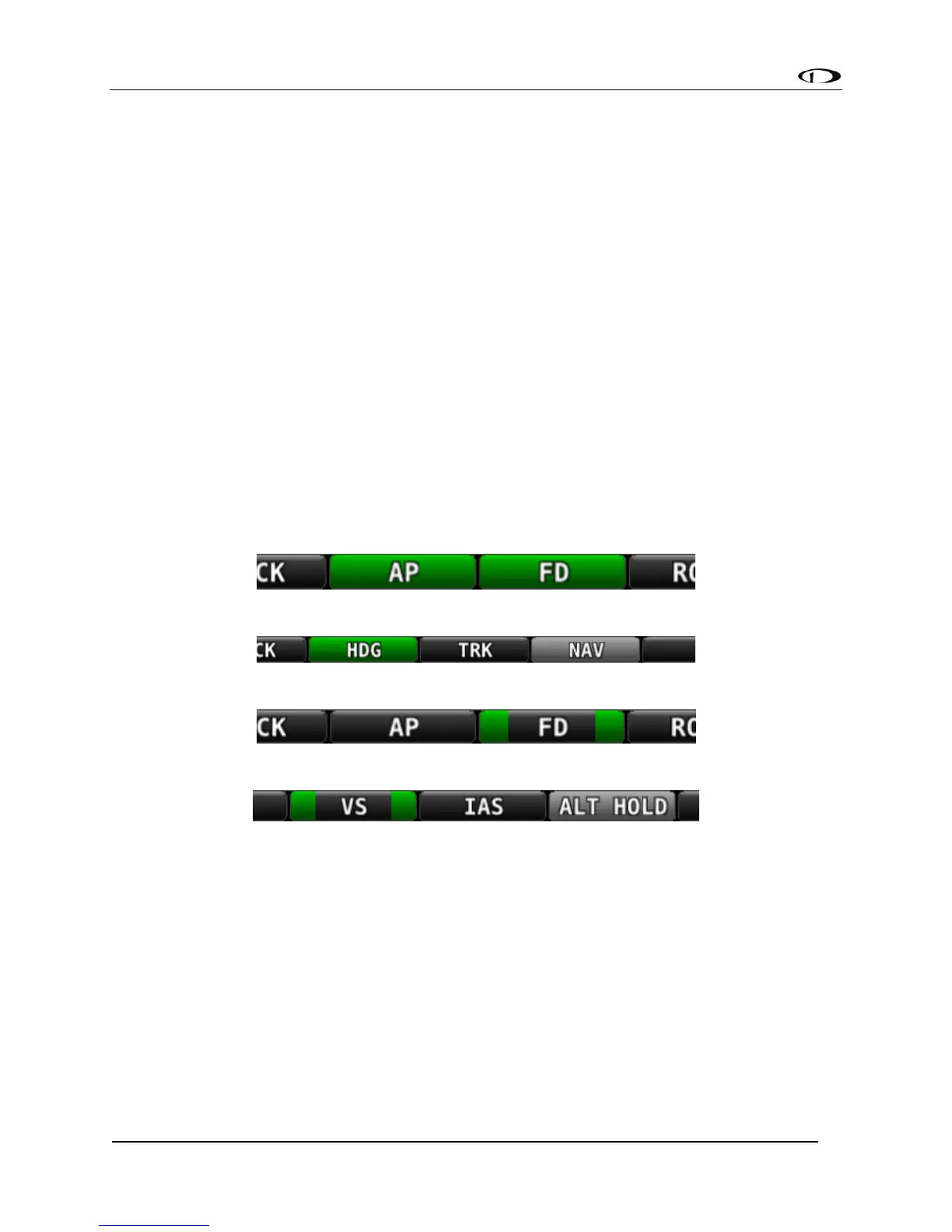
The expert autopilot menu uses a system of background highlighting of the buttons to indicate
the current state of the autopilot servos, flight director, active modes and armed modes.
• A solid green background indicates that a mode is active and the autopilot is
providing guidance with the servos engaged.
• A green border and black background indicates that the autopilot is providing
guidance via the flight director with the servos disengaged.
• A solid light gray background indicates that a mode is armed and will become active
when the autopilot detects the capture criteria for the armed mode have been met.
• A black background indicates that the mode or function is off.
The following figures illustrate the highlighting scheme:
Figure 207 - Autopilot and Flight Director Engaged
Figure 208 - HDG Mode Active / NAV Mode Armed / Autopilot Engaged
Figure 209 - Flight Director On and Servos not Engaged
Figure 210 - VS Mode Active / ALT HOLD Mode Armed / Servos Not Engaged
Engaging the Autopilot
Engaging the autopilot with the expert controls preserves the current roll and pitch state of the
aircraft thereby providing the pilot with the opportunity to command the autopilot without
unexpected deviations. With the default modes of the autopilot being roll hold and vertical
speed hold upon activation the aircraft continues its current attitude.
The following table describes the activation of the autopilot modes on an initial press of an
autopilot control, assuming no modes were previously activated:



 To Next Page