SV-MAP-270 Navigation Mapping Software
SkyView Classic Pilot’s User Guide – Revision Z 7-70
or navaids, they can be used in flight plans, as Direct-To navigation waypoints, or can simply be
used visually on the Map Page to help you navigate.
Creating Waypoints
To create a waypoint at your current location (if the map is centered on the aircraft), or the
lat/long that the map pointer is pointing (at if the map is in map panning mode), select MAIN
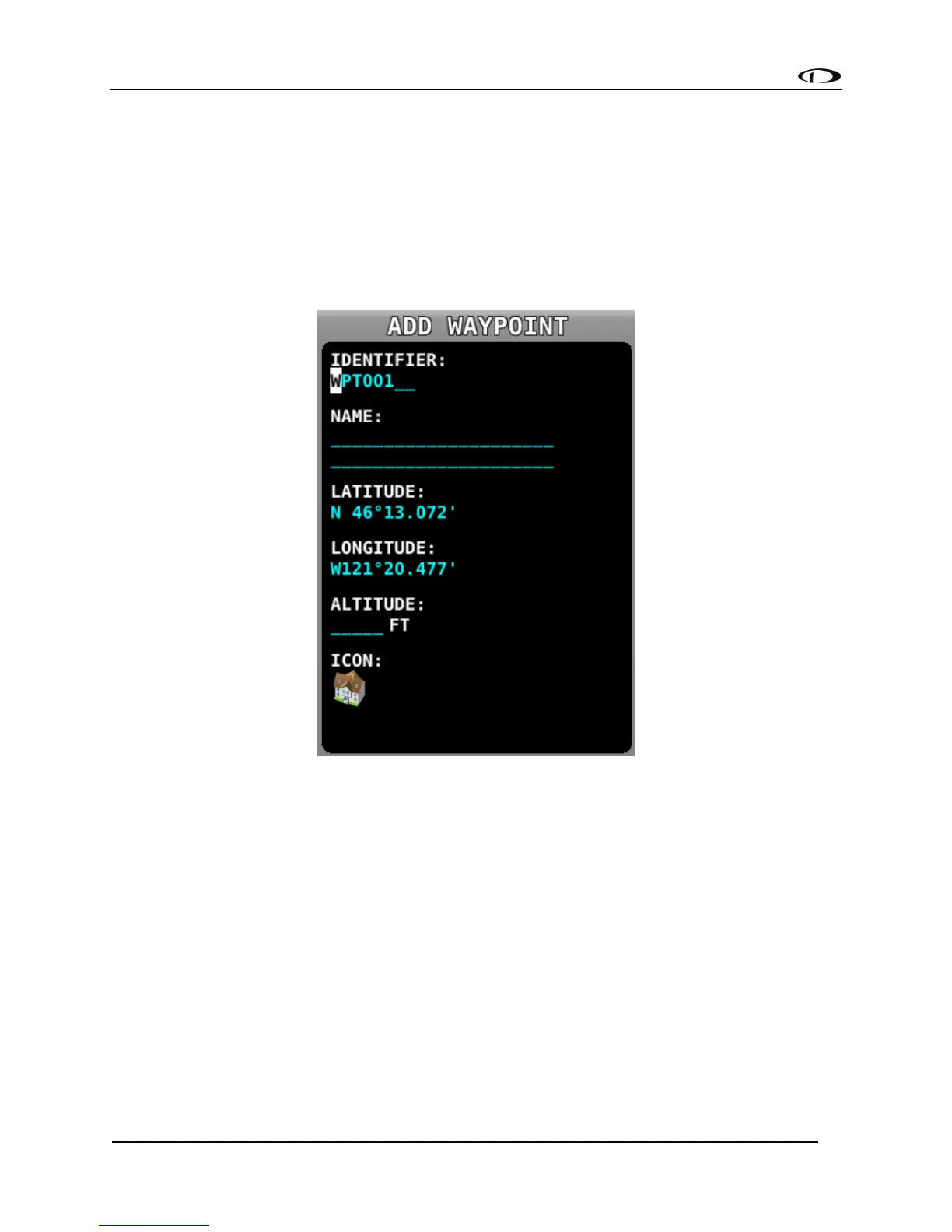
MENU > MAP > MENU > CREATE WAYPOINT to enter the user waypoint creation tool. A window
similar to the following will be shown.
Figure 156 - Waypoint Tools in the Map Menu
Move the CURSR joystick up and down to move the cursor between the various fields. Turn it to
select characters. The editable fields include:
• Identifier – Like other airports and navaids, the identifier is displayed on the map.
• Name – Longer description that is shown on the Info page.
• Latitude/Longitude – Defaults to the current aircraft lat/long if the map is centered
on the aircraft, or the lat/long that the map pointer is pointing at if the map is in
map panning mode. However, this field can be changed with the cursor if you would
like to create a waypoint based on other coordinates.
• Altitude – Not currently used for navigation purposes, but is shown on the Info page.
• Icon – Choose from a variety of aviation style icons, pushpins, buildings, etc.



 To Next Page