SV-MAP-270 Navigation Mapping Software
SkyView Classic Pilot’s User Guide – Revision Z 7-58
GPS and Attitude on ForeFlight
Once the SkyView is connected to ForeFlight, SkyView will also send its GPS position to the app.
The GPS position sent by SkyView is only usable within the ForeFlight app and cannot be used
by other apps on the device.
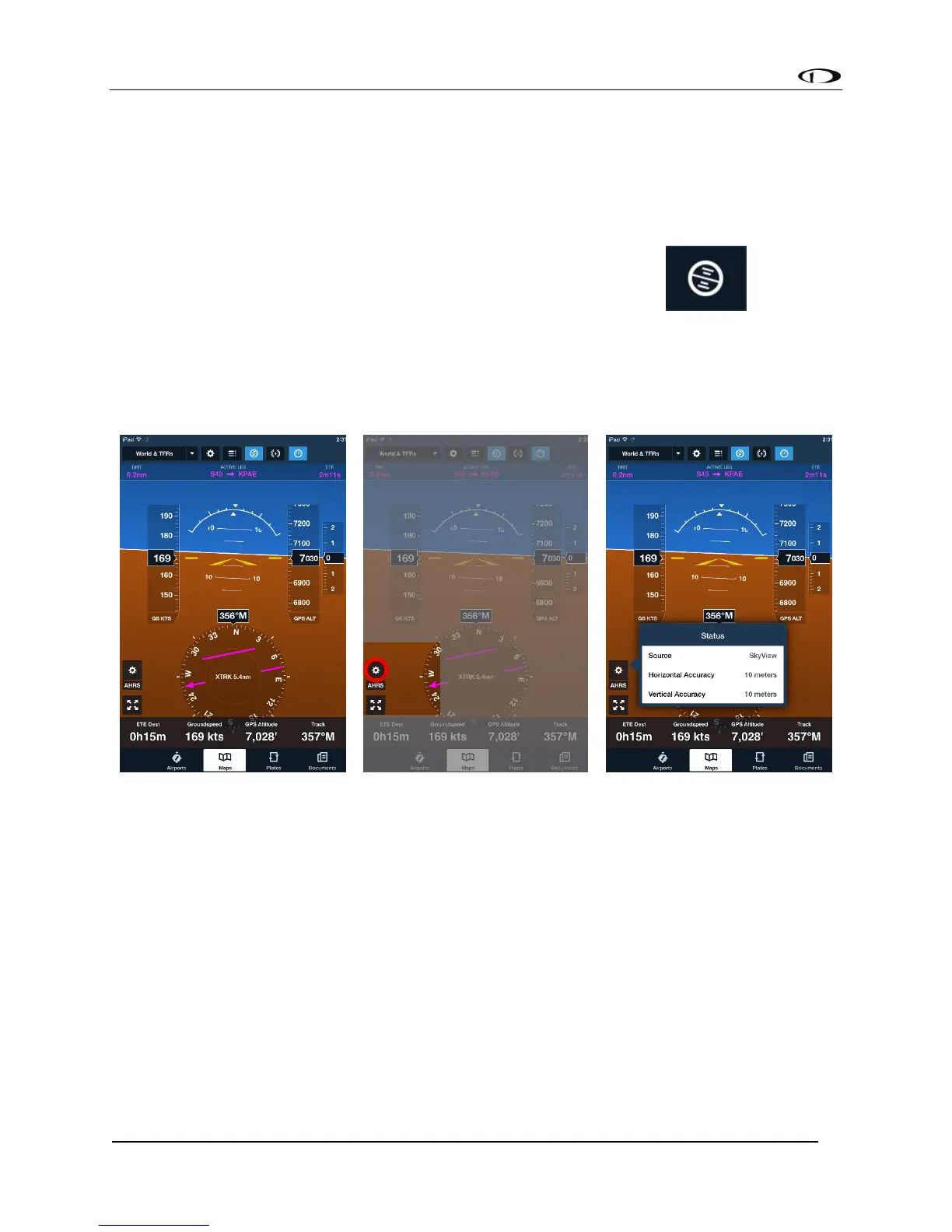
SkyView also continuously send primary flight instrument data for ForeFlight to display in the
app. To view, touch the Attitude Indicator button at the top of the menu . Note that
as of the initial ForeFlight Mobile release, speed, altitude, and other information is GPS-based.
See the ForeFlight documentation for a full description of how flight instrumentation is
displayed within the app. You can confirm that SkyView is ForeFlight’s source of attitude
information by touching the AHRS Status button.
Figure 140 - SkyView Attitude on ForeFlight
PocketFMS Flight Plans
As of SkyView software version 12, SkyView and PocketFMS EasyVFR customers can send and
receive flight plans between SkyView and their EasyVFR Mobile app on iOS, Android, Windows
Phone 8, OS X and Windows 7 & 8. See specific model and version requirements by PocketFMS.
This feature requires one Wi-Fi Adapter for SkyView for each display in the aircraft.
Connecting SkyView to PocketFMS EasyVFR
• Set up the Wi-Fi network on SkyView; see the SkyView Installation Guide for details.



 To Next Page