SV-MAP-270 Navigation Mapping Software
SkyView Classic Pilot’s User Guide – Revision Z 7-52
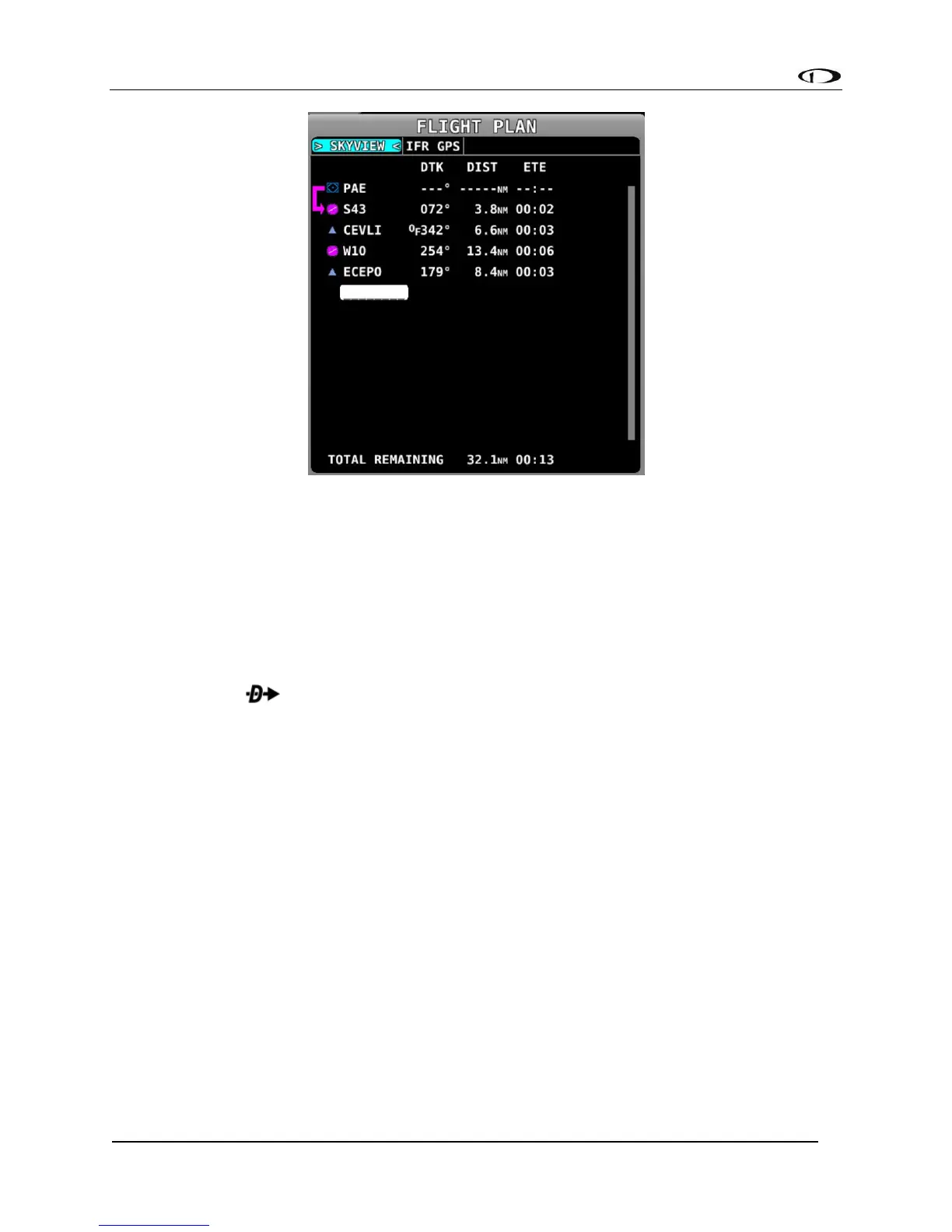
Figure 133 - Flight Plan Window
Figure 133 illustrates the following items:
• Waypoint List: The list of waypoints making up the current Flight Plan.
• Waypoint Icons: The icon that would be shown on the Map Page for the waypoint is
shown to the left of each waypoint in the Flight Plan.
• Active Leg Icon: The active leg of the Flight Plan is depicted by a hooked arrow from
origin waypoint to the destination waypoint if the leg is point-to-point. If the FPL
Menu function has been used to go directly to a waypoint within, the flight
plan, this arrow will instead be straight arrow pointing at the selected destination
waypoint.
• OF (overfly) Icon: This indicates the transition type of the leg. When OF is present,
the leg ending at this waypoint has an overfly transition, otherwise, it has a flyby
transition.
• DTK (Direct Track): The direction of the leg. For the active leg, though, this is the
direct track from the aircraft to the destination waypoint.
• DIST: The distance of the leg. For the active leg, it is the distance from the aircraft to
the next waypoint.
• ETE: The estimated time enroute for the leg, based on the current ground speed if
flying, and if stationary based on the Plan Ground Speed setting (MAP MENU > MAP
MENU > FLIGHT PLAN OPTIONS). For the active leg, this is the estimated time until
the aircraft reaches the next waypoint based on its current closure rate towards it.
• ------: The last item in the waypoint list is a placeholder for adding another waypoint
at the end of the Flight Plan.



 To Next Page