40
Playing the PC-80 keyboard
You can edit a parameter either by using the PC-80’s VALUE encoder or by
using the Synth panel.
If you use the Edit screen of the Synth panel, you’ll be able to edit a variety of
parameters to modify the sound.
■
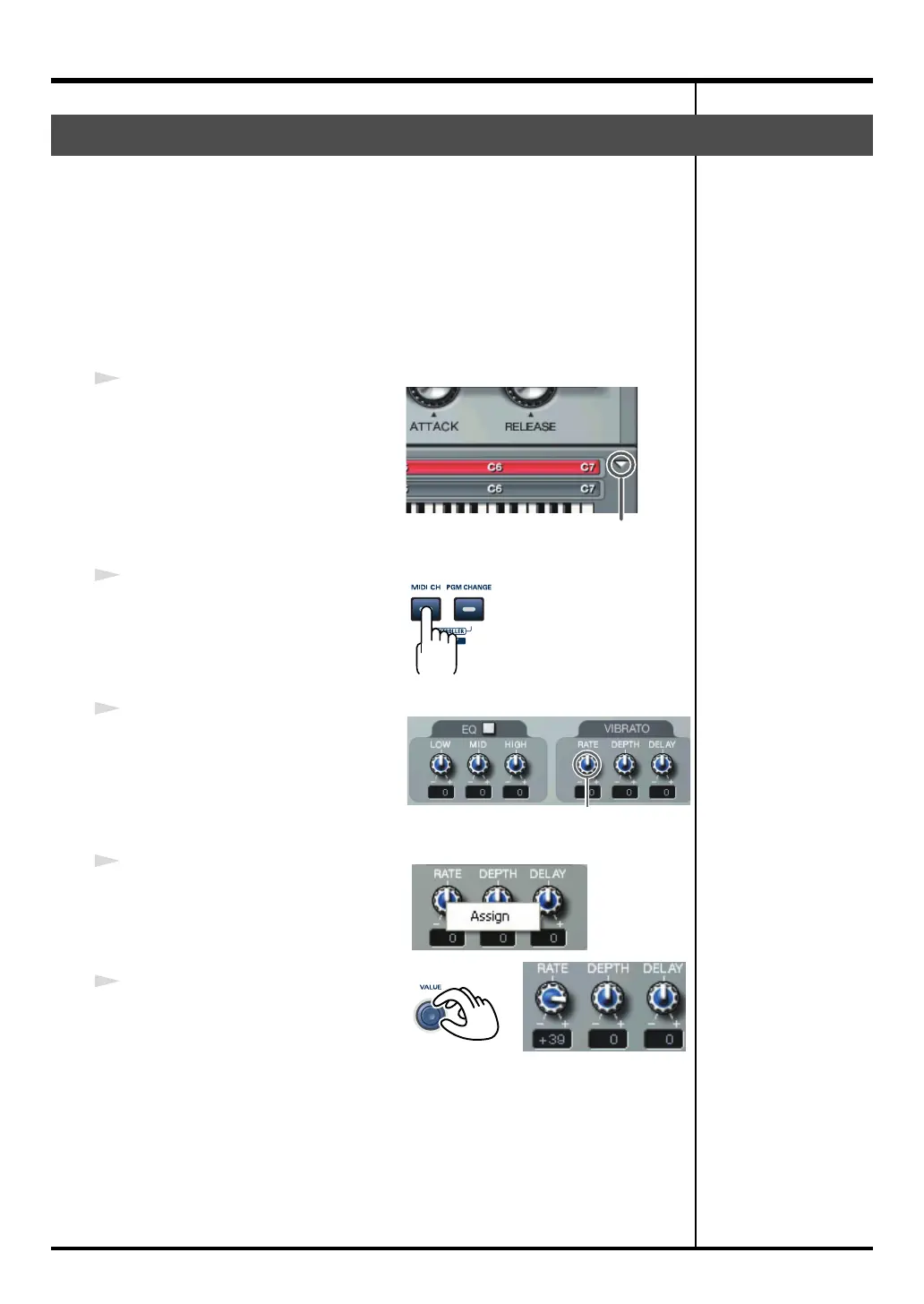
Using the PC-80’s VALUE encoder to edit the sound
If you assign a specific parameter to the PC-80’s VALUE encoder, you can
control that PC-80 parameter while editing or while playing.
1
Click the
[Normal/Edit screen
select]
button to switch to the Edit
screen.
2
Press the PC-80’s
MIDI CH
button to
turn it on (lit).
3
In the Synth panel, right-click the
parameter that you want to control.
(For Macintosh, hold down the
Control key and click.)
4
From the menu that appears, choose
“Assign.”
5
Operate the PC-80’s
VALUE
encoder
.
The value of the assigned parameter
will change.
You will hear the edited sound when you play the keyboard.
Editing the sound
[Normal/Edit screen select] button
Right-click
PC-80_e.book 40 ページ 2005年11月10日 木曜日 午前11時34分



 To Next Page