94
System settings for the PC-80
fig.util*
1
Simultaneously press the
MIDI CH
button and
PGM CHANGE
button,
and hold them down for a few moments.
The PC-80’s display will indicate “UTL,” and you will be in Utility mode.
fig.sy0
2
Press the
[SYSTEM]
key on the keyboard.
“SY0” appears (blinking) in the display.
3
Use the
VALUE
encoder or the
[4]
key of the keyboard to choose “
SY4
.”
fig.enter
4
Press the
ENTER
button.
* If you press any other button without pressing the ENTER button, the setting will be
cancelled.
5
Use the
VALUE
encoder or press the
[0]
or
[1]
key of the keyboard to switch MIDI I/F Mode
on or off.
6
Press the
ENTER
button.
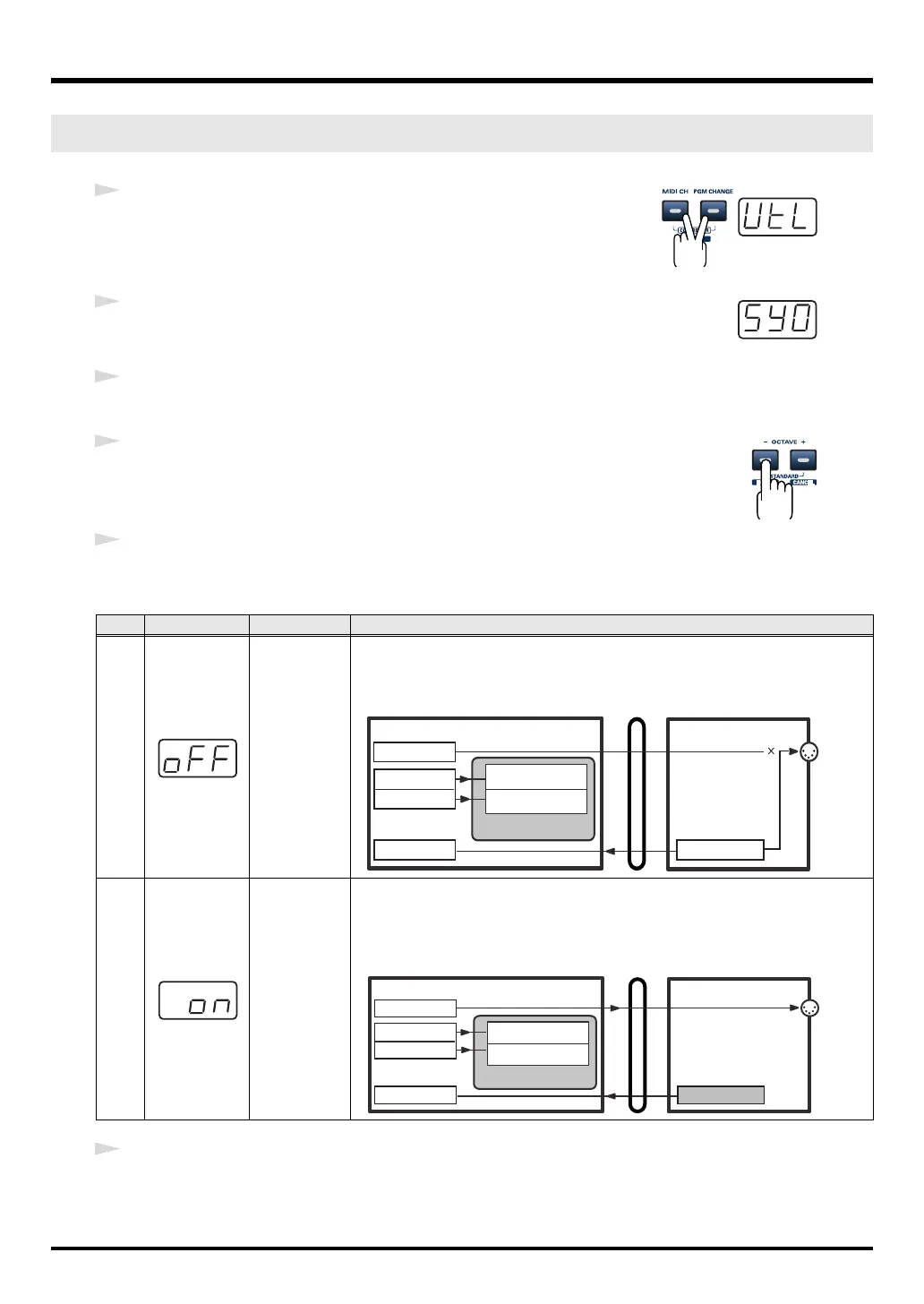
MIDI I/F MODE
Key
Display Mode Explanation
0
MIDI I/F
MODE OFF
MIDI messages from your computer will not be sent from the PC-80’s MIDI
OUT connector. MIDI messages from the PC-80’s keyboard will be sent both to
your computer and to the PC-80’s MIDI OUT connector.
1
MIDI I/F
MODE ON
The PC-80’s MIDI OUT connector will act as a MIDI interface. MIDI messages
from the computer connected via USB to the PC-80 will be sent to the MIDI de-
vice that’s connected to the PC-80’s MIDI OUT connector.
MIDI OUT DEVICE
MIDI IN DEVICE
MIDI OUT
PC-80PC
USB
PC-80 MIDI OUT
PC-80 Keyboard PC-80 keyboard
PC-80 Synth
PC-80 software synthesizer
PC-80 Player
Synth for manual
performance
Synth for
SMF playback
MIDI IN DEVICE
MIDI OUT DEVICE
MIDI OUT
PC-80PC
USB
PC-80 MIDI OUT
PC-80 Keyboard PC-80 Keyboard
MIDI I/F MODE ON
PC-80 Synth
PC-80 Player
PC-80 software synthesizer
Synth for manual
performance
Synth for
SMF playback
PC-80_e.book 94 ページ 2005年11月10日 木曜日 午前11時34分



 To Next Page