79
Using the PC-80 as a MIDI interface
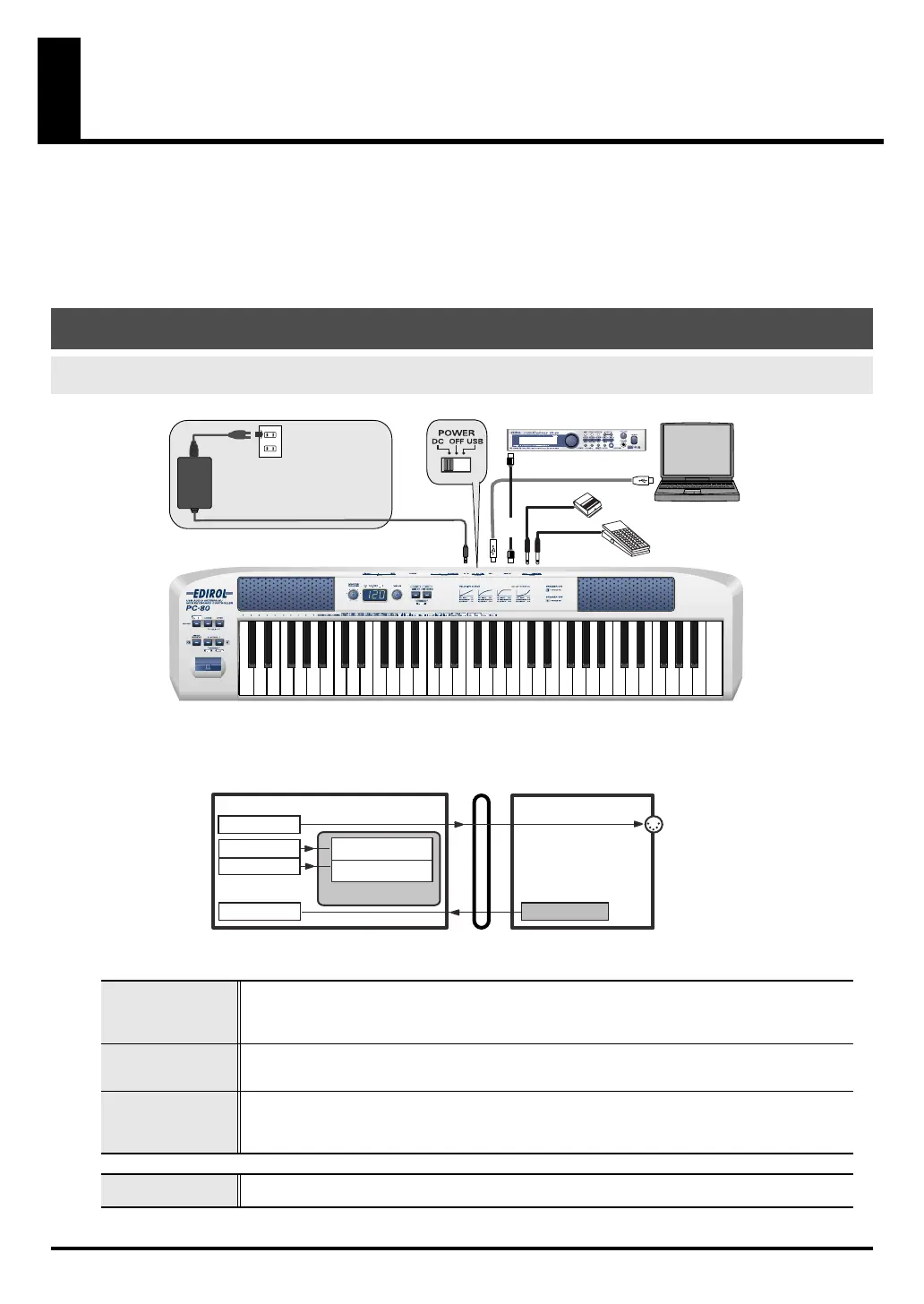
This section explains the basic connections and MIDI signal flow when using the PC-80 as a
MIDI interface.
• To prevent malfunction and/or damage to speakers or other devices, always turn down
the volume, and turn off the power on all devices before making any connections.
• Use only the specified expression pedal (EV-5; sold separately). By connecting any other
expression pedals, you risk causing malfunction and/or damage to the unit.
fig.connect-MIDI-IF
■
MIDI flow
fig.flow-USB-on-e
*Turn MIDI I/F mode
ON
as described in
“MIDI I/F MODE”
(p. 94).
Basic connections and signal flow
Connecting to your computer via USB
—Using the PC-80 as a MIDI interface
PC-80 MIDI OUT
If you specify PC-80 MIDI OUT as the output port for your sequencer software, messages will be transmitted
from the PC-80’s MIDI OUT connector.
* If the MIDI I/F mode is turned off, MIDI messages from your computer will not be transmitted.
You must turn MIDI I/F mode on. (
➔
“MIDI I/F MODE”
(p. 94))
PC-80 Synth
Choose PC-80 Synth if you want to play MIDI data on the PC-80 software synthesizer for manual performance.
* For details on the sound generator for manual performance, refer to
“How the PC-80 software synthesizer is
structured”
(p. 32).
PC-80 Player
Choose PC-80 Player if you want to play MIDI data on the included PC-80 software synthesizer for SMF play-
back.
* For details on the software synthesizer for SMF playback, refer to
“How the PC-80 software synthesizer is struc-
tured”
(p. 32).
PC-80 keyboard
This section transmits MIDI messages from the keyboard, pitch bend/modulation lever, VALUE encoder, hold
pedal, and expression pedal.
MIDI sound module (sold separately)
MIDI IN
USB cable
Roland
DP series (sold separately)
EV-5
(sold separately)
MIDI
OUT
Set the power switch to the
DC position, and connect the
AC adaptor.
AC adaptor
MIDI IN DEVICE
MIDI OUT DEVICE
MIDI OUT
PC-80PC
USB
PC-80 MIDI OUT
PC-80 Keyboard PC-80 Keyboard
MIDI I/F MODE ON
PC-80 Synth
PC-80 Player
PC-80 software synthesizer
Synth for manual
performance
Synth for
SMF playback
PC-80_e.book 79 ページ 2005年11月10日 木曜日 午前11時34分



 To Next Page