Parameterisation
MSM-USM2G-BA-UK-001 Page 29 of 45
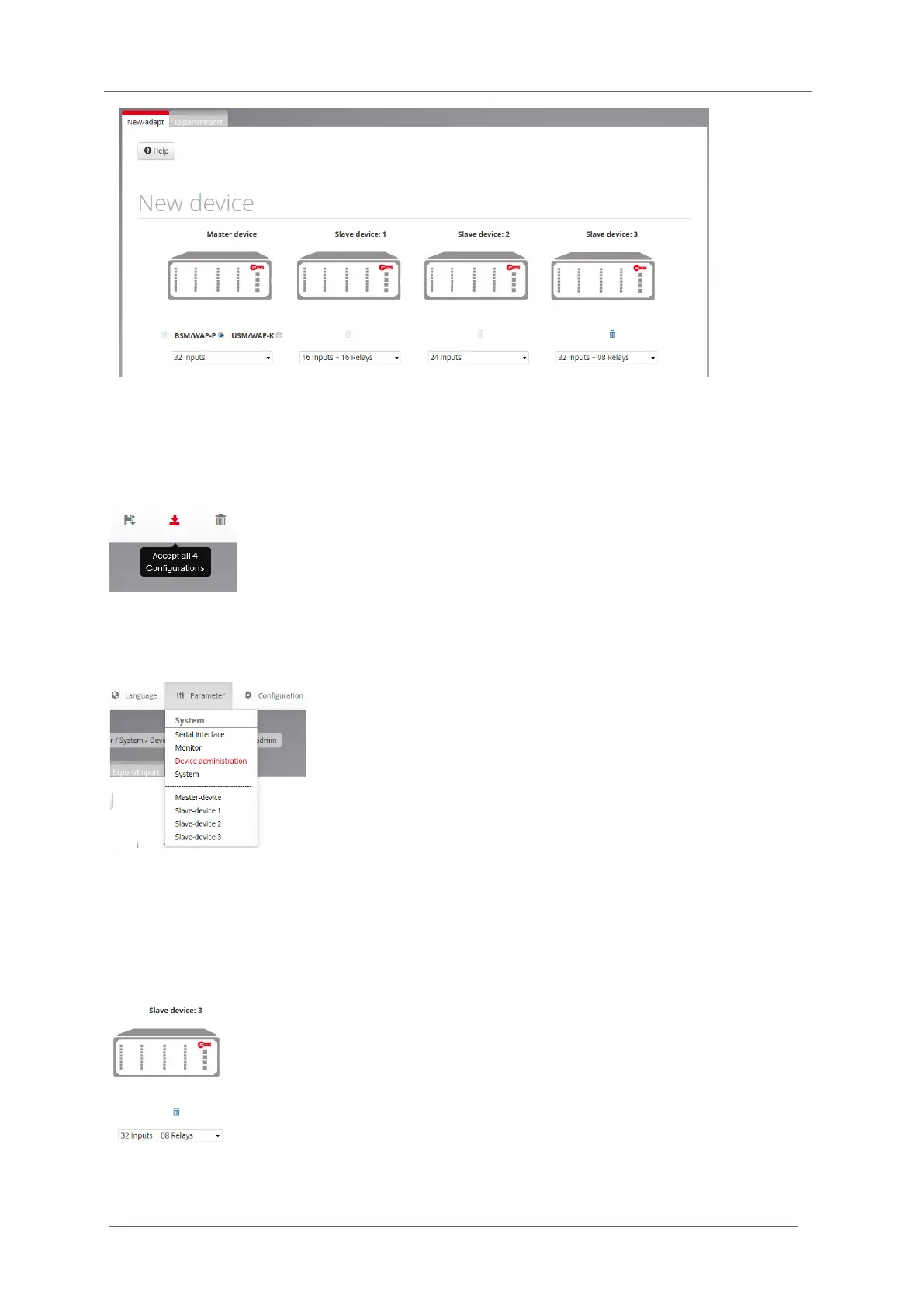
Fig.6.9: Submenu New/adapt
After selection of the required annunciator type from the respective drop down menu, the device will
automatically be added to the parameterisation. After all required devices have been edited, please
confirm the system configuration with the button „Accept all 4 configurations“.
The added slave devices now can be found in the menu „Parameter“ as items „Slave-device 1…3“.
The menu of each of the slave devices resembles the menu „Master-device“. The tab „reporting
sequence“ is not available for the slave devices since the sequence is identical with the master device.
Fig. 6.10: Menu „Parameter“, complemented with the entries „Slave-device 1…3“
By this means, up to three slave devices can be added. Each slave will be displayed under the name
Slave-device 1…3 in the menu „Parameter“ – independent from the defined devicename.
By click on the paper bin symbol the respective last slave device in the cascaded system can be
deleted.
Fig. 6.11 Paper bin - symbol of the last annunciator in the cascaded system


 To Next Page