Parameterisation
Page 40 of 45 MSM-BSM2G-BA-UK-001
Output parallel
If the relay is triggered from a signal input, it can be defined if the relay directly follows the input (input
parallel) or if it is activated until the corresponding alarm is acknowledged (stored alarm = output
parallel).
Checkbox checked (default setting) – Relay follows the stored alarm (= output parallel)
Pulse length
If a relay is triggered from the IEC interface, the pulse width can be defined here in the range from
10…10000 ms.
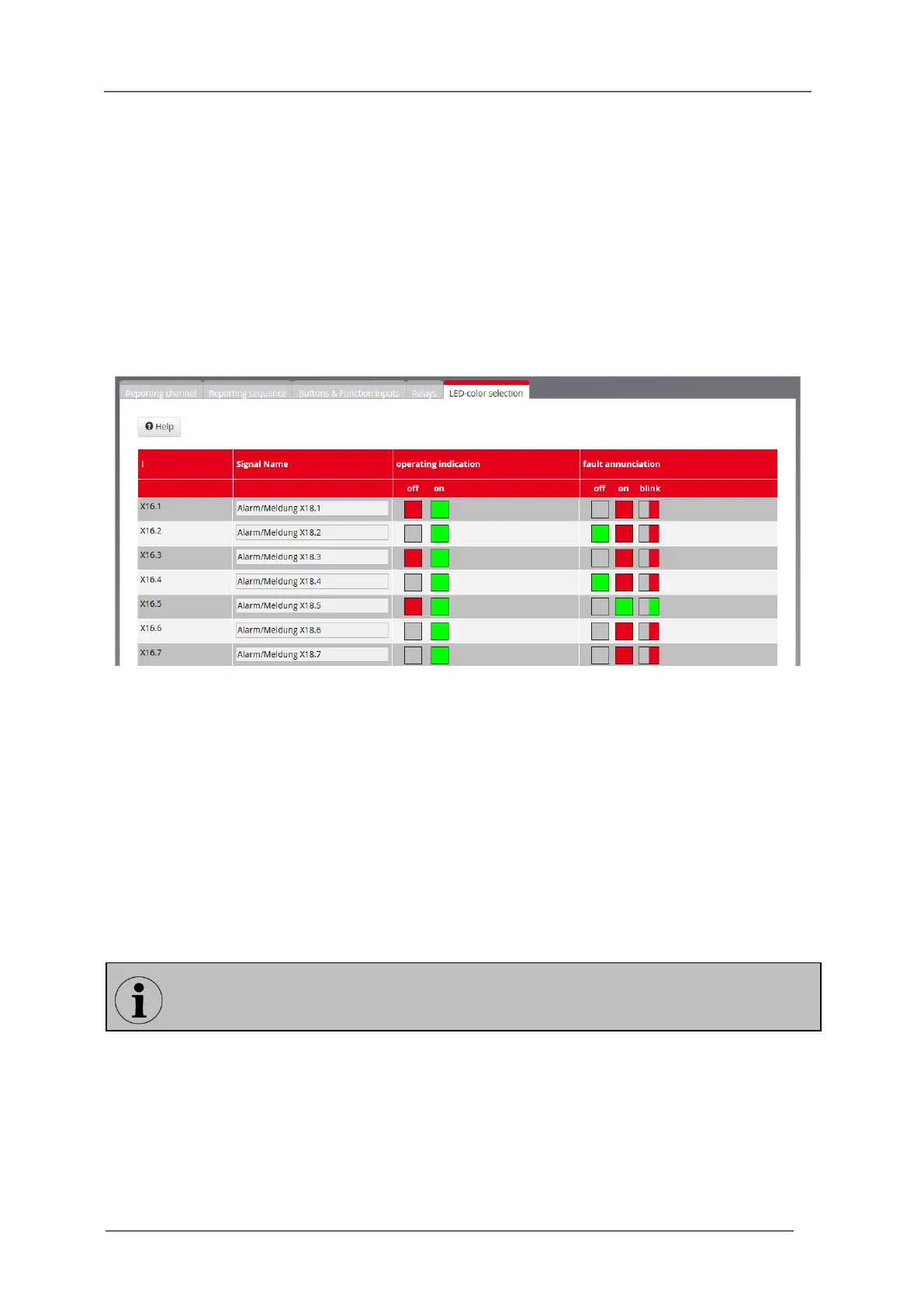
6.2.4.6 Submenu LED-colour selection
Fig. 6.19: Page LED-colour
On this page the LED colours for the operation modes “operation indication” and “fault annunciation”
of each channel can be defined.
Operation indication
For both states OFF and ON the LED can be triggered as follows:
LED OFF or colour: RED, GREEN.
Fault annunciation
For fault annunciation signals the colour for the signal conditions OFF and ON can be defined as
follows:
LED OFF (only available for signal condition OFF) or colour: RED, GREEN.
The LED colour for “flashing-on” is automatically set to the colour of the signal condition ON.
Please note that for the states OFF and ON of one channel different colours need to be
defined.


 To Next Page