Parameterisation
Page 32 of 45 MSM-BSM2G-BA-UK-001
Interface
If this checkbox is activated the corresponding error can be forwarded through the IEC interface (only
available for USM).
Device and Output
With the columns „Device“ and „Output“ a signal channel on one of the annunciators (Master device
(0) or Slave device 1…3) can be defined, which will be triggered by this error.
Output active
With this checkbox the specified display (Device/Output) can be activated / deactivated.
6.2.4 Menu Master-device / Slave-device1..3
In the menu “Master-device” or “Slave-device1..3”, respectively, the fault annunciation functionalities
of the device can be parameterised. This menu contains the following sub-menus:
Reporting channel
Reporting sequence
Buttons & function inputs
Relays
Repeat relays
LED-colour selection
6.2.4.1 Submenu Reporting Channel
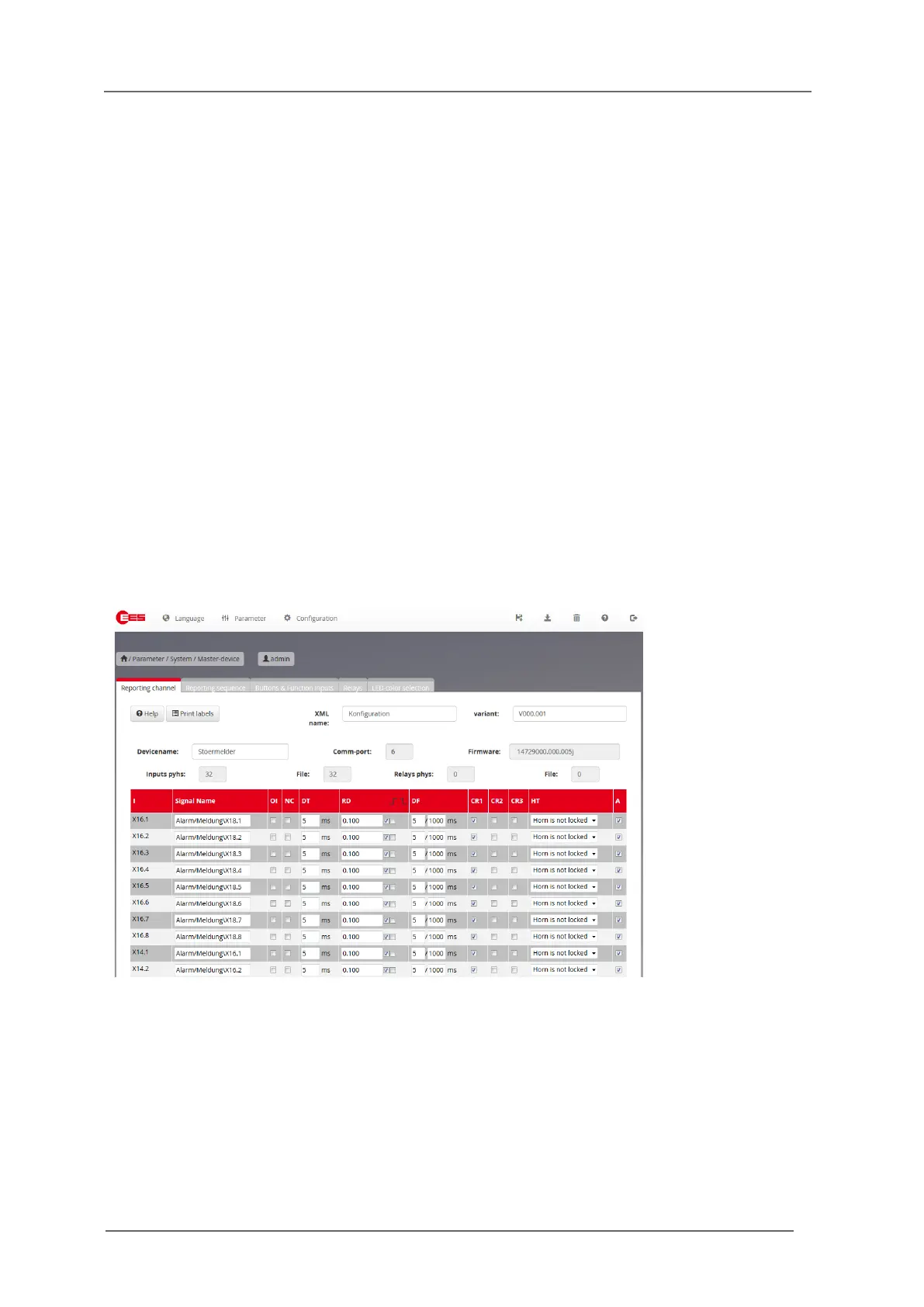
Fig. 6.13: Page Reporting channel
Devicename
A device designation with a maximum length of 40 ASCII characters can be entered here. This
designation serves for identification of the device, is transmitted to the BSM when parameterised and
stored there.


 To Next Page