LMI Setup-Greer EEC-0066 V1.0
LMI Setup
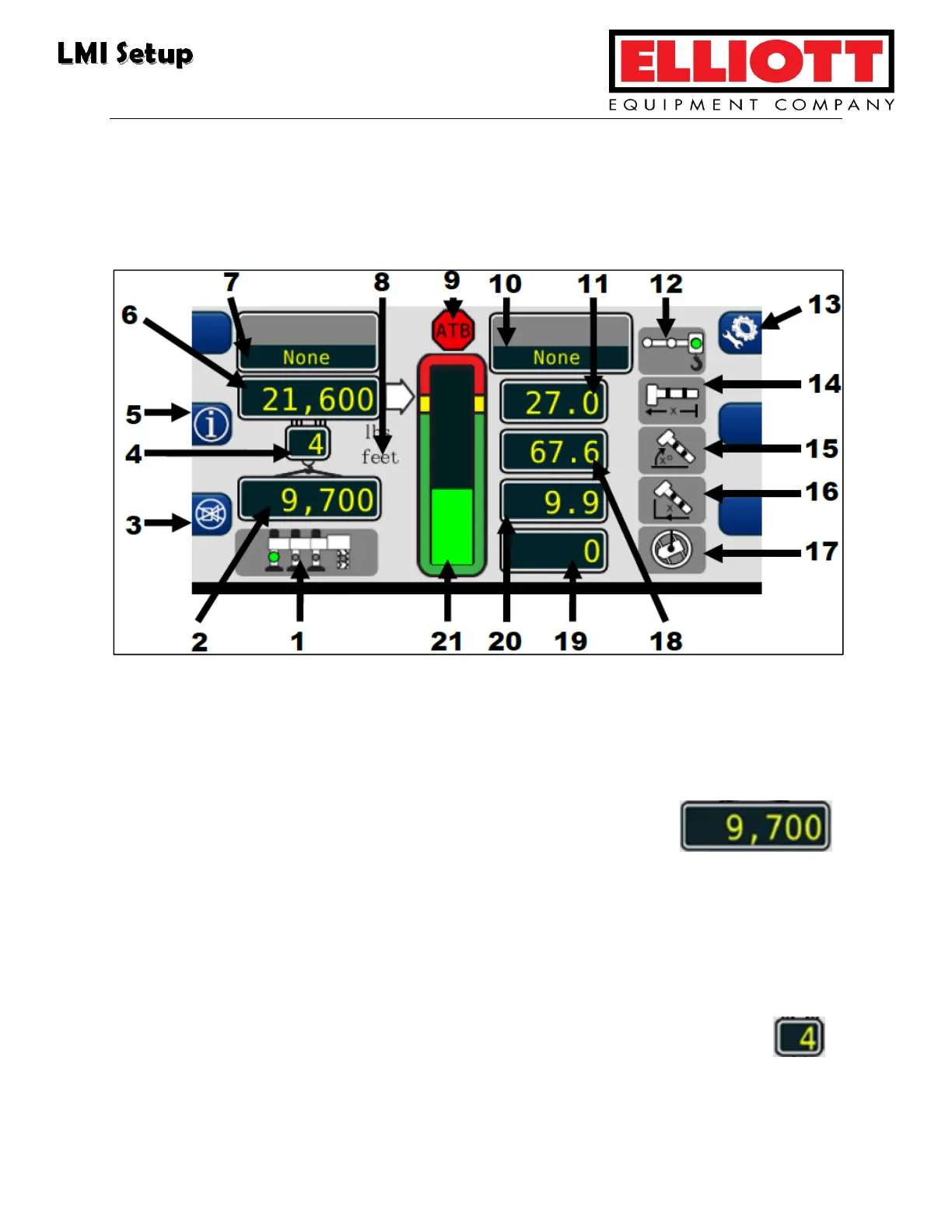
Once the operator has made all necessary selections on the Crane Configuration
screen, press the Home screen button to get to the Home Display:
Home screen
1. Outrigger setting: Green indicator light reflects when the operator selects either
full, intermediate, or retracted outriggers on the Crane Configuration screen.
2. Actual Load Value: This displays the total load amount
(including slings, etc.) suspended below the lifting point.
3. Cancel Alarm button: The operator uses this button to silence the alarm
generated by either Overload, Anti-Two-Block, Outrigger Position Mismatch, or
an Operator Programmable Alarm.
4. Parts Of Line: This displays shows the amount of line selected for the
chosen configuraiton. Adjustments must be made on the Crane
Configuration screen.



 To Next Page