41
PLAYING VIDEOS
Tap a thumbnail to play a video file.
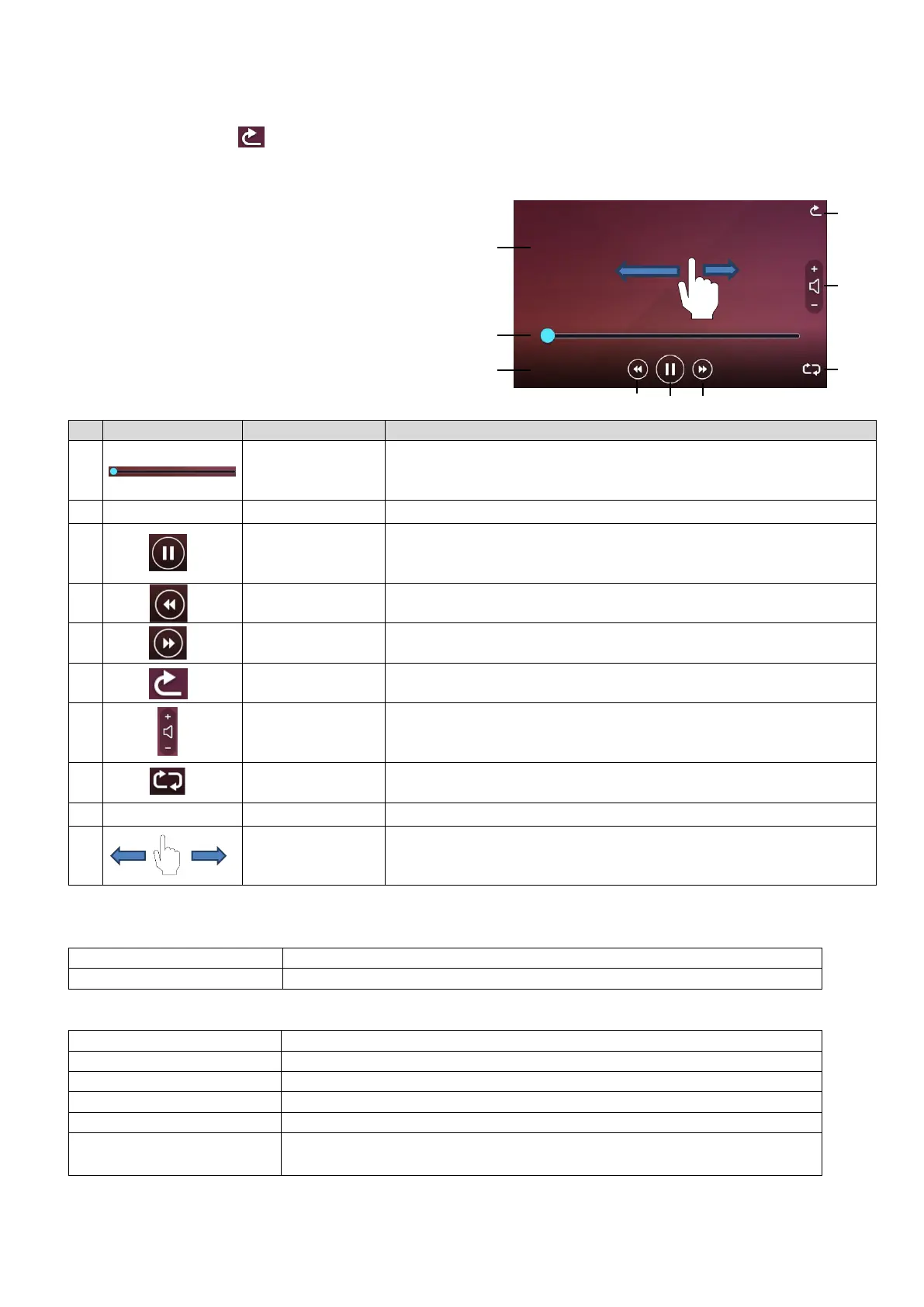
Tap the Return icon [ ] to return to the list of thumbnails. You can switch between videos by
performing left flick or right flick while the video is playing. (The switched video does not play
automatically.)
Left flick: To display the previous video.
Right flick: To display the next video.
PLAYBACK SPECIFICATIONS (STILL PICTURE / VIDEO)
<STILL IMAGE PLAYBACK>
<VIDEO PLAYBACK>
To display the current playback position of the video.
The playback position can be shifted by tapping any part of the
bar or by sliding the seek bar left and right.
To display playback time.
To pause the played video. This button changes to the
Playback button during pause. Tap this button again to restart
the video.
Go to previous
video file
To return to the [SD video] screen.
To adjust the playback audio volume using + and -.
(0~10: 11 levels)
To automatically replay the video.
To display the selected video.
To switch between videos.
Left flick: to display the previous video
Right flick: to display the next video
SD card, USB flash drive, internal memory
SD card (Class 10 or above)
To start video from specific time using the seek bar.
To playback audio by sending audio signals to HDMI and HDBaseT.
※No audio playback from the built-in speaker.



 To Next Page