40
EXPLANATION OF ICONS
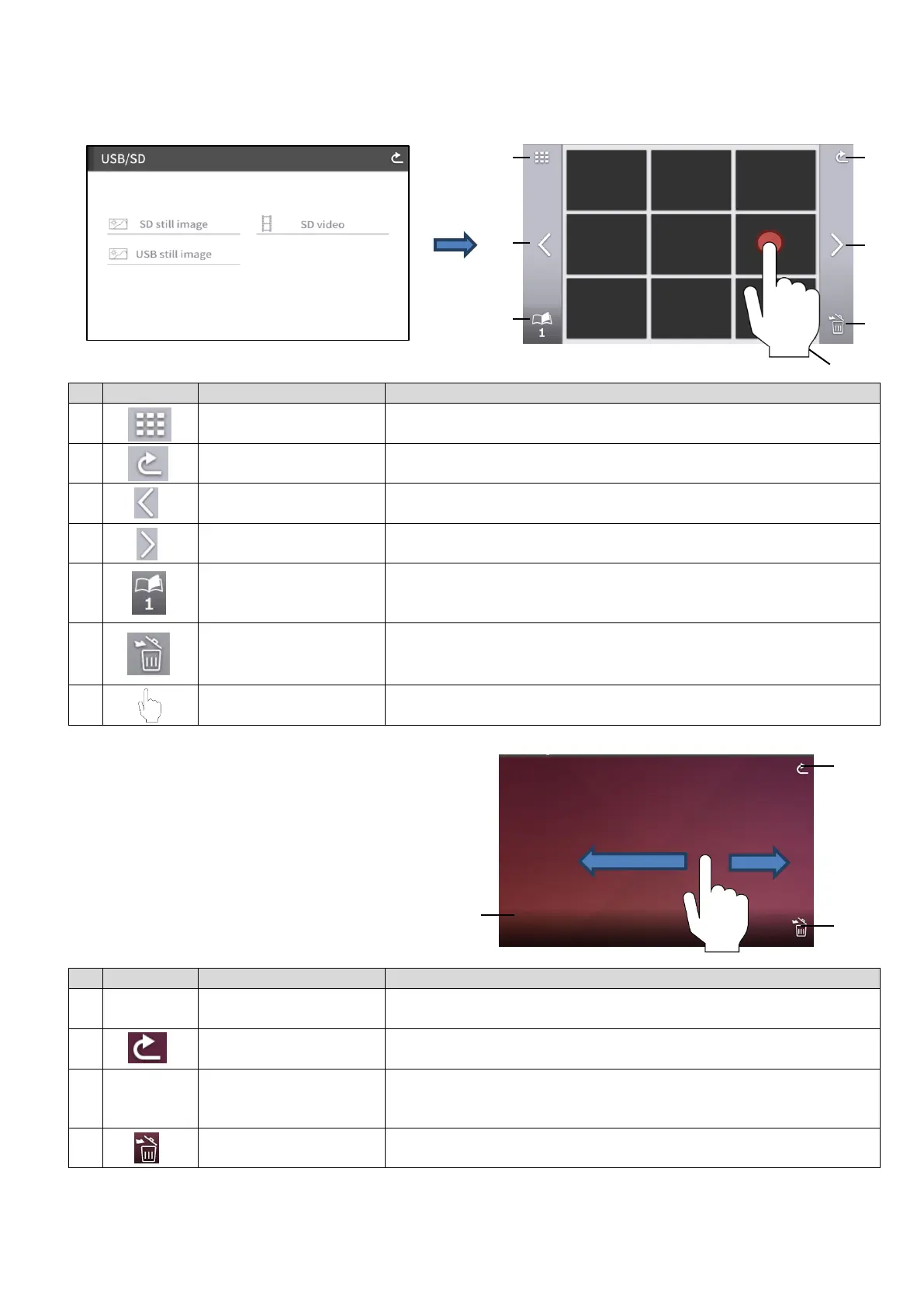
SD still image still image / SD video / USB still image (list of thumbnails)
DISPLAYING STILL IMAGE
Tap a thumbnail to display a still image.
Tap the screen to display the menu.
※When any part of the screen outside the menu is tapped while the menu is displayed, the screen
returns to the still image screen.
Number of thumbnails
displayed
To change the number of thumbnails displayed. (9 / 4)
To return to the [USB/SD] screen.
To move to the previous page.
To move to the next page.
To display total number of pages in the SD card or USB flash
drive.
To delete all the files selected.
Tap the Return button to exit the File delete mote.
(※It is possible to select files across multiple pages.)
To select a video to play or still image to display.
Recorded time and
date / File name
To display the recorded time and date, and file name.
To return to the [SD still image/ SD video/ USB still image]
screen.
To move between images.
Left flick: move to the previous image
Right flick: move to the next image
To delete the displayed still image.
2017-12-20 19:16
sample_still.jpg



 To Next Page