www.elstat.io
50
8.7 How to troubleshoot temperature sensor alarms
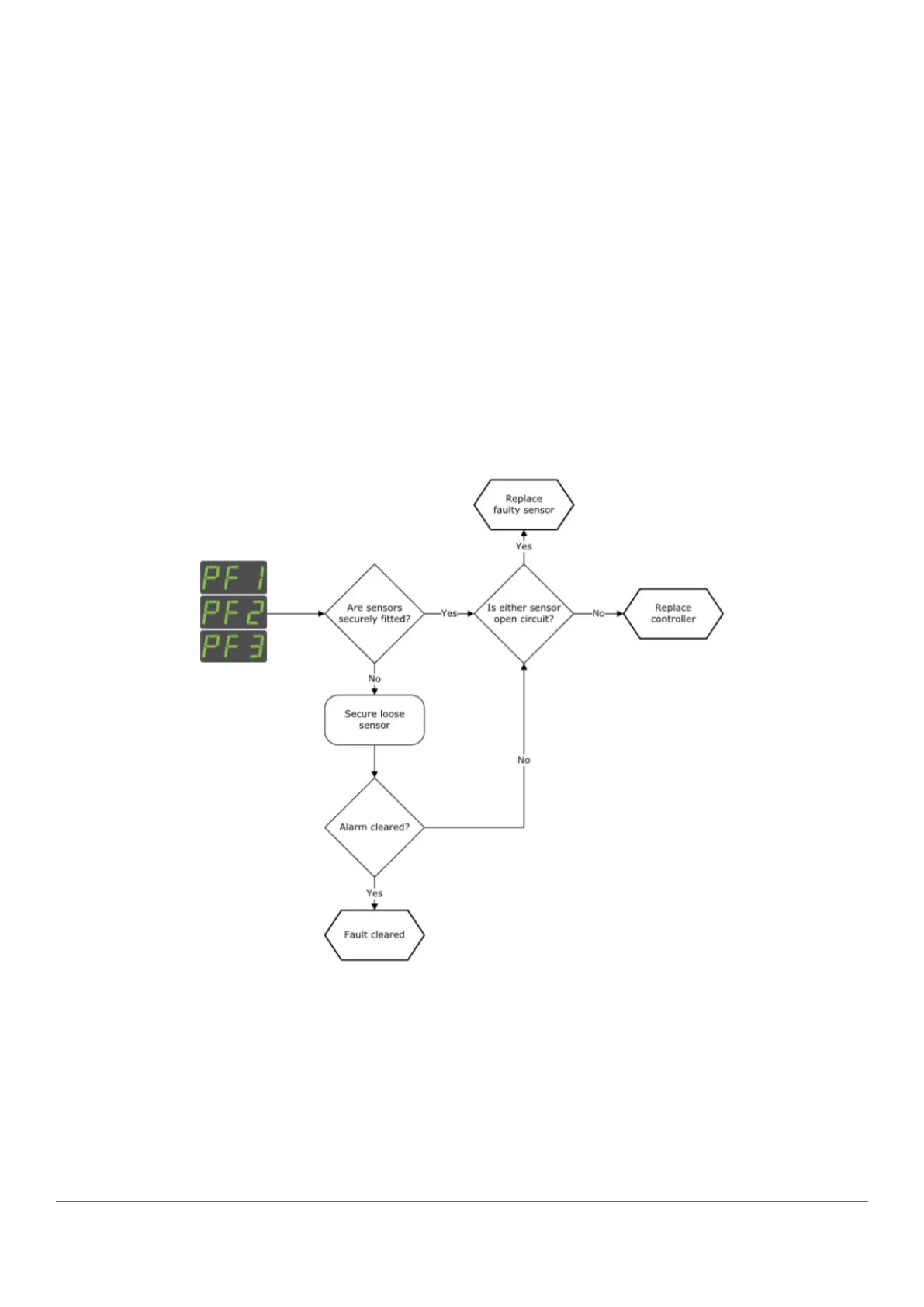
ems controllers manage sensor failures as follows:
• PF1 alarms: ems controllers stop running the compressor and then wait 60 seconds before re-starting (switch off
and then switch on). If the fault continues, the ems controller repeats and continues the cycle until the fault is
corrected
• PF2 alarms: ems controllers continue running the compressor. ems controllers alternate the display between
PF2 and the appliance sensor temperature indicating a fault
• PF2 alarms: ems55advanced CO2 controllers continue to run the compressor normally and alternate the display
PF2 and the gas cooler sensor temperature indicating a fault
• PF3 alarms: ems controllers continue to run the compressor normally and alternate the display PF3 and the
appliance sensor temperature.
Sensor faults may also be identified by using the input test within the test routine, see ”how to run the test routine
(tst)” .
Follow the chart below to troubleshoot problems with the appliance sensor, condenser sensor, evaporator sensor or
gas cooler sensor.



 To Next Page